
Rare fixation techniques. Part 2
More in General
- We helped Apple fix a vulnerability in the kernel of its operating systems
We helped Apple fix a vulnerability in the kernel of its operating systems PT ESC expert…
- Recovering EVTX records: carving methods
Recovering EVTX records: carving methods 🧩 When investigating incidents where attackers encrypt virtual machine images, a…
- Operation Chewbacca
At the end of June, the PT ESC team, during incident investigations, discovered a new group…
- Your Zimbra server is at risk
Recently, our PT ESC IR team encountered a new attack by ransomware groups on Zimbra mail…
- He's not your gsocket
He's not gsocket to you 😑 During the investigation of one of the incidents, PT ESC…




Rare persistence techniques. Part 2
Also read about: Zabbix Agent, TimeProvider.
3️⃣ COM Hijacking
For persistence in the infrastructure, the attackers used a rare technique — Component Object Model Hijacking.
The essence of the method is not in directly replacing the DLL of a system service (which is easily detected), but in manipulating the Component Object Model registry structure. The attackers create their own COM object pointing to a malicious library and redirect calls from trusted system components to it through a legitimate compatibility mechanism.
The key element of the attack is the TreatAs registry key, originally intended for transparently redirecting requests from one COM object to another. The attackers find a system CLSID that is accessed regularly and inconspicuously, and substitute its handling with their own object.
Of particular interest is the Network List Manager COM object with the identifier {DCB00C01-570F-4A9B-8D69-199FDBA5723B}, which is responsible for managing network profiles (netprofm). It is accessed every time the network connection changes, network diagnostics are launched, and the operating system starts.
The attackers modify the branch:
HKLM\Software\Classes\CLSID{DCB00C01-570F-4A9B-8D69-199FDBA5723B}\TreatAs,
by writing the CLSID of their malicious COM object into the default value. As a result, when working with network profiles, the system automatically redirects the call and loads the malicious DLL located at %systemroot%\system32\netprofmaaa.dll (the name mimics the original netprofm.dll).
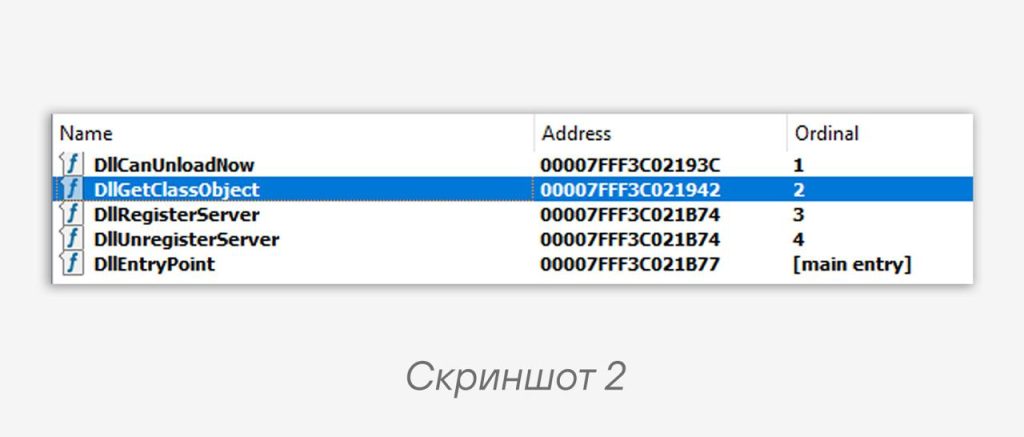
❗️ DLL requirements: the library must be a fully functional COM server implementing all interfaces expected of the substituted Network List Manager object, and must correctly export the standard functions (screenshot 2): DllGetClassObject(), DllCanUnloadNow(), DllRegisterServer() and DllUnregisterServer().
When DllGetClassObject() is called, it must return a class factory capable of creating instances of the object with the expected interfaces (including INetworkListManager). This is necessary for the crash-free operation of the calling processes and for maintaining stealth — otherwise, applications that access the network manager will crash and unmask the presence of the malicious code.
To be continued in the next posts 🙂
#ir #dfir #tips
@ptescalator
More from oUth0R
- We helped Apple fix a vulnerability in the kernel of its operating systems
We helped Apple fix a vulnerability in the kernel of its operating systems PT ESC expert…
- Recovering EVTX records: carving methods
Recovering EVTX records: carving methods 🧩 When investigating incidents where attackers encrypt virtual machine images, a…
- Operation Chewbacca
At the end of June, the PT ESC team, during incident investigations, discovered a new group…
- Your Zimbra server is at risk
Recently, our PT ESC IR team encountered a new attack by ransomware groups on Zimbra mail…
- He's not your gsocket
He's not gsocket to you 😑 During the investigation of one of the incidents, PT ESC…
More in General
- We helped Apple fix a vulnerability in the kernel of its operating systems
We helped Apple fix a vulnerability in the kernel of its operating systems PT ESC expert…
- Recovering EVTX records: carving methods
Recovering EVTX records: carving methods 🧩 When investigating incidents where attackers encrypt virtual machine images, a…
- Operation Chewbacca
At the end of June, the PT ESC team, during incident investigations, discovered a new group…
- Your Zimbra server is at risk
Recently, our PT ESC IR team encountered a new attack by ransomware groups on Zimbra mail…
- He's not your gsocket
He's not gsocket to you 😑 During the investigation of one of the incidents, PT ESC…