
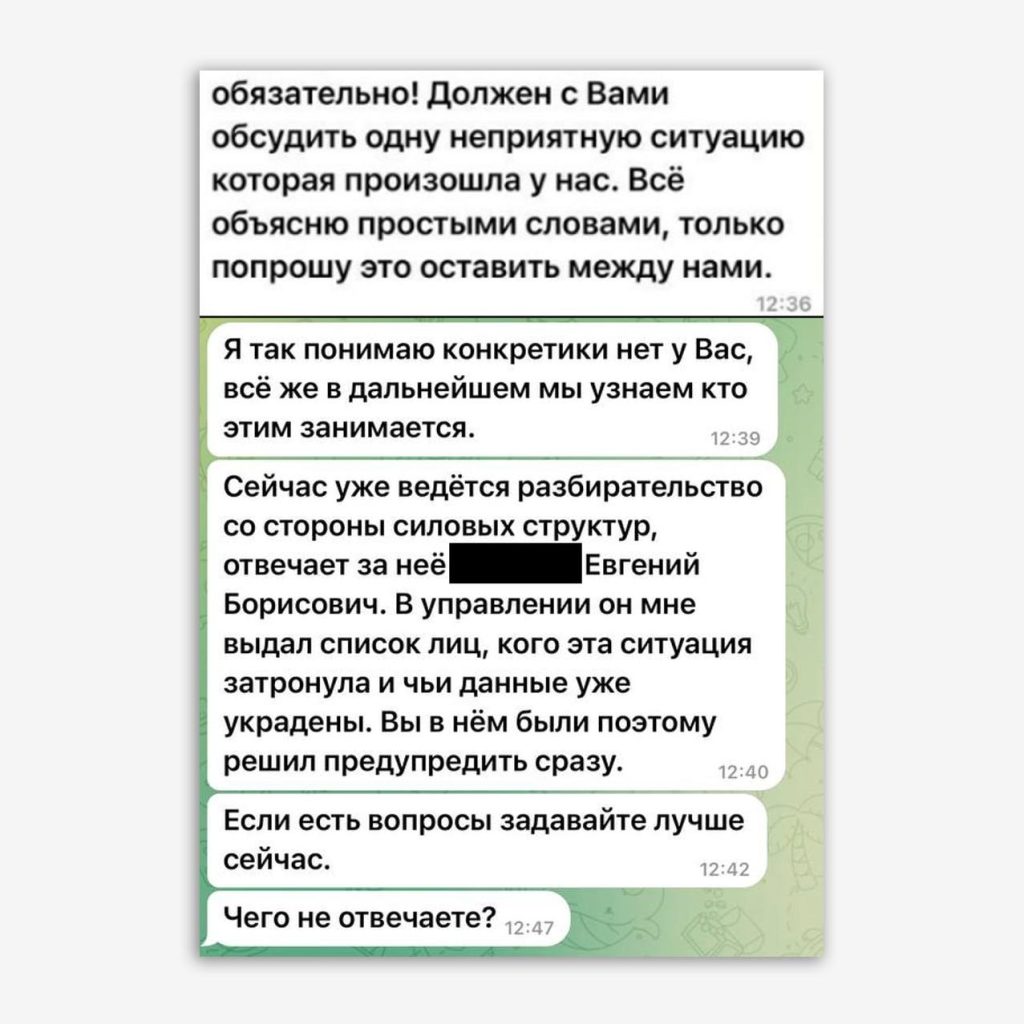
"Why aren't you answering?", or The Story of How to Hijack a Telegram Account Without Registration or SMS
More in General
- We helped Apple fix a vulnerability in the kernel of its operating systems
We helped Apple fix a vulnerability in the kernel of its operating systems PT ESC expert…
- Recovering EVTX records: carving methods
Recovering EVTX records: carving methods 🧩 When investigating incidents where attackers encrypt virtual machine images, a…
- Operation Chewbacca
At the end of June, the PT ESC team, during incident investigations, discovered a new group…
- Your Zimbra server is at risk
Recently, our PT ESC IR team encountered a new attack by ransomware groups on Zimbra mail…
- He's not your gsocket
He's not gsocket to you 😑 During the investigation of one of the incidents, PT ESC…




😐 “Why aren’t you answering?”, or The Story of How to Steal a Telegram Account Without Registration or SMS
Recently we published an article about the most popular methods of stealing accounts in Telegram.
😑 The article covers schemes such as:
• Distribution of phishing messages about receiving a Premium subscription.
• Sending messages asking for help in voting.
• Obtaining an authorization code under the guise of tech support staff, law enforcement officers, etc.
• Issuing a duplicate SIM card.
• Copying files with active user sessions.
Among the particularly interesting points:
🖥 Nuances for official desktop versions and web clients of the applications are examined.
🔜 Session theft by copying tdata, (appstore, stable — for macOS) with device authorization keys (authorization key) remains unnoticed by the user (there is no information about an additional session in the list of active devices).
☝️ Confidential information that interests attackers is most often stored in the directories:
For Windows: C:\Users\<Username>\AppData\Roaming\TelegramDesktop\tdata
For Linux: /home/<Username>/.local/share/TelegramDesktop/tdata
For macOS, Telegram for Mac client: HDD/Users/<Username>/Library/Application Support/Telegram Desktop/tdata
For macOS, Telegram for macOS client: HDD/Users/<Username>/Library/GroupContainers/6N38VWS5BX.ru.keepcoder.Telegram/appstore (stable, if installed via a DMG file)
🌐 When using web versions, an account can be stolen if one has physical access to the device.
For Google Chrome, attackers copy the contents of the directories:
Windows: C:\Users\<Username>\AppData\Local\Google\Chrome\User Data\Default
Linux: /home/<Username>/.config/google-chrome/Default
macOS: HDD/Users/<Username>/Library/Application Support/Google/Chrome/Default
💻 It makes no difference which operating system the attacker uses the stolen information on: tdata from Windows can be used for authorization on both Linux and macOS. This also works with web versions.
🔗 When following the link https://web.telegram.org/ from the app on a computer or mobile device, an access token to the account’s contents is generated — it is possible to log into the web version of Telegram. Try it yourself!
📝 Recommendations are given on how to identify illegitimate sessions and protect yourself from the attacks discussed.
Read the full text of the article on Habr.
#dfir #macos #win #linux #web
@ptescalator
More from oUth0R
- We helped Apple fix a vulnerability in the kernel of its operating systems
We helped Apple fix a vulnerability in the kernel of its operating systems PT ESC expert…
- Recovering EVTX records: carving methods
Recovering EVTX records: carving methods 🧩 When investigating incidents where attackers encrypt virtual machine images, a…
- Operation Chewbacca
At the end of June, the PT ESC team, during incident investigations, discovered a new group…
- Your Zimbra server is at risk
Recently, our PT ESC IR team encountered a new attack by ransomware groups on Zimbra mail…
- He's not your gsocket
He's not gsocket to you 😑 During the investigation of one of the incidents, PT ESC…
More in General
- We helped Apple fix a vulnerability in the kernel of its operating systems
We helped Apple fix a vulnerability in the kernel of its operating systems PT ESC expert…
- Recovering EVTX records: carving methods
Recovering EVTX records: carving methods 🧩 When investigating incidents where attackers encrypt virtual machine images, a…
- Operation Chewbacca
At the end of June, the PT ESC team, during incident investigations, discovered a new group…
- Your Zimbra server is at risk
Recently, our PT ESC IR team encountered a new attack by ransomware groups on Zimbra mail…
- He's not your gsocket
He's not gsocket to you 😑 During the investigation of one of the incidents, PT ESC…