
Deobfuscating .NET function names manually
More in General
- Operation Chewbacca
At the end of June, the PT ESC team, during incident investigations, discovered a new group…
- Ding, ding — who's there?
Ding, ding — who's there? 🔔 The cyber intelligence group of Positive Technologies' expert security center…
- Enterprise-grade validation system with schema support
Enterprise-grade validation system with schema support (c) The author of a dozen trojans who forgot to…
- One less feathered thief — plus one hundred rating points!
One less feathered thief — plus one hundred rating points! 😵 The Threat Intelligence team at…
- DragonDoll: a matryoshka in the world of Android spies
DragonDoll: a matryoshka in the world of Android spies 🪆 At the beginning of this spring,…




.NET malware loves packers, obfuscation (of names, CFG, and other things), and multi-stage reflective image loading. At the same time, open-source deobfuscators always lag behind the current versions of their counterparts, if they are maintained at all. Let’s look at one such case.
Let’s assume that we already have a dump of the necessary process and some knowledge of where the payload we need was located in memory, as well as the binary that we were able to extract from there (we’ll talk about how to do this in an automated way some other time).
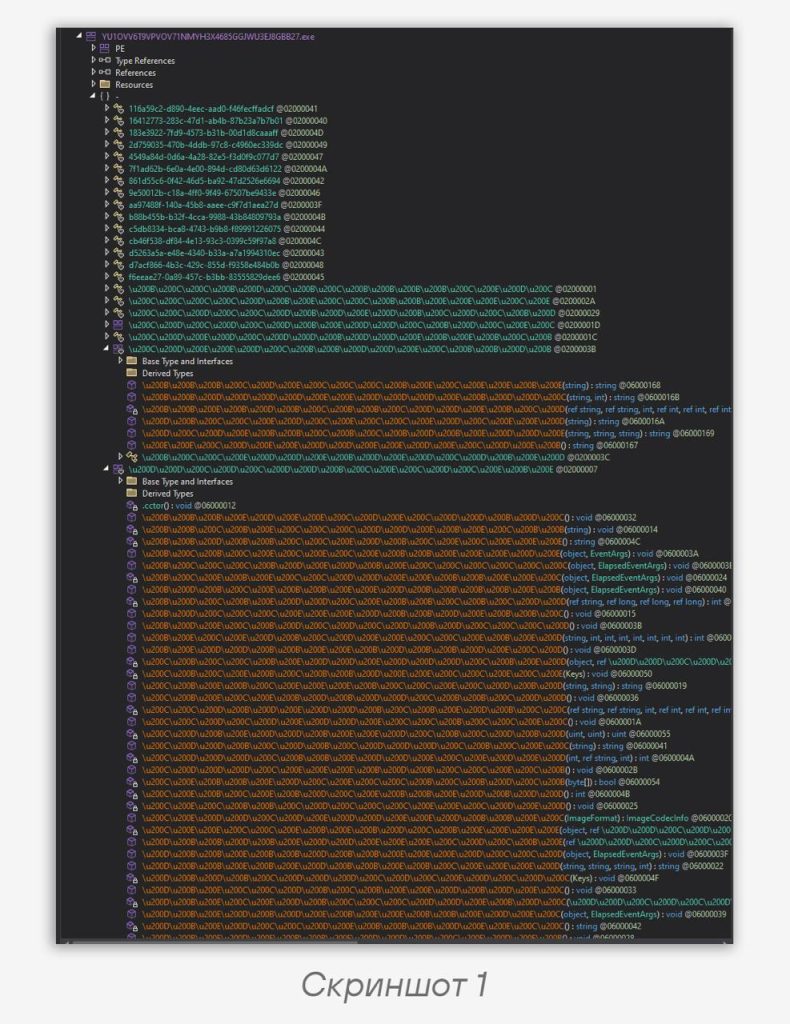
Let’s open the binary in dnSpy and see the following picture (screenshot 1).
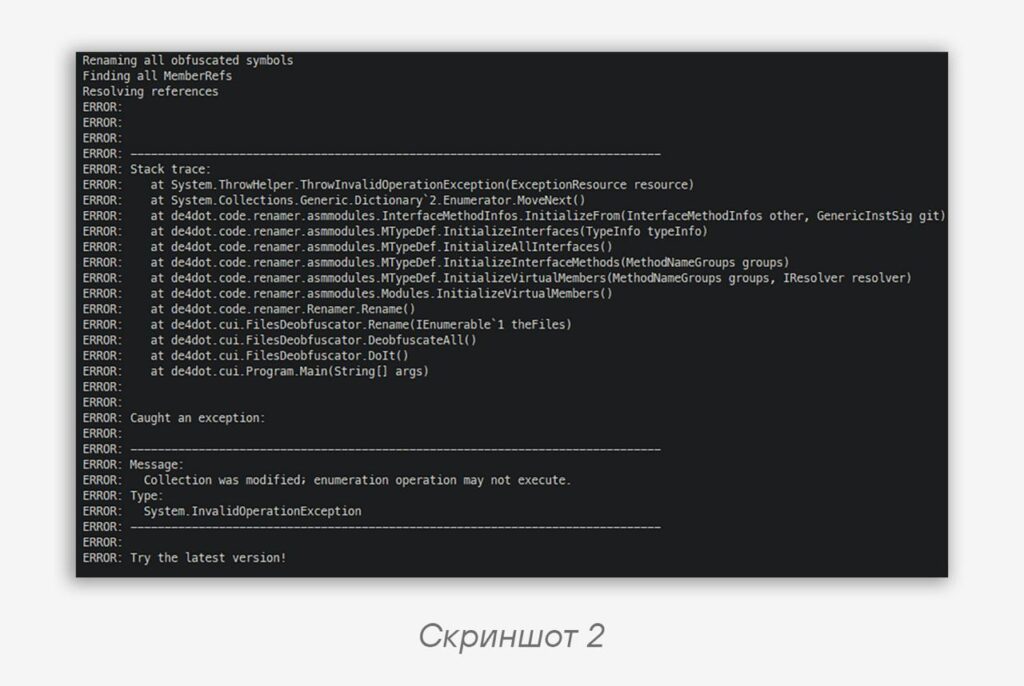
Let’s recall that de4dot exists and try feeding the binary to it. Taking what looks like the most up-to-date version among a bunch of forks (or forks of forks (or forks of forks of forks)), let’s run the command:
> de4dotex .\sample.bin -vvCode language: plaintext (plaintext)The result is in screenshot 2.
No luck. But from the error it becomes clear that the problem is somewhere in the renaming logic and may be related, for example, to the packer being used or to the fact that the binary was ripped from the dump not entirely correctly. We’ll have to fix them manually.
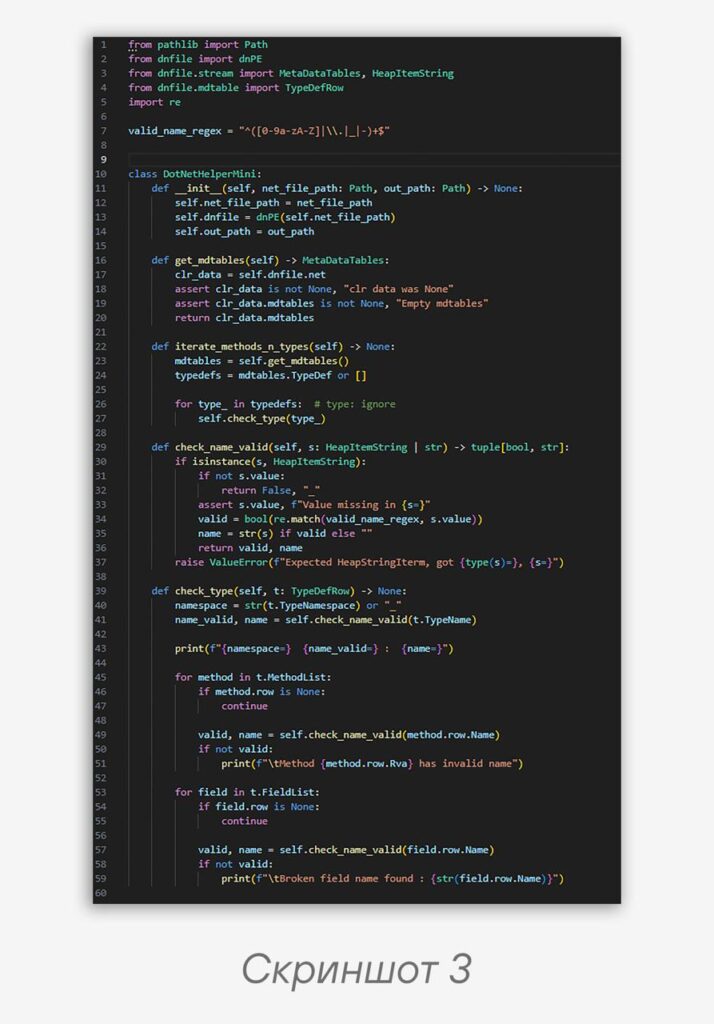
🐍Let’s try doing this in Python, using the dnfile and dncil, combo, throwing together some code to collect the obfuscated function and field names (screenshot 3).
Now we need to write the logic for patching names directly in the binary. However, there is a catch related to the fact that…dncil doesn’t have such functionality.
Let’s rewrite the same thing in C#, borrowing
dnlib.dll from de4dot so as not to suffer with building it ourselves. And to avoid getting confused among the pile of Visual Studio menus, let’s just reduce the .csproj to the following form (.Net 4.8 and its SDK are required):<Project Sdk="Microsoft.NET.Sdk">
<PropertyGroup>
<TargetFramework>net48</TargetFramework>
<ImplicitUsings>enable</ImplicitUsings>
<LangVersion>10.0</LangVersion>
<Nullable>enable</Nullable>
<OutputType>Exe</OutputType>
</PropertyGroup>
<ItemGroup>
<Reference Include="dnlib">
<HintPath>dnlib.dll</HintPath>
</Reference>
</ItemGroup>
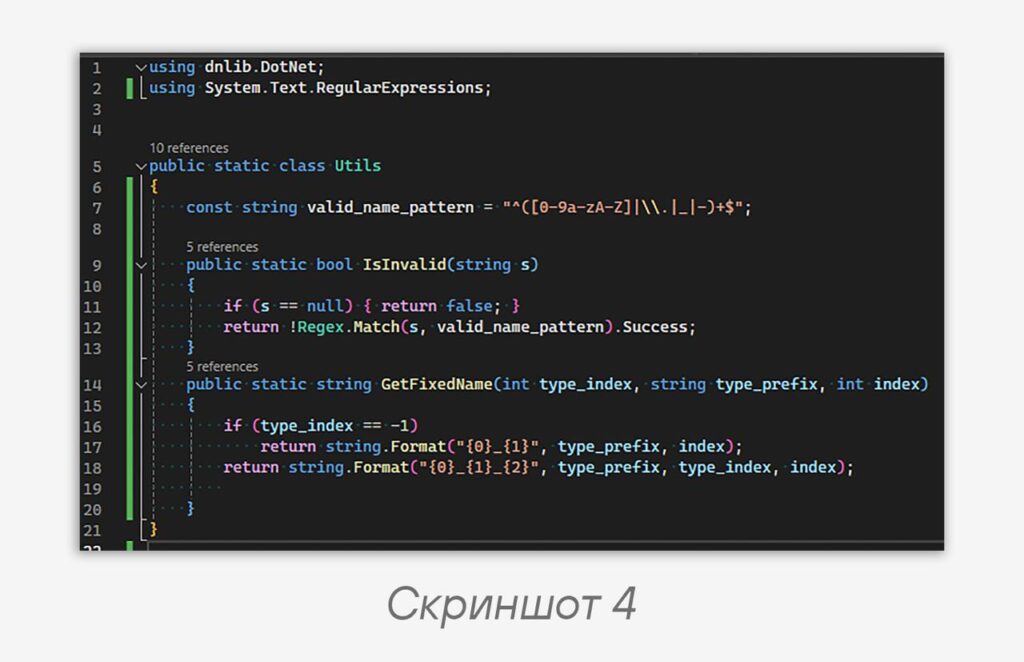
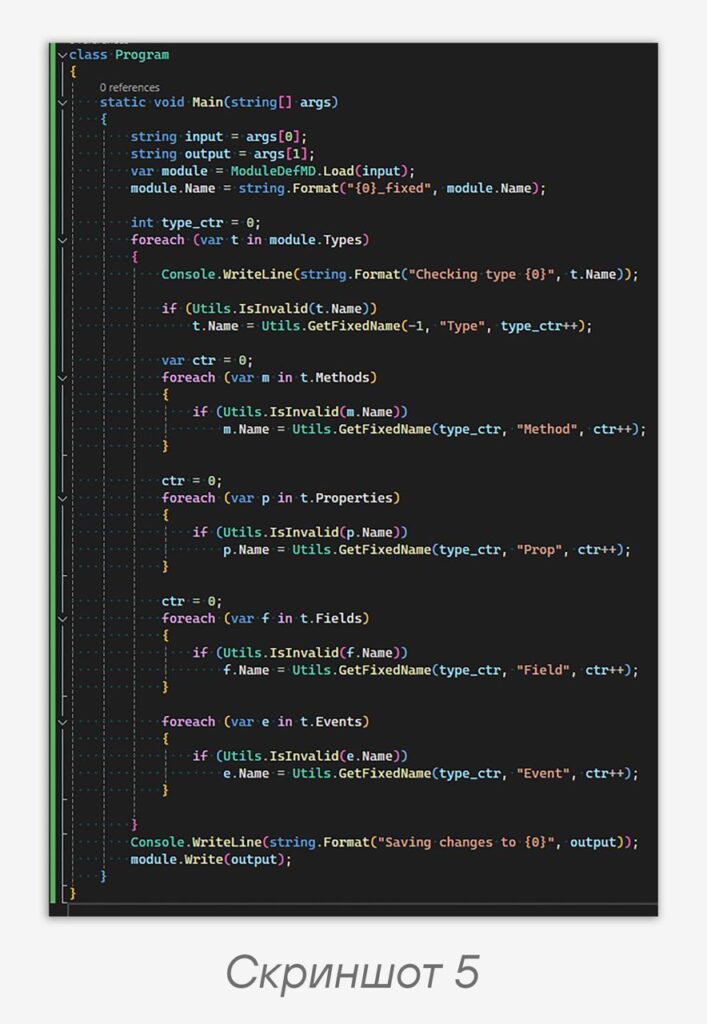
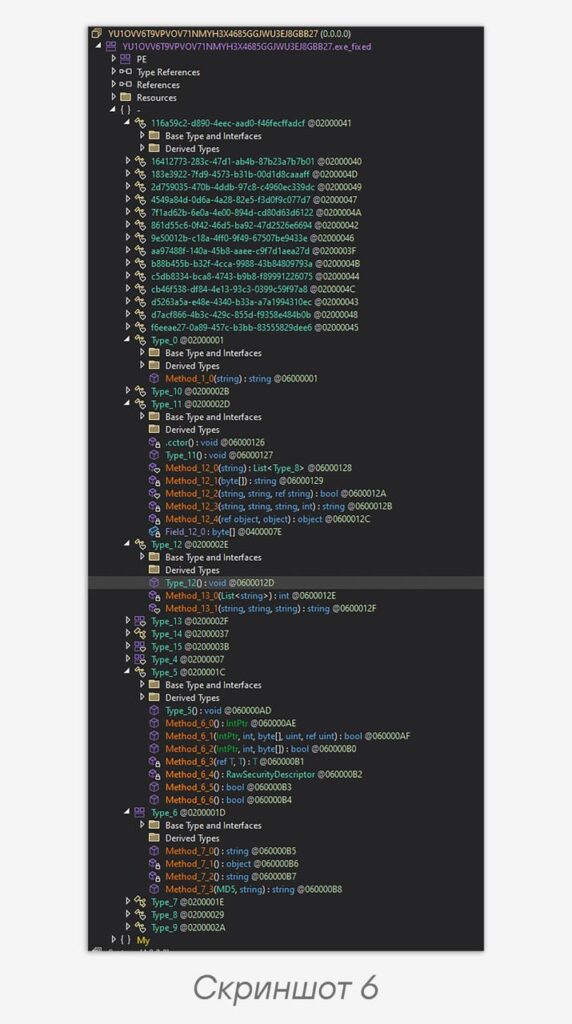
</Project>Code language: plaintext (plaintext)Let’s create a Utils class with two functions — checking the validity of a name and generating a new name (screenshot 4). Finally, let’s describe the main logic for renaming types, methods, properties, fields, and class events (screenshot 5). The result of running the program is presented in screenshot 6.
As you can see, the methods and fields were renamed and everything worked successfully. At the same time, it’s important to understand that you can’t always deobfuscate names so “bluntly” while preserving the program’s functionality. For example, if the image searches for some function at runtime by its string name, after such manipulations it won’t find it.
For static analysis, however, this approach is quite convenient — instead of a ton of identical junk that doesn’t fit on the screen, you can get short names for the fields of interest. If you go over the resulting binary again with your eyes, you can find some more obfuscated fields: variable names in methods, some structures, etc. If desired, they can be fixed in a similar way.
👀 To summarize the above:
dncil is convenient if cross-platform capability is required and there is no need to modify data. Such a task, for example, is finding the constructor that fills in the malware’s configuration.In the alternative case, you can go straight to
dnlib or tools based on it.Happy reversing!
#TI #reverse #malware #tip
@ptescalator
More from ti_author
- Ding, ding — who's there?
Ding, ding — who's there? 🔔 The cyber intelligence group of Positive Technologies' expert security center…
- Enterprise-grade validation system with schema support
Enterprise-grade validation system with schema support (c) The author of a dozen trojans who forgot to…
- One less feathered thief — plus one hundred rating points!
One less feathered thief — plus one hundred rating points! 😵 The Threat Intelligence team at…
- DragonDoll: a matryoshka in the world of Android spies
DragonDoll: a matryoshka in the world of Android spies 🪆 At the beginning of this spring,…
- ⚡Fake news — THAT'S ALL
⚡Fake news — B U L L S H I T PT ESC specialists discovered an…
More in General
- Operation Chewbacca
At the end of June, the PT ESC team, during incident investigations, discovered a new group…
- Ding, ding — who's there?
Ding, ding — who's there? 🔔 The cyber intelligence group of Positive Technologies' expert security center…
- Enterprise-grade validation system with schema support
Enterprise-grade validation system with schema support (c) The author of a dozen trojans who forgot to…
- One less feathered thief — plus one hundred rating points!
One less feathered thief — plus one hundred rating points! 😵 The Threat Intelligence team at…
- DragonDoll: a matryoshka in the world of Android spies
DragonDoll: a matryoshka in the world of Android spies 🪆 At the beginning of this spring,…