
consumerWiper: architecture and mechanism of operation. part 1
More in Malware
- This is Siemens...
Recently, our colleagues from the Positive Industrial Expertise Center discovered a curious Windows sample on MalwareBazaar.…
- Anti-antivirus
Recently, we came across an APK with an intriguing and trust-inspiring name: «Антивирус ФСБ.apk». After installing…
- .exe .docm .xlsm
.exe .docm .xlsm Malicious files with these extensions are most often found in corporate network traffic.…
- Operation Chewbacca
At the end of June, the PT ESC team, during incident investigations, discovered a new group…
- Your Zimbra server is at risk
Recently, our PT ESC IR team encountered a new attack by ransomware groups on Zimbra mail…





During the investigation of one of the incidents, the PT ESC response team discovered the
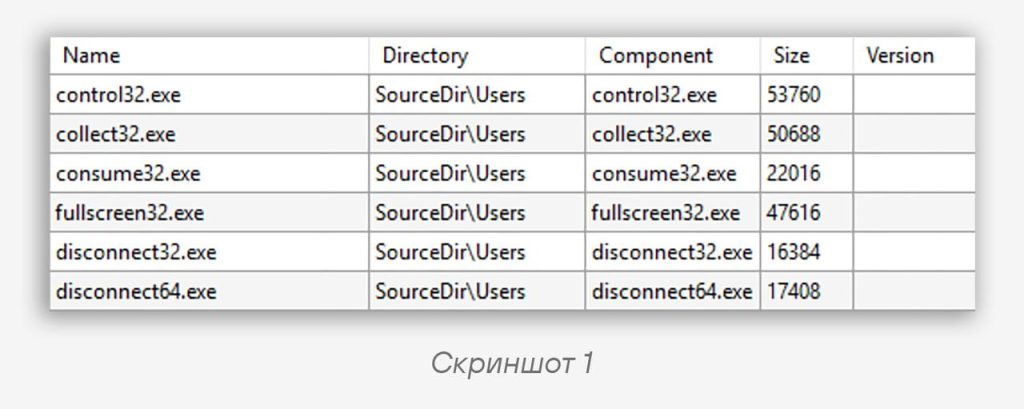
consumerWiper wiper, distributed as an MSI installation package and consisting of several functional components.Using the lessmsi utility, you can view the list of files (screenshot 1) contained in the package and extract them for subsequent study. The CustomAction table defines the command executed during installation of the MSI package:
cmd.exe /c schtasks /create /ru SYSTEM /tn task /sc minute /tr "\"C:\users\control32.exe\" YES 3407657776"Code language: plaintext (plaintext)With its help, a task named
task is created that runs every minute, launching the main malware component under the SYSTEM account.📂 The wiper consists of six executable files with the following functions:
•
collect32.exe — recursive traversal of the file system and compilation of a file listing•
consume32.exe — destruction of files•
fullscreen32.exe — display of a window with a system failure message•
disconnect32.exe / disconnect64.exe — disabling of all network adapters in the system•
control32.exe — launching and coordination of the other utilitiesLet’s examine the functionality and implementation details of the malware components.
1️⃣ collect32.exe
When launched with the
YES command-line argument, it enumerates files on each logical drive and writes the result to the file list_%d.dll (where %d is the drive’s ordinal number, and each line of the file is a single path). When launched without an argument or with any other argument, it enumerates files in the trash directory (key values other than YES are not used during the wiper’s operation, so they were presumably used for testing the utility). The utility ignores files with the .dll extension and all files in the directories C:\Program Files\, C:\Program Files (x86)\ and C:\Windows.2️⃣ consume32.exe
The utility performs the main work of destroying files. When launched, the following are passed in the command-line arguments:
• the path to the listing of files to be overwritten (for example, the created
list_%d.dll)• the number of lines to skip
• the number of lines to process
• the overwrite mode (
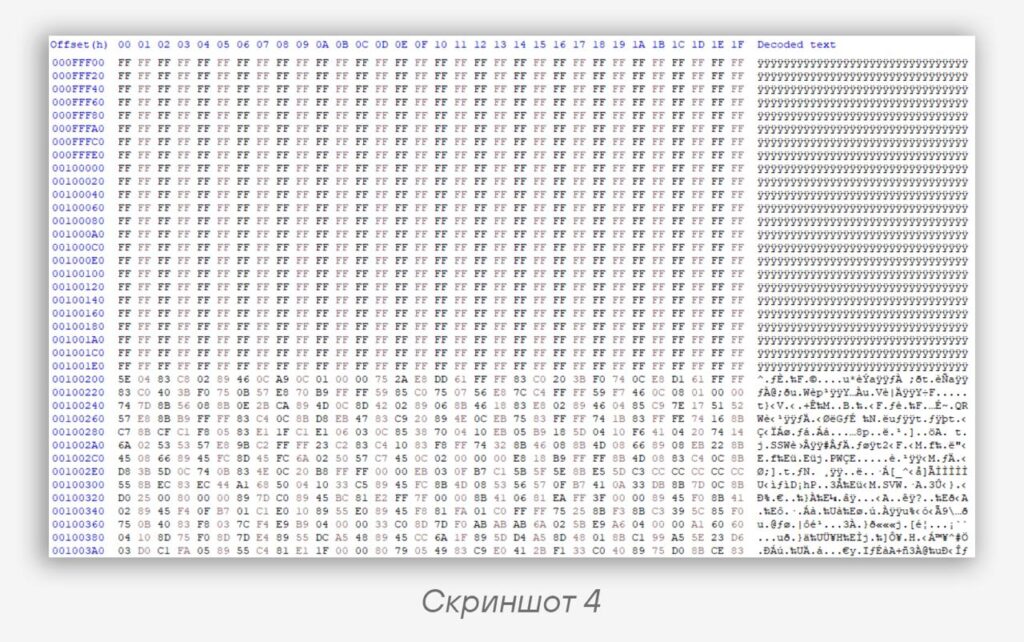
1MB/ALL)Instead of deleting files, a data overwrite algorithm is used with 1 MB blocks containing
0xFF. The utility has two data overwrite modes: 1 MB at the beginning of each file or a full overwrite of the file. In both variants, overwriting starts at an offset of 512 bytes.3️⃣ fullscreen32.exe
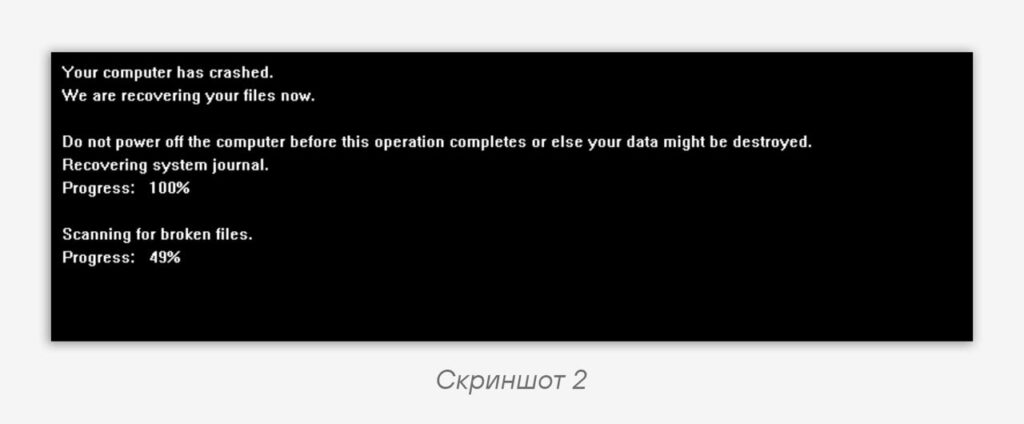
Displays a window showing a fake message about an OS failure and file recovery (screenshot 2). Using calls to
ShowCursor(0) and BlockInput(1), user interaction with the system is blocked. Upon reaching 100%, the utility hangs in an infinite loop, displaying maximum progress.4️⃣, 5️⃣ disconnect32.exe / disconnect64.exe
When launched, they enumerate all network adapters (class GUID —
4D36E972-E325-11CE-BFC1-08002BE10318) and disable them. The presence of a 64-bit version is due to the fact that 32-bit programs run on 64-bit systems using WOW64, so working with device drivers may not proceed entirely correctly.6️⃣ control32.exe
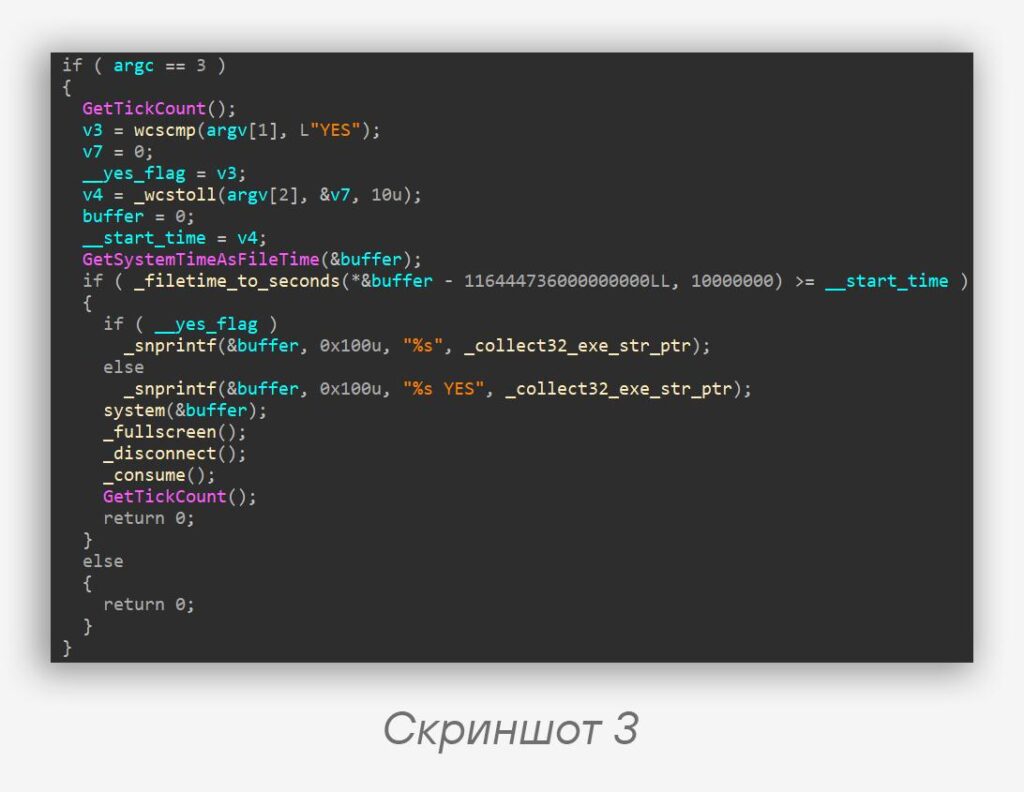
The central component of the wiper, responsible for orchestrating all the other utilities. It is launched with two arguments —
YES / any other value and a timestamp. Upon launch, it checks that the system time at the moment of launch is greater than the one specified in the command-line arguments; otherwise, the malware terminates without executing its payload.It is this utility that is launched by the scheduled task created during installation, with the arguments:
• YES
•
3407657776The utilities are launched in the following order (screenshot 3):
1.
collect32.exe (with the YES argument passed if present)2.
fullscreen32.exe3.
disconnect32.exe / disconnect64.exe (depending on the machine’s architecture)4.
consume32.exeIt is worth noting separately that when
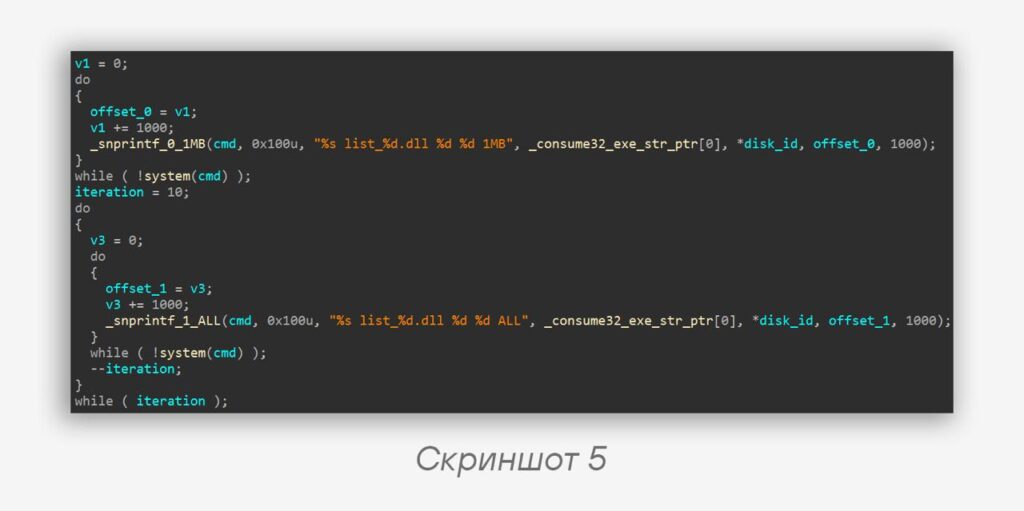
consume32.exe is launched, a separate thread of execution is started for each drive, in which, over batches of 1000 files, partial destruction is first invoked (argument 1MB, screenshot 4), and then tenfold full destruction (argument ALL) (screenshot 5).
#dfir #ir #wiper #malware
@ptescalator
More from oUth0R
- We helped Apple fix a vulnerability in the kernel of its operating systems
We helped Apple fix a vulnerability in the kernel of its operating systems PT ESC expert…
- Recovering EVTX records: carving methods
Recovering EVTX records: carving methods 🧩 When investigating incidents where attackers encrypt virtual machine images, a…
- Operation Chewbacca
At the end of June, the PT ESC team, during incident investigations, discovered a new group…
- Your Zimbra server is at risk
Recently, our PT ESC IR team encountered a new attack by ransomware groups on Zimbra mail…
- He's not your gsocket
He's not gsocket to you 😑 During the investigation of one of the incidents, PT ESC…


More in Malware
- This is Siemens...
Recently, our colleagues from the Positive Industrial Expertise Center discovered a curious Windows sample on MalwareBazaar.…
- Anti-antivirus
Recently, we came across an APK with an intriguing and trust-inspiring name: «Антивирус ФСБ.apk». After installing…
- .exe .docm .xlsm
.exe .docm .xlsm Malicious files with these extensions are most often found in corporate network traffic.…
- Operation Chewbacca
At the end of June, the PT ESC team, during incident investigations, discovered a new group…
- Your Zimbra server is at risk
Recently, our PT ESC IR team encountered a new attack by ransomware groups on Zimbra mail…