
How not to fight obfuscation
More in Indicators & C2
- This is Siemens...
Recently, our colleagues from the Positive Industrial Expertise Center discovered a curious Windows sample on MalwareBazaar.…
- Operation Chewbacca
At the end of June, the PT ESC team, during incident investigations, discovered a new group…
- Your Zimbra server is at risk
Recently, our PT ESC IR team encountered a new attack by ransomware groups on Zimbra mail…
- He's not your gsocket
He's not gsocket to you 😑 During the investigation of one of the incidents, PT ESC…
- Hunting RATs by their own certificates 🕵️
Our colleagues at Censys published a breakdown of the AsyncRAT family, describing an entire genealogical tree:…




Automatic configuration extraction simplifies the identification of new C2s. We reverse a malware family, find the configuration, and write a script to extract it. However, if the code is heavily obfuscated, as is the case with, for example,
Emotet 5, the task becomes more complicated.In addition to the
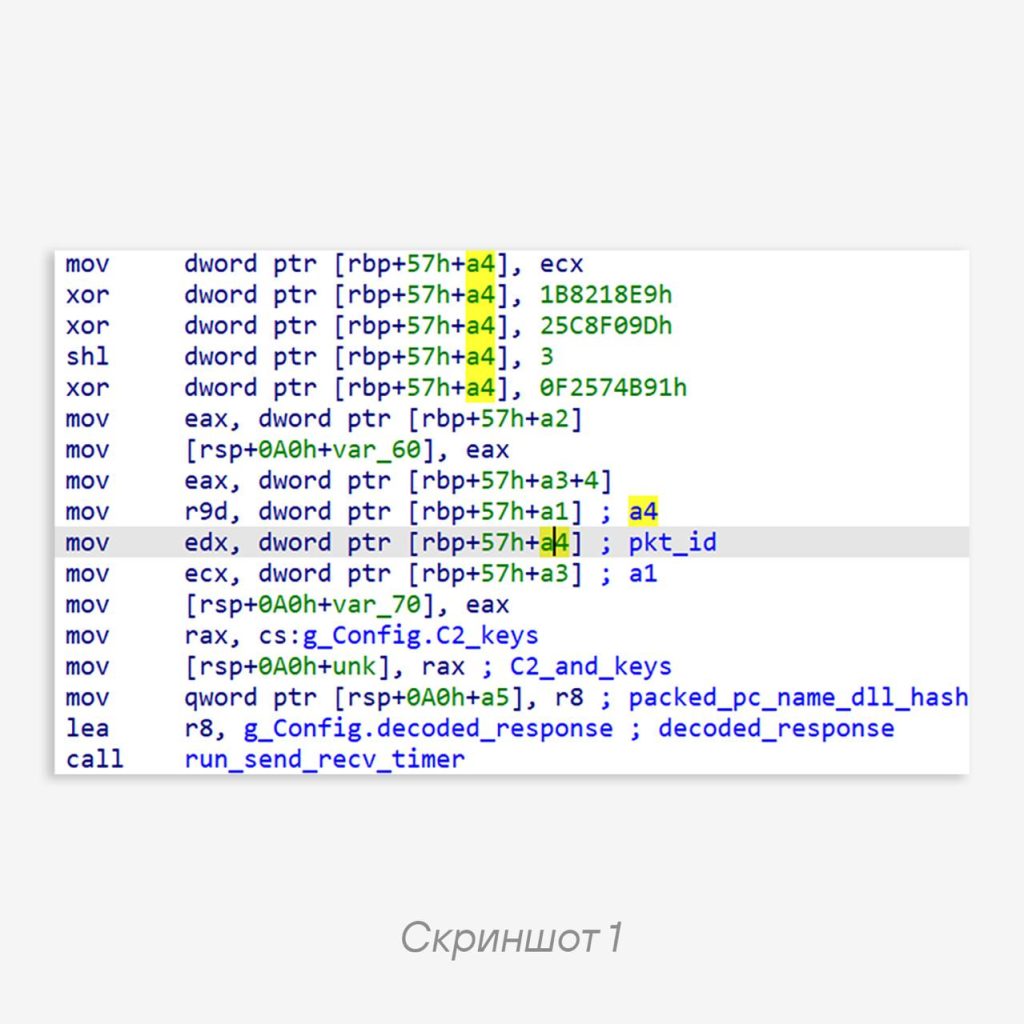
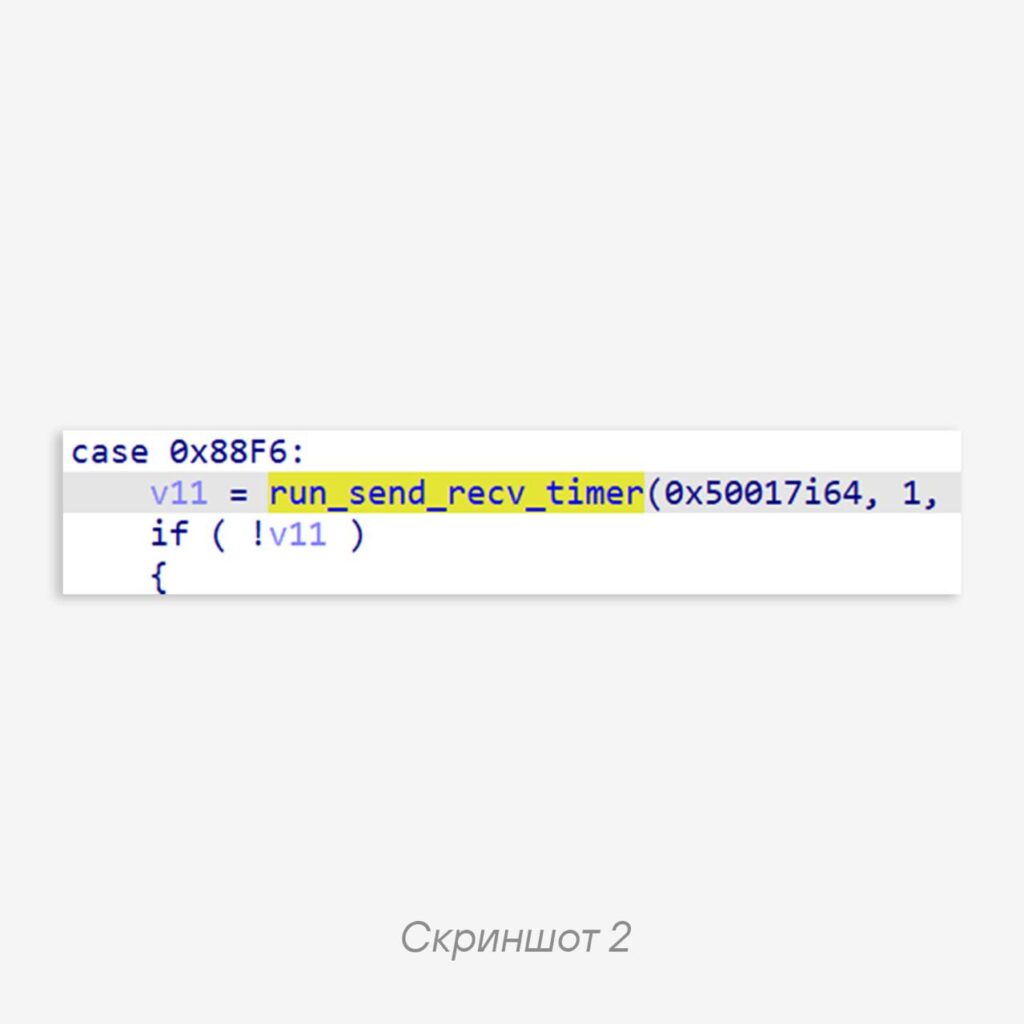
Control Flow Flattening technique, which is unpleasant in itself, it adds a lot of dead code, and also breaks arithmetic expressions down into a set of seemingly meaningless and random operations, for example, as in screenshot 1.The value that is placed into edx — the second argument of the run_send_recv_timer function — is computed in a rather strange way, although in the end the result looks like screenshot 2.
All these arithmetic exercises are necessary in order to ultimately get 1.
📂 Effective configuration extraction requires the ability to find important fragments of code and data, including among such samples.
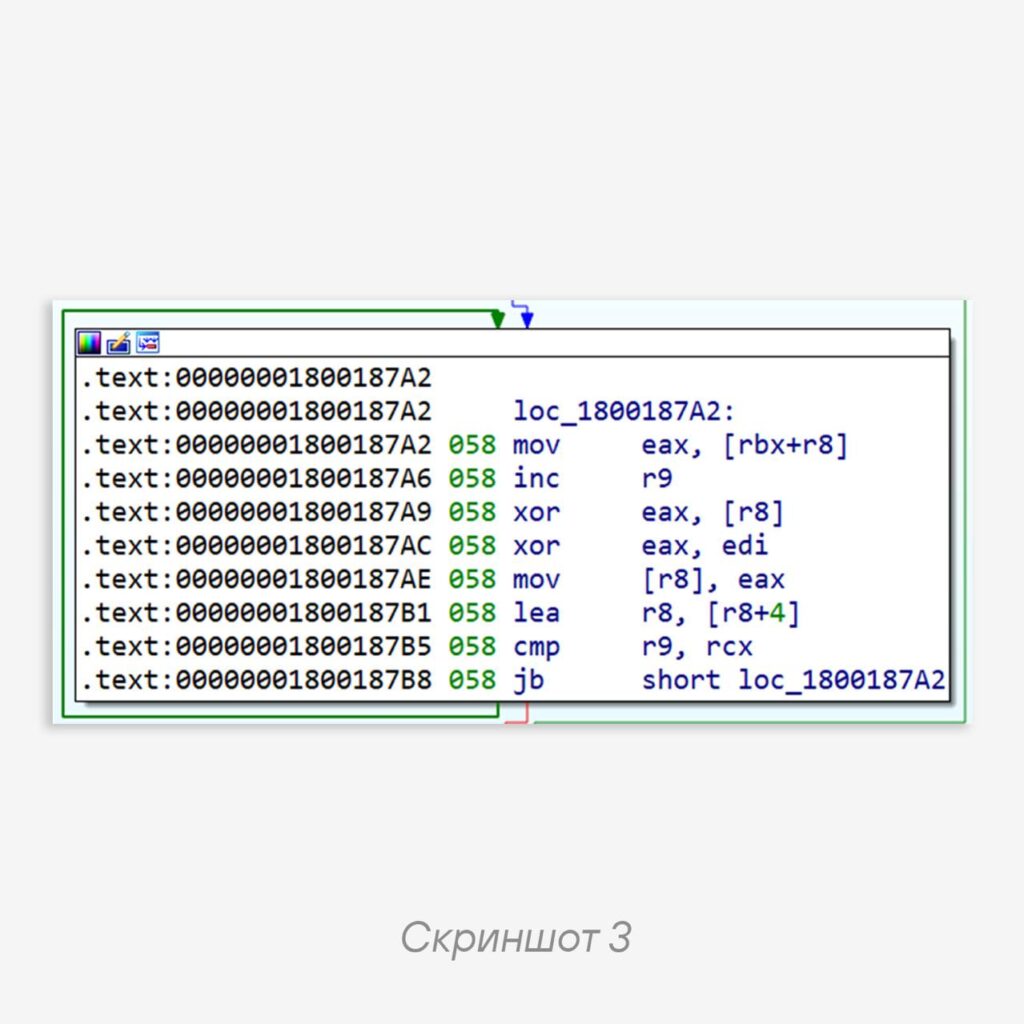
In this case, we are interested in the server’s public ECDH key, used to generate the session key for data encryption in the protocol. It is encrypted with a single-byte XOR. The problem lies in the randomized arithmetic operations for assembling the key buffer on the stack.
Finding the decryption function in the dump is easy; the relevant code fragment is in screenshot 3.
🧐 The problem becomes finding a reference to the function. If the sample were x32, the task would be simple: find the start of the function and the bytes
E8 <function-address-LE>, that is, a call with an operand in the form of the decryption function’s address. But in
x64, all addressing is RIP-relative, that is, address operands are offsets relative to the end of the current instruction. So we will find all call instructions and check whether the operand is equal to the address of the start of the decryption function. It looks like this:
calls = self.mdmp.find_bytes(b"\xE8", segment_start, segment_size, find_first=False)
    decrypt_refs = []
for call_pos in calls:
    call_offset = self.mdmp.read(call_pos + 1, 4)
    call_offset = struct.unpack("<i", call_offset)[0]
    if call_pos + 5 + call_offset == decrypt_key_func_start:
        decrypt_refs.append(call_pos)
    if len(decrypt_refs) == 2:
        break
Code language: Python (python)💡Note: there are two references because two keys are hardcoded — one for
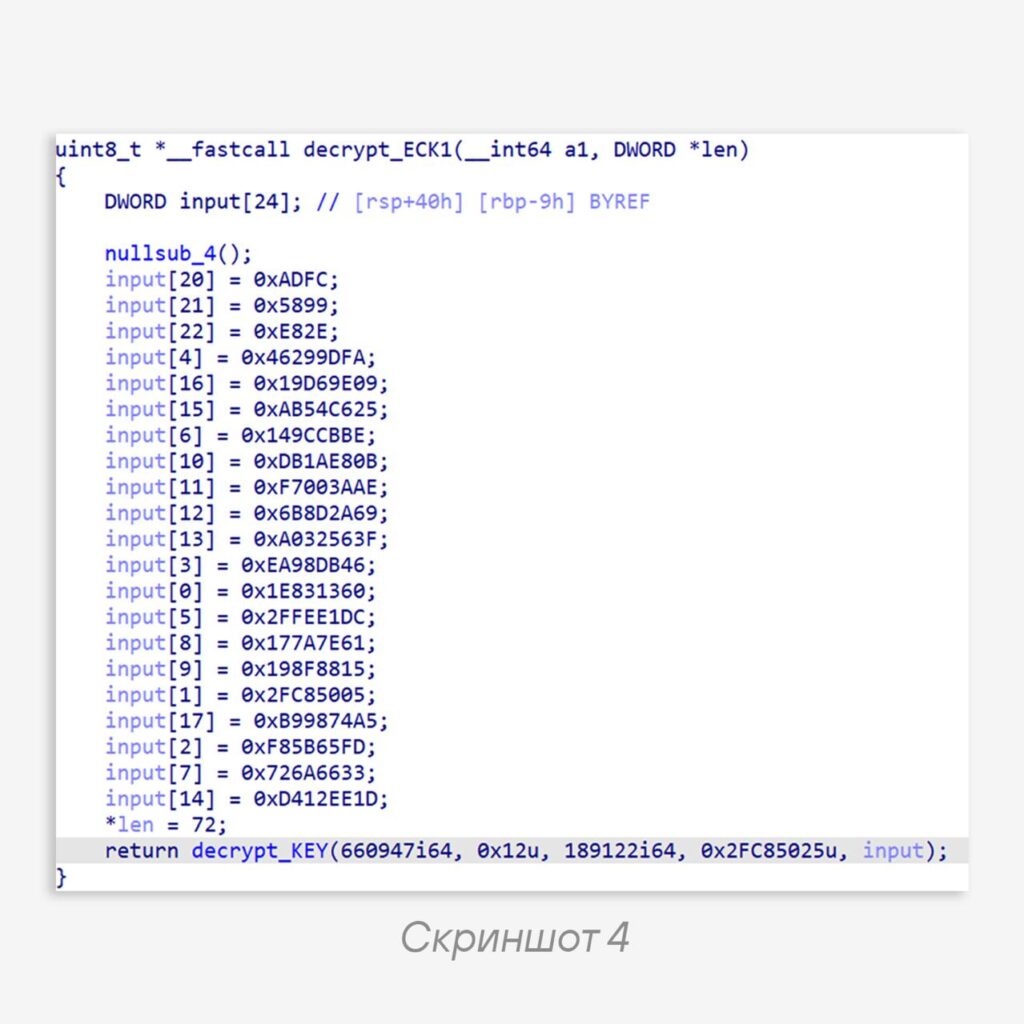
ECDH, the second for ECDSA, each decrypted in a separate function.Having found the reference to the decryption function, we look for the start of the function that calls it. Its pseudocode is in screenshot 4.
The encrypted key is assembled on the stack and then decrypted. We know that behind this beauty lies heavily obfuscated assembly code, which means reading the buffer “as is” will be difficult.
Let’s resort to a tool such as an emulator. We will not deobfuscate this with a script or reproduce the logic, but simply “execute” it and read the result.
To do this, since we know the address of the reference to the
decrypt_KEY function, we only need to find the start of the decrypt_ECK1 function, read it, and hand it to the emulator, which will do all the dirty work. For emulation we use Speakeasy, which can emulate not only instructions but also the OS environment.As a result, we get an elegant solution: create an emulator, allocate 4 bytes for the result length, load the function body as shellcode, and set a hook that will trigger on every instruction.
def emulate_decrypt_key_func(self, func_body):
    emul = speakeasy.Speakeasy()
    shellcode = emul.load_shellcode(fpath=None, data=func_body, arch="amd64")
    ctx = {"entry": True, "mem": emul.mem_alloc(4), "skip_call": True}
    emul.add_code_hook(self.code_hook_key, ctx=ctx)
    emul.run_shellcode(shellcode)
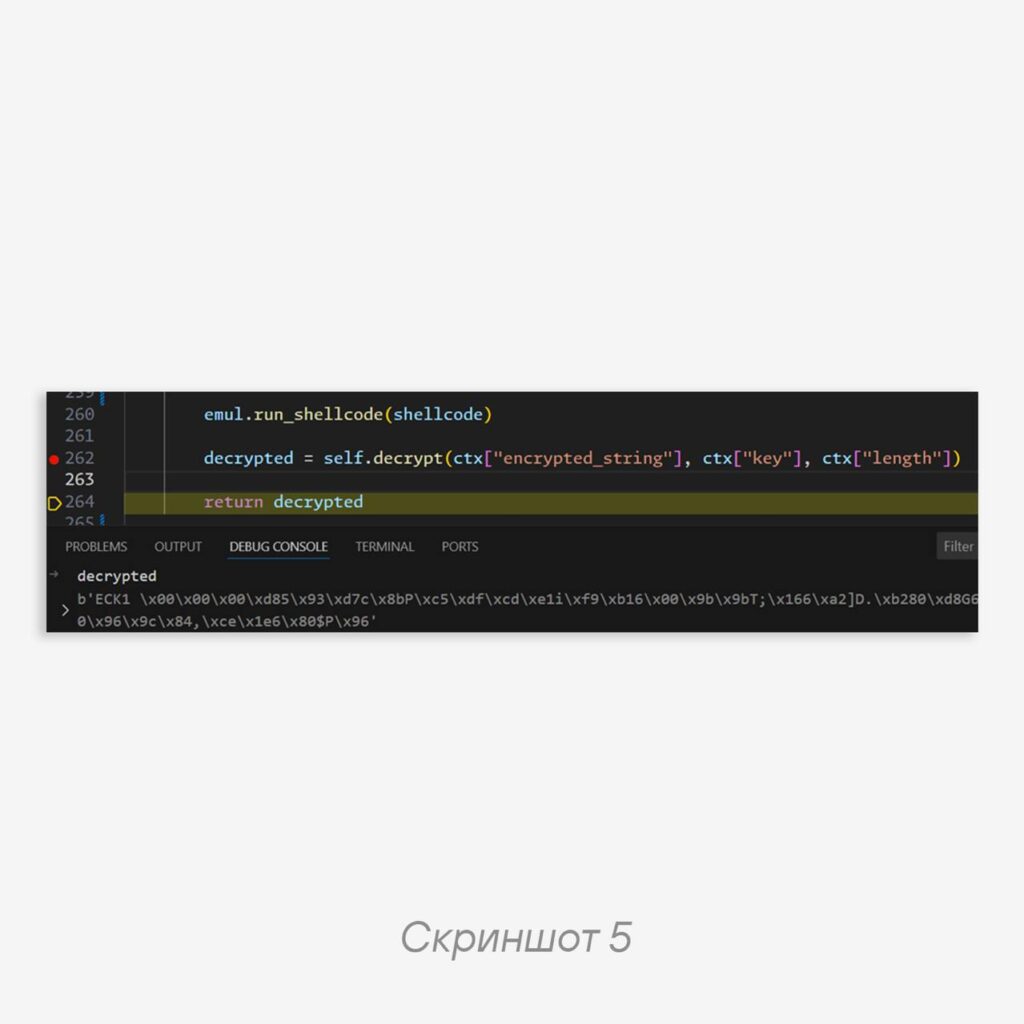
    decrypted = self.decrypt(ctx["encrypted_string"], ctx["key"], ctx["length"])
    return decrypted
Code language: Python (python)
Inside the callback, we skip one
call — the call to the dummy nullsub_4 — and stop before the call to decrypt_key. At this moment, one of the parameters contains the ready buffer with the encrypted key. Then this buffer is read and decrypted into the ECDH key, as can be seen in screenshot 5.Thanks to the emulator, we did not try to change the obfuscation, but accepted it as it is, in order to get what we wanted 😌
#tip #trick #C2
@ptescalator
More from global_author
- This is Siemens...
Recently, our colleagues from the Positive Industrial Expertise Center discovered a curious Windows sample on MalwareBazaar.…
- Anti-antivirus
Recently, we came across an APK with an intriguing and trust-inspiring name: «Антивирус ФСБ.apk». After installing…
- .exe .docm .xlsm
.exe .docm .xlsm Malicious files with these extensions are most often found in corporate network traffic.…
- Chaos, shock, private keys from a not-so-private GitLab 💻
Over the past couple of months, the attacker has been distributing trojans from several npm accounts:…
- ::%16777216 — so what exactly are you?
::%16777216 — so what exactly are you? It is known that during attacks, adversaries can use…



More in Indicators & C2
- This is Siemens...
Recently, our colleagues from the Positive Industrial Expertise Center discovered a curious Windows sample on MalwareBazaar.…
- Operation Chewbacca
At the end of June, the PT ESC team, during incident investigations, discovered a new group…
- Your Zimbra server is at risk
Recently, our PT ESC IR team encountered a new attack by ransomware groups on Zimbra mail…
- He's not your gsocket
He's not gsocket to you 😑 During the investigation of one of the incidents, PT ESC…
- Hunting RATs by their own certificates 🕵️
Our colleagues at Censys published a breakdown of the AsyncRAT family, describing an entire genealogical tree:…