
🦈Looking "under the hood" of secure connections in Wireshark. Part 2: Windows protocols
More in General
- We helped Apple fix a vulnerability in the kernel of its operating systems
We helped Apple fix a vulnerability in the kernel of its operating systems PT ESC expert…
- Recovering EVTX records: carving methods
Recovering EVTX records: carving methods 🧩 When investigating incidents where attackers encrypt virtual machine images, a…
- Operation Chewbacca
At the end of June, the PT ESC team, during incident investigations, discovered a new group…
- Your Zimbra server is at risk
Recently, our PT ESC IR team encountered a new attack by ransomware groups on Zimbra mail…
- He's not your gsocket
He's not gsocket to you 😑 During the investigation of one of the incidents, PT ESC…




In the first part, we examined the decryption of TLS connections, which are often used on the internet. But if we move inside a corporate environment, other protocols will prevail there — SMB, LDAP, and DCERPC — and all of them have the ability to encrypt the contents of their requests.
For example, this feature appeared in SMB version 3, most DCERPC connections use the Packet Privacy authentication level, and LDAP protocol messages are encrypted when signing is enabled (LDAP Signing).
They have something in common: the Session Key encryption key is ultimately generated based on the user account password or the device account key. However, the decryption algorithm itself differs greatly depending on the protocol (NTLM or Kerberos).
1️⃣ NTLM authentication
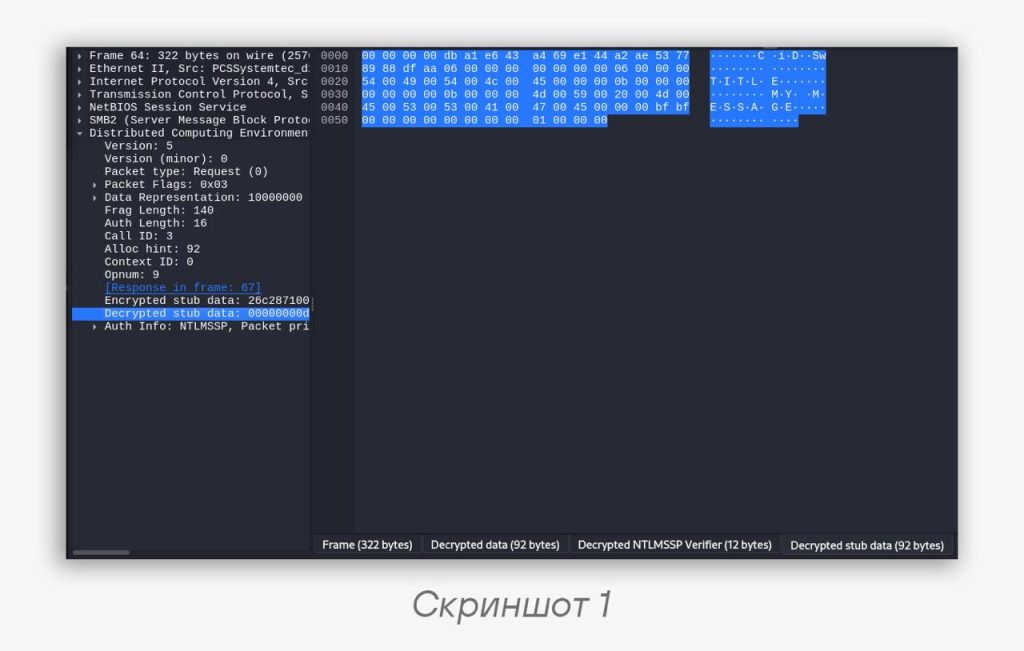
The simplest case: to decrypt, we only need the user’s password. To specify it in Wireshark, you need to open Edit → Preferences, then in the NTLMSSP protocol settings enter the password in the NT Password field. Now decrypted blocks will appear next to the encrypted ones (screenshot 1).
2️⃣ Kerberos
To decrypt sessions with Kerberos authentication, you need either the user account password or the service account password, since both of these passwords are involved in forming the session key. Essentially, we first need to decrypt the session key value inside Kerberos, and then use it to decrypt SMB or other protocols. First, we need to generate a keytab file.
Generating a keytab file from a user password
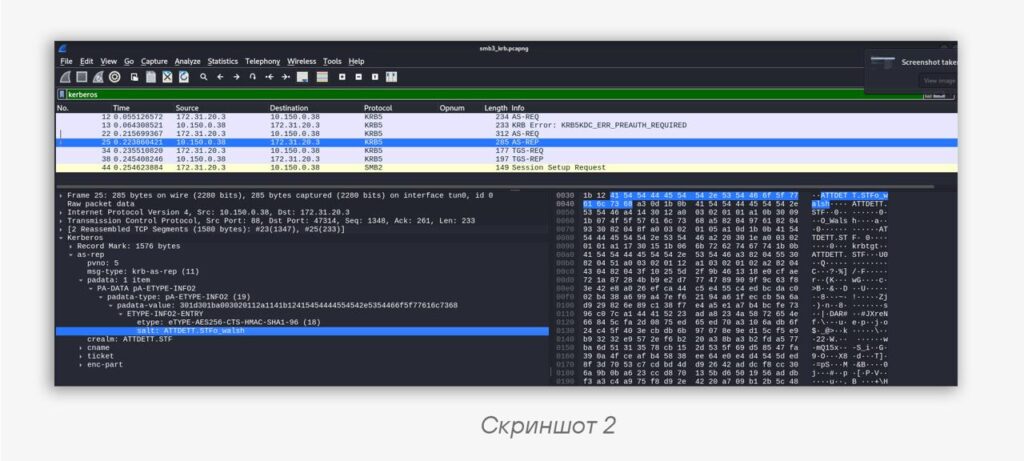
From the Kerberos AS-REP response, we find out the encryption algorithm and the salt value using the formula <REALM> + <cname>. In our case, they will be aes256-cts-hmac-sha1-96 and ATTDETT.STFo_walsh respectively, and it’s important to pay attention to the case (scr. 2).
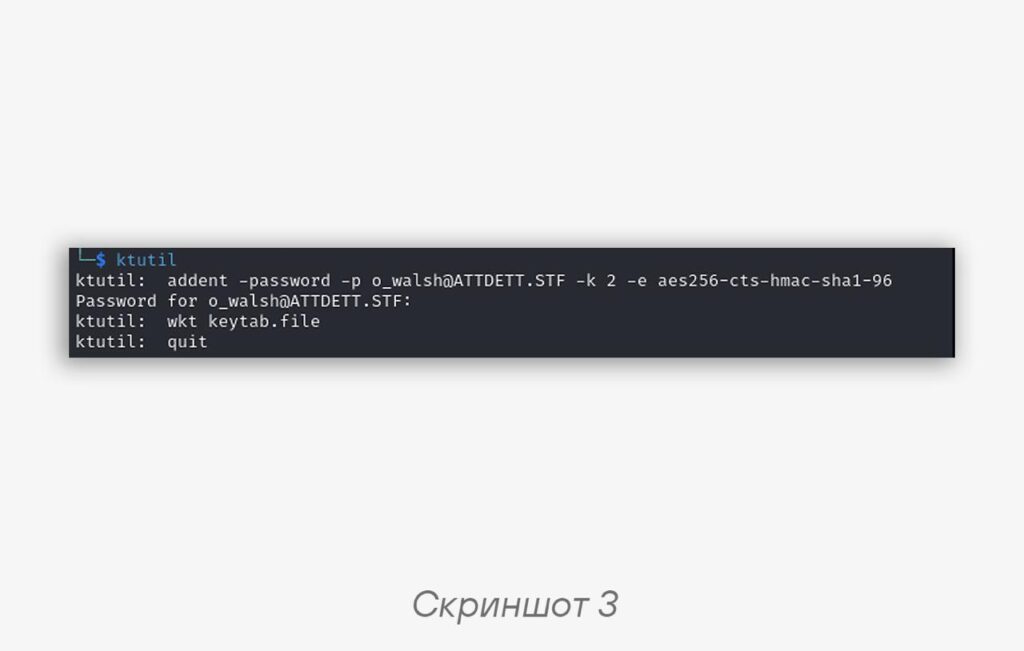
Using the Linux utility kutils, we add an entry for the desired user using the addent command with the -password parameter. We specify the parameters as in the command below, and the -k parameter (Key Version Number, kvno) can be any number. We save the keytab using the wkt command (scr. 3).
ktutil: addent -password -p o_walsh@ATTDETT.STF -k 2 -e aes256-cts-hmac-sha1-96
Code language: YAML (yaml)
Generating a keytab file from a service account key
The session key in the TGS ticket can also be decrypted using the service account key. This is useful if we want to decrypt connections to a service for any users. Service account passwords, as a rule, match the device account password — it is very complex and is generated automatically every 30 days.
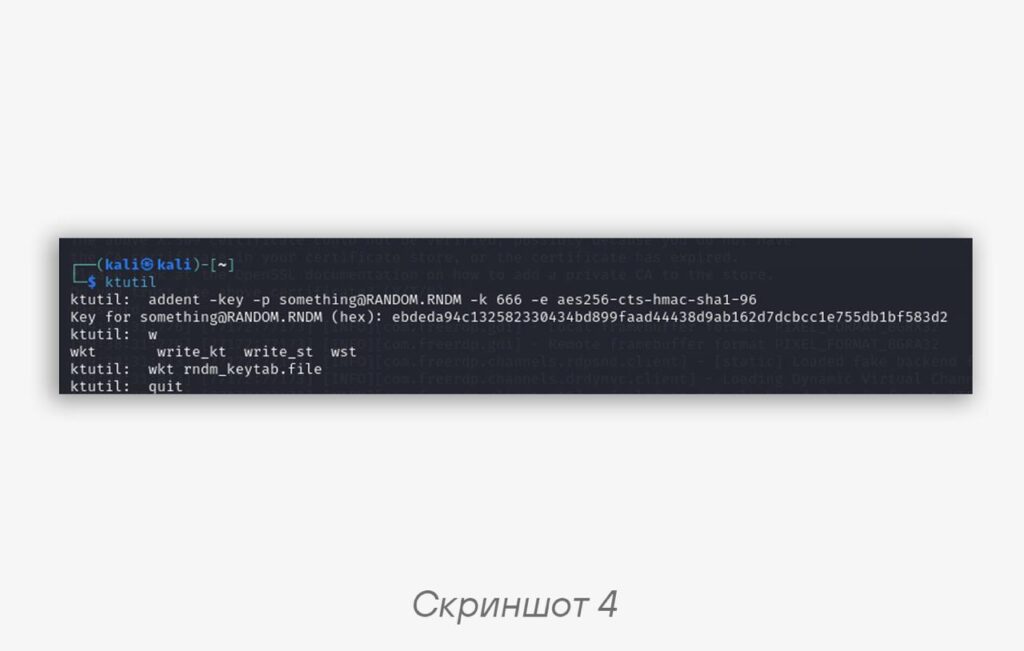
From the TGS response, we likewise extract the encryption algorithm and, using the same kutils utility, add an entry. The only difference is that instead of a password, we use the -key parameter with the service account key, which can be obtained, for example, using the secretsdump script from the Impacket framework. The -p (principal) parameter is unimportant for Wireshark; we can specify any values for -p and -k (scr. 4).
ktutil: addent -key -p something@RANDOM.RND -k 666 -e aes256-cts-hmac-sha1-96
Code language: YAML (yaml)
How to use the resulting keytab file?
In Wireshark, enable the Try to decrypt Kerberos blobs option:
Edit → Preferences → Protocols → KRB5 → Try to decrypt Kerberos blobs
To specify the keytab file in Wireshark, you need to open Edit → Preferences, then in the KRB5 protocol settings select the Kerberos keytab file. Some fields will be displayed undecrypted — this is normal. Then we proceed to decrypt SMB3.
SMB3
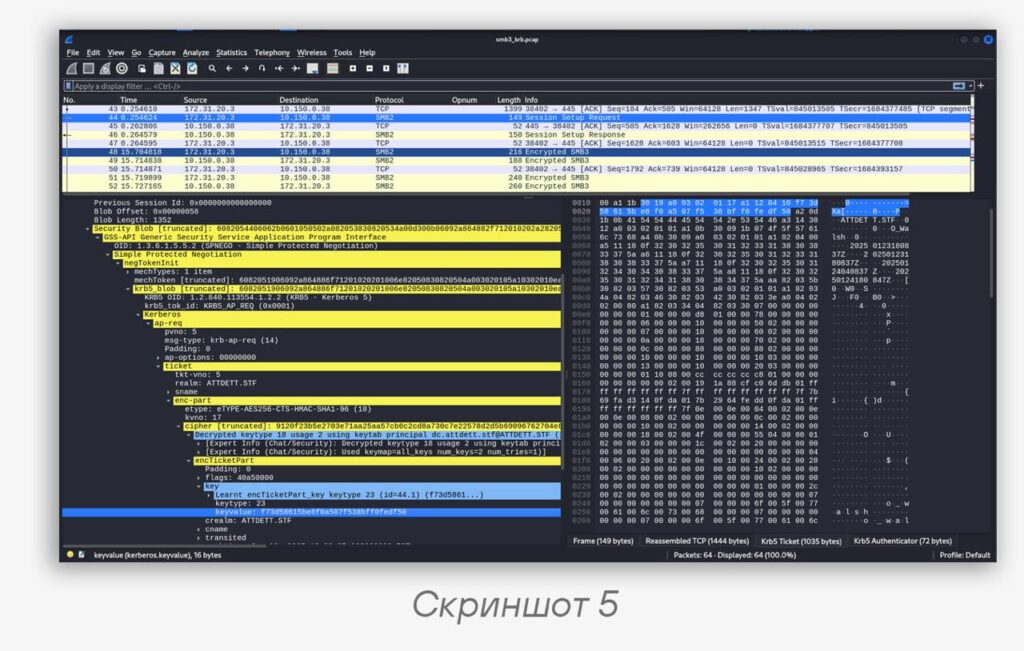
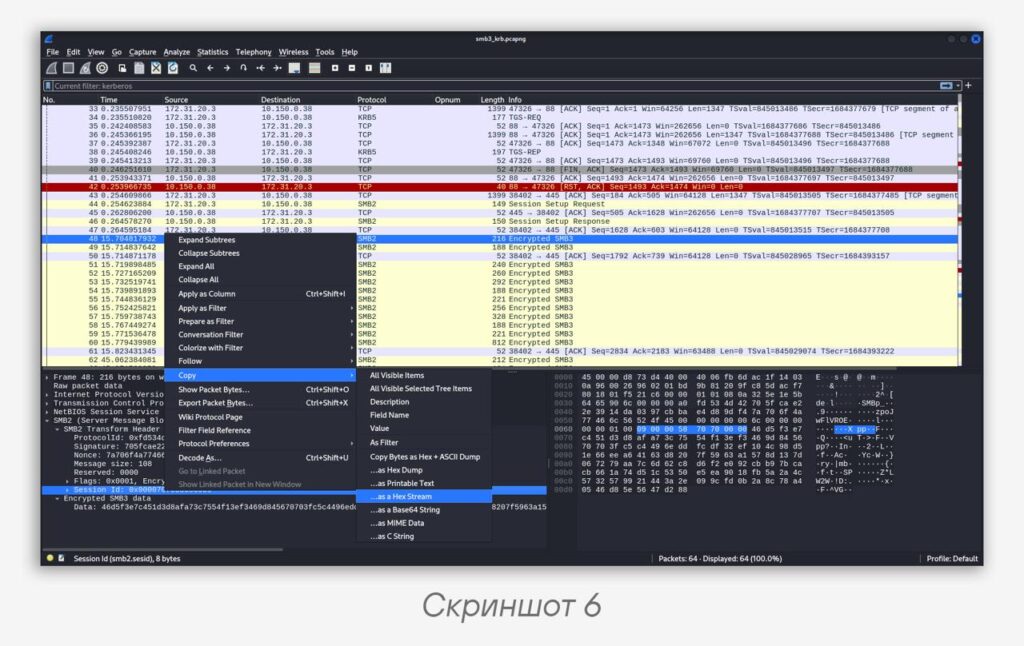
We will need that very session key. It can be found in the keyvalue field in TGS-REP or AP-REQ packets. Then we take one of the SMB3 packets we’re interested in and copy the Session ID from the header (as in scr. 5, 6).
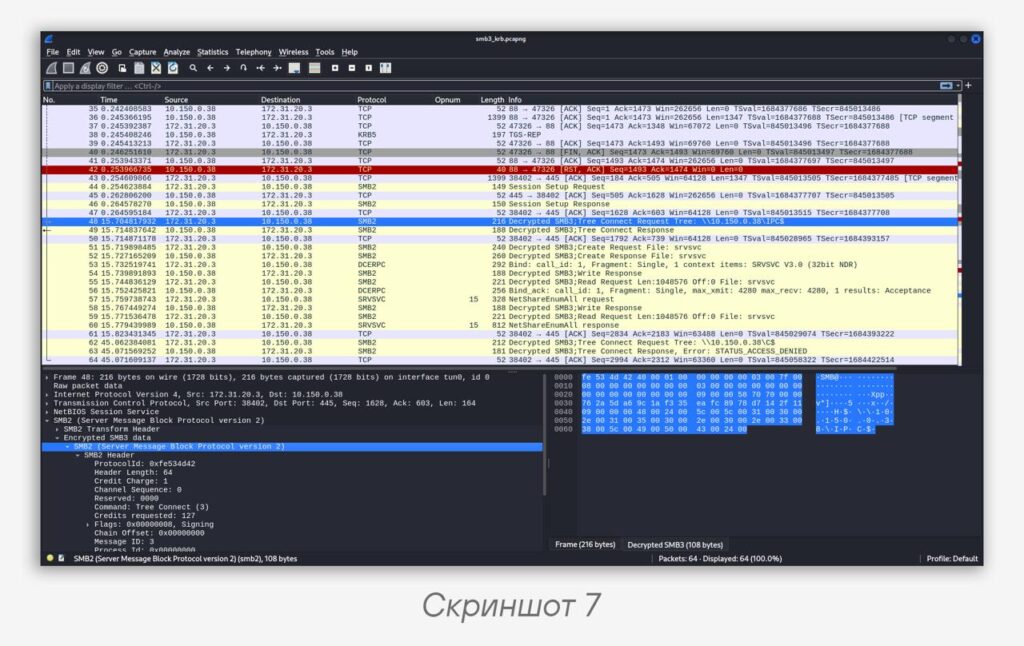
We specify the session key and Session ID in the Secret session key field in Wireshark in the SMB2 protocol settings:
Edit → Preferences → Protocols → SMB2 → Secret session key for decryption
Bingo! We get the decrypted SMB3 (scr. 7). The same algorithm works for decrypting other protocols as well (DCERPC, LDAP, etc.).
#dfir #tip #network
@ptescalator
More from oUth0R
- We helped Apple fix a vulnerability in the kernel of its operating systems
We helped Apple fix a vulnerability in the kernel of its operating systems PT ESC expert…
- Recovering EVTX records: carving methods
Recovering EVTX records: carving methods 🧩 When investigating incidents where attackers encrypt virtual machine images, a…
- Operation Chewbacca
At the end of June, the PT ESC team, during incident investigations, discovered a new group…
- Your Zimbra server is at risk
Recently, our PT ESC IR team encountered a new attack by ransomware groups on Zimbra mail…
- He's not your gsocket
He's not gsocket to you 😑 During the investigation of one of the incidents, PT ESC…
More in General
- We helped Apple fix a vulnerability in the kernel of its operating systems
We helped Apple fix a vulnerability in the kernel of its operating systems PT ESC expert…
- Recovering EVTX records: carving methods
Recovering EVTX records: carving methods 🧩 When investigating incidents where attackers encrypt virtual machine images, a…
- Operation Chewbacca
At the end of June, the PT ESC team, during incident investigations, discovered a new group…
- Your Zimbra server is at risk
Recently, our PT ESC IR team encountered a new attack by ransomware groups on Zimbra mail…
- He's not your gsocket
He's not gsocket to you 😑 During the investigation of one of the incidents, PT ESC…