
🦈 Looking under the hood of secure connections in Wireshark. Part 3: MITM attack on SSL/TLS connections
More in General
- We helped Apple fix a vulnerability in the kernel of its operating systems
We helped Apple fix a vulnerability in the kernel of its operating systems PT ESC expert…
- Recovering EVTX records: carving methods
Recovering EVTX records: carving methods 🧩 When investigating incidents where attackers encrypt virtual machine images, a…
- Operation Chewbacca
At the end of June, the PT ESC team, during incident investigations, discovered a new group…
- Your Zimbra server is at risk
Recently, our PT ESC IR team encountered a new attack by ransomware groups on Zimbra mail…
- He's not your gsocket
He's not gsocket to you 😑 During the investigation of one of the incidents, PT ESC…




MITM attack is a fairly popular feature of various sandboxes and application analysis systems. Typically, tools that enable MITM attacks are a proxy server that allows flexible processing of incoming traffic and interception of SSL/TLS sessions, extraction of master keys, and much more. In this case, we need to specify this proxy server in the application or service that is planned to be MITM-attacked. Depending on the flexibility of the tool, it may also have a built-in transparent proxy mode, which, unlike a classic proxy, usually requires traffic to be redirected by network rules (e.g., using iptables) to a specific machine.
👀 Let’s look at sslsplit — an open-source tool that allows decrypting SSL/TLS connections transparently.
Let’s configure a Debian-based gateway using the make_gateway.sh. script as an example.
First, let’s generate certificates for the subsequent operation of the transparent proxy.
openssl genrsa -out ca.key 2048
openssl req -new -x509 -days 365 -key ca.key -out ca.crtCode language: plaintext (plaintext)
Let’s launch sslsplit with the specified parameters.
sslsplit -M keys.log -D -l connections.log -j sslsplit/ -S logdir/ -k ca.key -c ca.crt ssl 0.0.0.0 8443 tcp 0.0.0.0 8080Code language: plaintext (plaintext)From another machine, let’s make a request without specifying any proxy parameters, since here the proxy is transparent for us and traffic is redirected to the gateway from the client machine, and then SSL/TLS from port 443 is redirected to the running transparent proxy on port 8443, while there are no traffic redirection rules on the client.
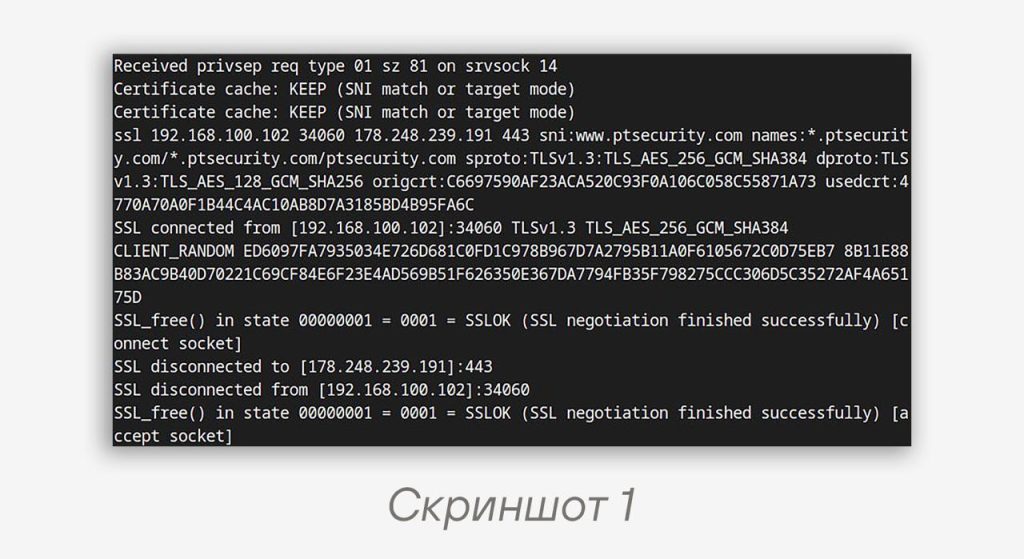
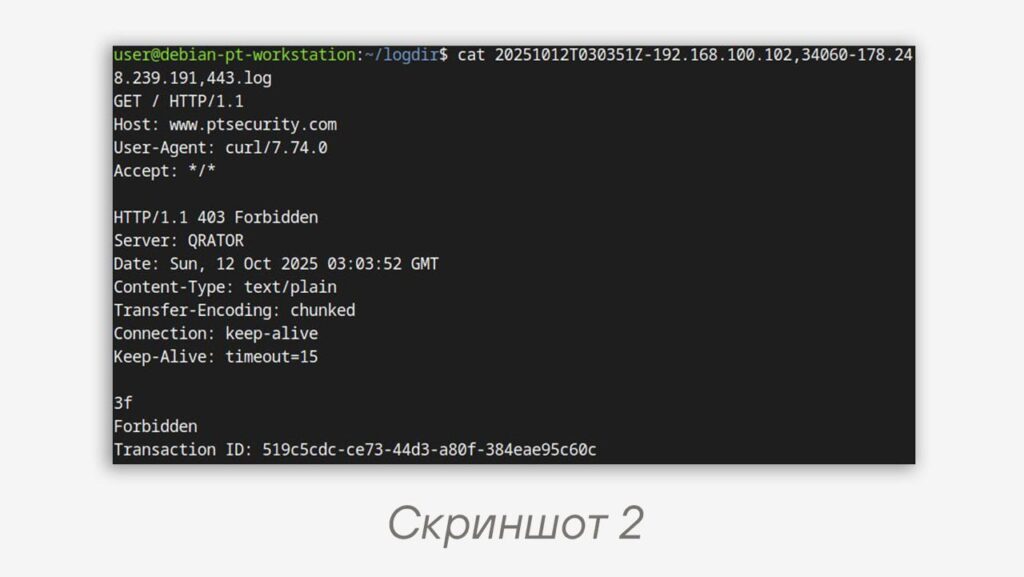
curl --cacert ca.crt --tlsv1.3 https://www.ptsecurity.com/Code language: Bash (bash)The tool’s log outputs information that the request passed through the proxy, even though we did not specify it directly (screenshot 1). In the logdir directory that we specified in the tool, a file appears containing the decrypted stream (screenshot 2). At the same time, the keys.log file records SSL/TLS master keys, and subsequently these keys can be used, for example, in Wireshark, if we first capture all the traffic that needs to be decrypted. We talked about this in the first part of the posts about Wireshark. It is worth noting a shortcoming of this tool — SSLKEYLOGFILE for TLSv1.3 sessions is generated incorrectly, and as a result, when opening a PCAP file in Wireshark, there will be no access to the decrypted data.
But what if we want to generate a PCAP file with decrypted data?
🐻 PolarProxy — unlike the tool mentioned above, PolarProxy allows generating a PCAP file with decrypted data, but its main drawback is that it is proprietary.
Let’s launch SOCKS in PolarProxy and specify recording directly to a PCAP file.
At the same time, PolarProxy has a built-in certificate web host; let’s launch it on port 10080.
sudo ./PolarProxy -v --certhttp 10080 --socks 1080 -w polarproxy.pcapCode language: Bash (bash)Let’s download the certificate
wget http://127.0.0.1:10080/polarproxy.crtCode language: Bash (bash)Let’s form a request through the launched proxy.
First, specify the certificate in the --cacert option.
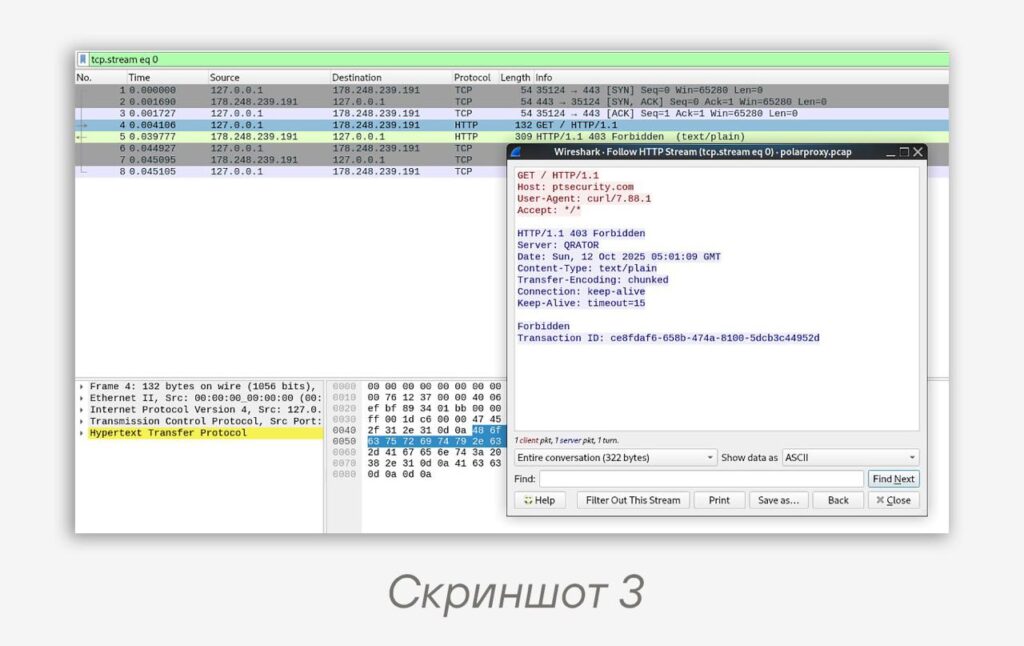
curl --cacert polarproxy.crt --proxy socks5://127.0.0.1:1080 https://ptsecurity.com/Code language: Bash (bash)After PolarProxy finishes running, we get the recorded PCAP file polarproxy.pcap. In it, we can view this decrypted request through Wireshark (screenshot 3). Unlike the previously described tools, here a decrypted PCAP file is generated in its pure form, so this file can be parsed using Zeek, Suricata, and other DPI tools.
The tool has the ability to use the transparent proxy option, for example:
sudo ./PolarProxy -v -p 0.0.0.0,10443,80,443 -w polarproxy.pcapCode language: Bash (bash)Then PolarProxy will be launched transparently on port 10443 and will process traffic from the client machine from ports 80, 443 on all interfaces.
Continued in the post below 👇
#dfir #tip #mitm #ssl #tls
@ptescalator
More from oUth0R
- We helped Apple fix a vulnerability in the kernel of its operating systems
We helped Apple fix a vulnerability in the kernel of its operating systems PT ESC expert…
- Recovering EVTX records: carving methods
Recovering EVTX records: carving methods 🧩 When investigating incidents where attackers encrypt virtual machine images, a…
- Operation Chewbacca
At the end of June, the PT ESC team, during incident investigations, discovered a new group…
- Your Zimbra server is at risk
Recently, our PT ESC IR team encountered a new attack by ransomware groups on Zimbra mail…
- He's not your gsocket
He's not gsocket to you 😑 During the investigation of one of the incidents, PT ESC…
More in General
- We helped Apple fix a vulnerability in the kernel of its operating systems
We helped Apple fix a vulnerability in the kernel of its operating systems PT ESC expert…
- Recovering EVTX records: carving methods
Recovering EVTX records: carving methods 🧩 When investigating incidents where attackers encrypt virtual machine images, a…
- Operation Chewbacca
At the end of June, the PT ESC team, during incident investigations, discovered a new group…
- Your Zimbra server is at risk
Recently, our PT ESC IR team encountered a new attack by ransomware groups on Zimbra mail…
- He's not your gsocket
He's not gsocket to you 😑 During the investigation of one of the incidents, PT ESC…