
Did you know that malicious people don't like LNK file parsers?
More in Windows
- This is Siemens...
Recently, our colleagues from the Positive Industrial Expertise Center discovered a curious Windows sample on MalwareBazaar.…
- A look inside ESE
Looking inside ESE 🫣 During incident investigations, we at PT ESC IR regularly encounter the need…
- ::%16777216 — so what exactly are you?
::%16777216 — so what exactly are you? It is known that during attacks, adversaries can use…
- Confusion in WSUS vulnerabilities: setting the record straight
Confusion Around WSUS Vulnerabilities: Setting the Record Straight 🕷 One of the most pressing vulnerabilities in…
- Disabling Defender / MpPreference
In addition to the post 👆 Disabling Defender / MpPreference Set-MpPreference -DisableRealtimeMonitoring $true Set-MpPreference -DisableBehaviorMonitoring $true…


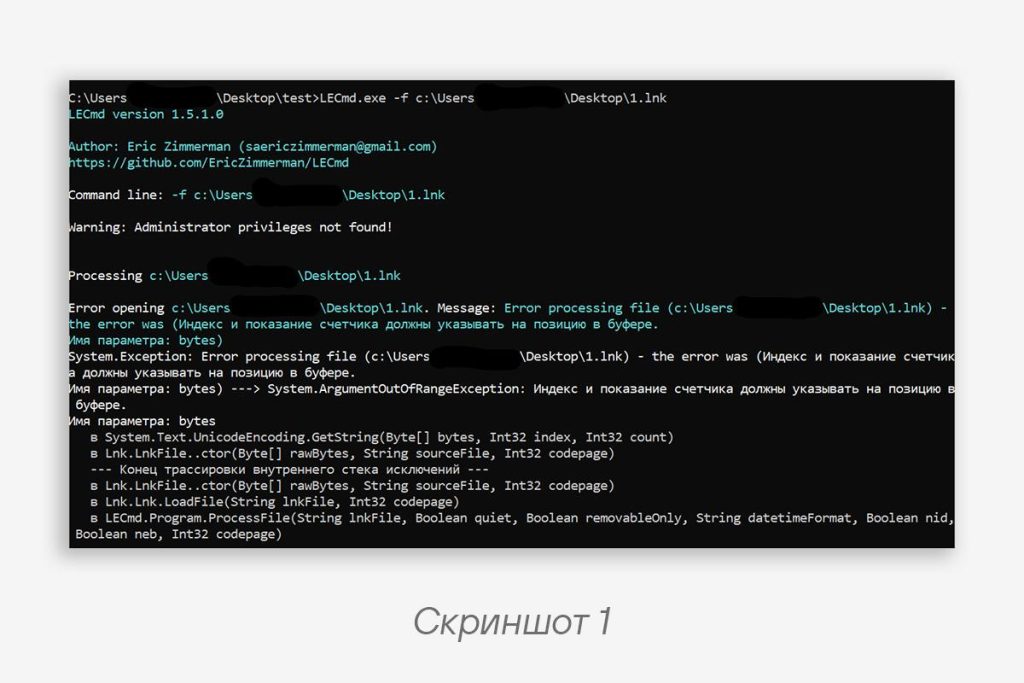
In March we wrote about XDSpy attacks on Russian organizations. The LNK files used in this attack were modified in such a way that many parsers “crashed” when processing them. For example, this applies to LECmd, LnkParse3, and ExifTool, which is used on VirusTotal (screenshot 1).
Let’s figure out where the problem lies and how to fix it 🔧
In general terms, the structure of an LNK file looks as follows:
1.
SHELL_LINK_HEADER with the LinkFlags value we’re interested in. It defines the presence of certain structures in the LNK file and looks like this:typedef struct
{
uint32 HasLinkTargetIDList : 1; // there is a LINKTARGET_IDLIST
uint32 HasLinkInfo : 1; // there is a LINKINFO
uint32 HasName : 1; // there is STRING_DATA
uint32 HasRelativePath : 1; // there is STRING_DATA
uint32 HasWorkingDir : 1; // there is STRING_DATA
uint32 HasArguments : 1; // there is STRING_DATA
uint32 HasIconLocation : 1; // there is STRING_DATA
uint32 IsUnicode : 1; // strings in UTF-16
// ... skipped
} LinkFlags;
Code language: plaintext (plaintext)2. [Optional]
LINKTARGET_IDLIST. 3. [Optional]
LINKINFO.4. [Optional]
STRING_DATA.STRING_DATA is an array of
StringData structures, each of which has the following format:•
CountCharacters (the number of characters in the string, so for Unicode the number of bytes will be CountCharacters × 2).•
String (the string, which according to the documentation MUST NOT be NULL-terminated).The
STRING_DATA structure contains Description (Name), RelativePath, WorkingDir, Arguments, and IconLocation in the order specified in LinkFlags.🫱 The problem for parsers that rely on it lies precisely in
CountCharacters. To “bring them down,” the kind gentlemen set a large value in CountCharacters, for example 0xFFFF. They make String up to 260 characters long, and place the next StringData exactly 260 characters later (in UTF-16 that’s 520 bytes).As it turns out, Windows “under the hood” limits the length of the
Description, RelativePath, and WorkingDir strings to 260 characters. As a result, we have the following:• Parsers “crash” due to incorrect values (they calculate the offset of
0xFFFF and land on meaningless bytes).• Windows limits itself to 260 characters, correctly landing on the next
StringData, and launches the LNK file without any problems.• The 260-character limit is definitely implied for
Description, which was not obvious, RelativePath, and WorkingDir.• For
Arguments there is no such limit, or the threshold is much higher, which already makes sense. At the same time, in the LNK file properties, when you right-click, only the first 260 characters of the command will be displayed.• Windows considers the last byte to be null, even if it isn’t, although from the documentation one might have assumed that the last character is also counted.
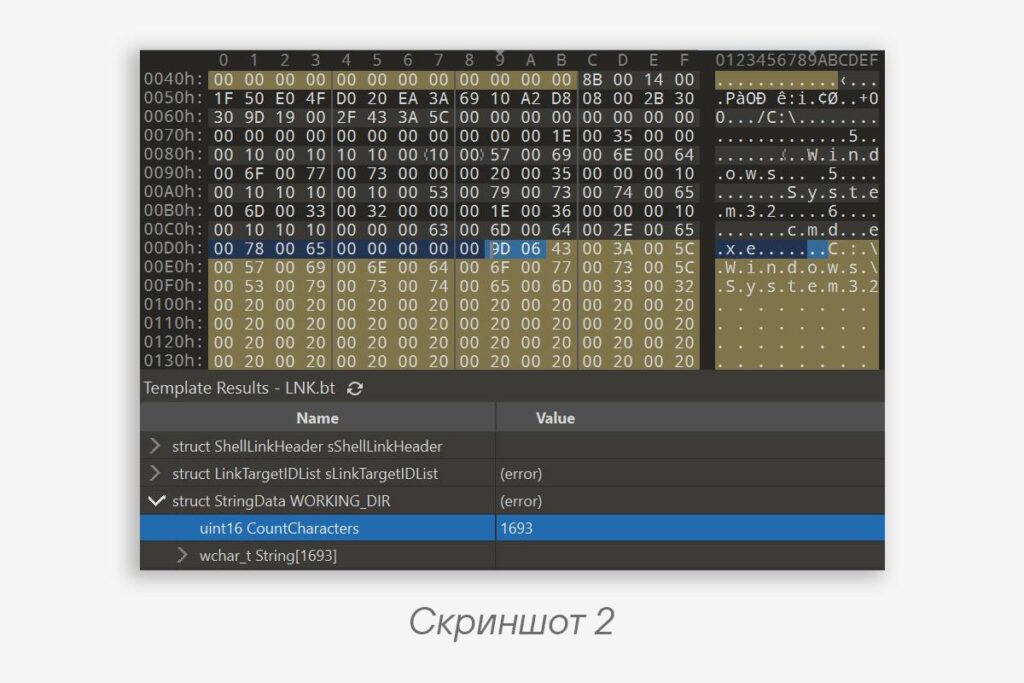
🕵️♀️ In the LNK file variant from XDSpy, the attackers “broke” the
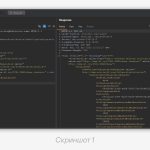
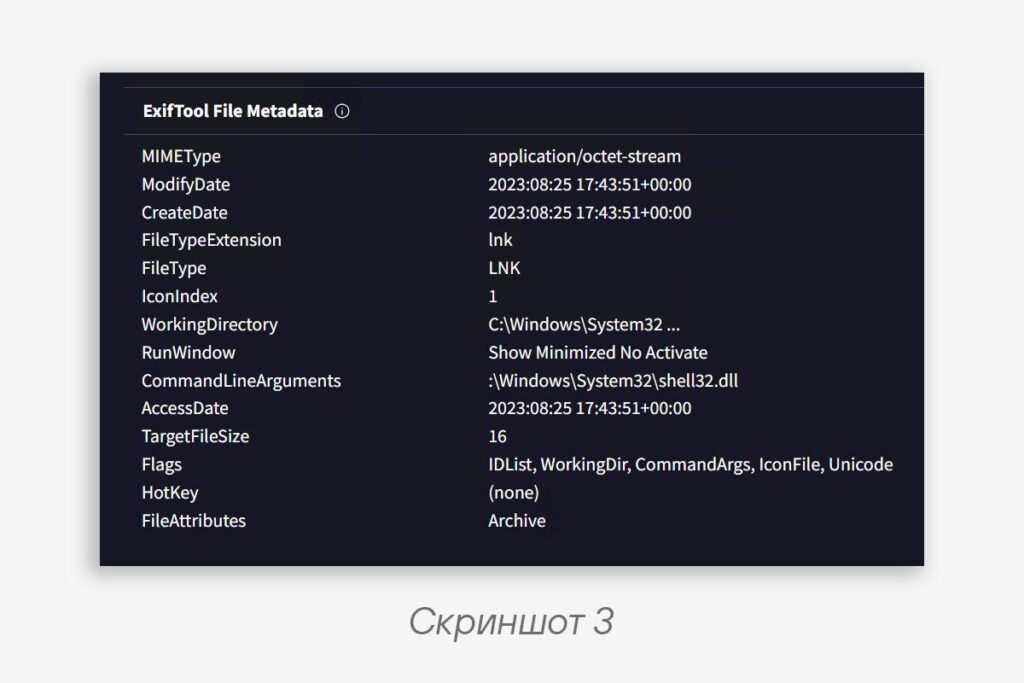
WorkingDir string in this way and set its value to C:\Windows\System32\<spaces> with a length of 260 characters (screenshot 2). Here you can see what such a file looks like on VT (screenshot 3).---- WorkingDir ----
0x0 CountCharacters (0XFFFF)
0x2 String (up to 0x208) // C:\Windows\System32_______
---- Arguments ----
0x20A CountCharacters // The Windows parser goes here
0x20C String // Arguments
...
0xFFFF RandomData // Regular parsers go here
Code language: plaintext (plaintext)To fix this misunderstanding, you need to check the size of
CountCharacters for the relevant strings and limit the offset to the next StringData to 260 characters, taking into account the isUnicode flag.
#tip #win
@ptescalator
More from global_author
- This is Siemens...
Recently, our colleagues from the Positive Industrial Expertise Center discovered a curious Windows sample on MalwareBazaar.…
- Anti-antivirus
Recently, we came across an APK with an intriguing and trust-inspiring name: «Антивирус ФСБ.apk». After installing…
- .exe .docm .xlsm
.exe .docm .xlsm Malicious files with these extensions are most often found in corporate network traffic.…
- Chaos, shock, private keys from a not-so-private GitLab 💻
Over the past couple of months, the attacker has been distributing trojans from several npm accounts:…
- ::%16777216 — so what exactly are you?
::%16777216 — so what exactly are you? It is known that during attacks, adversaries can use…


More in Windows
- This is Siemens...
Recently, our colleagues from the Positive Industrial Expertise Center discovered a curious Windows sample on MalwareBazaar.…
- A look inside ESE
Looking inside ESE 🫣 During incident investigations, we at PT ESC IR regularly encounter the need…
- ::%16777216 — so what exactly are you?
::%16777216 — so what exactly are you? It is known that during attacks, adversaries can use…
- Confusion in WSUS vulnerabilities: setting the record straight
Confusion Around WSUS Vulnerabilities: Setting the Record Straight 🕷 One of the most pressing vulnerabilities in…
- Disabling Defender / MpPreference
In addition to the post 👆 Disabling Defender / MpPreference Set-MpPreference -DisableRealtimeMonitoring $true Set-MpPreference -DisableBehaviorMonitoring $true…