
Looking for the necessary system calls
More in Malware
- This is Siemens...
Recently, our colleagues from the Positive Industrial Expertise Center discovered a curious Windows sample on MalwareBazaar.…
- Anti-antivirus
Recently, we came across an APK with an intriguing and trust-inspiring name: «Антивирус ФСБ.apk». After installing…
- .exe .docm .xlsm
.exe .docm .xlsm Malicious files with these extensions are most often found in corporate network traffic.…
- Operation Chewbacca
At the end of June, the PT ESC team, during incident investigations, discovered a new group…
- Your Zimbra server is at risk
Recently, our PT ESC IR team encountered a new attack by ransomware groups on Zimbra mail…





@The malware got into the system…
@The malware wants to pull a prank…
@The malware calls a WinAPI and…
@The EDR system detects it and starts screaming very loudly…
😱 Not the most pleasant turn of events for virus writers. So how do they deal with situations like this?
One way is to call the necessary Windows function not through the WinAPI, but through system calls. Many EDR systems intercept WinAPI function calls, but they far from always detect the use of system calls. This peculiarity can be exploited to bypass defensive mechanisms.
SysWhispers
Why implement the syscall invocation mechanism yourself when kind people have already done it for you? Right, we’ll use a ready-made solution — SysWhispers (in this post we’ll talk about its second version). It’s worth noting that besides providing a convenient interface through which you can invoke a syscall, SysWhispers also hashes them.
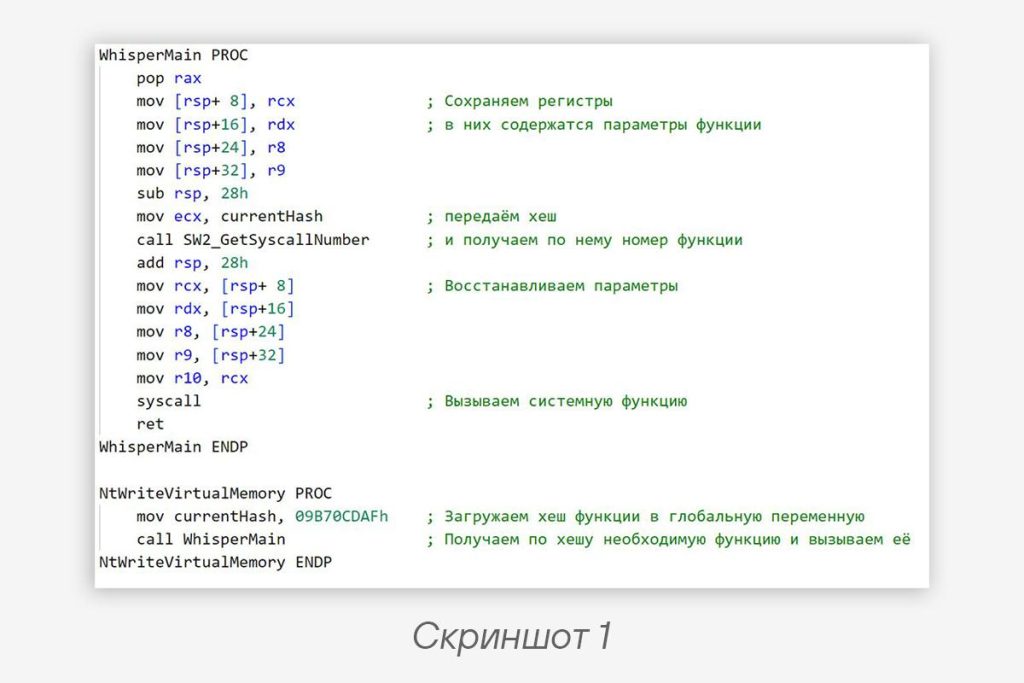
It looks like this: we call the SW2_GetSyscallNumber function, into which we pass the hash of the required syscall. In response, the function returns the number of the system function, which we then invoke using the syscall instruction. This process is shown in more detail in screenshot 1 (it shows an example of calling the NtWriteVirtualMemory function).
🧐 And now along comes a researcher who needs to reverse this. How are they supposed to figure out which syscall is being used?
We can’t directly obtain the number of the required system function: it’s hashed, so we’ll have to come up with something. We could write a script that implements the same hashing algorithm as SysWhispers (essentially, it uses XOR of the function name against a random value). But we could take a different path: using the Appcall mechanism in IDA Pro (Appcall only works in debug mode, so it’s better to work with malware in a virtual machine), directly call SW2_GetSyscallNumber, passing it the hash of the required function. We’ll still get the function number, but the process will go much faster.
Just compare — writing a script that recreates the hash function, or a single line of Python code:
syscall_id = idaapi.Appcall.SW2_GetSyscallNumber(hash).value
Code language: plaintext (plaintext)
👋 Yep, we’ve got the syscall number, but what next, how do we find out its name?
We can find it by number in the table, or we can do without it and go in for process automation. As was said earlier, Appcall works specifically in debug mode, and in this mode we can obtain the names of functions defined in various modules loaded during the binary’s execution. Among these modules, the most interesting for us is ntdll.dll: it contains definitions of wrappers over system calls that have identical names. It’s from these wrappers that we’ll get the name of the system function.
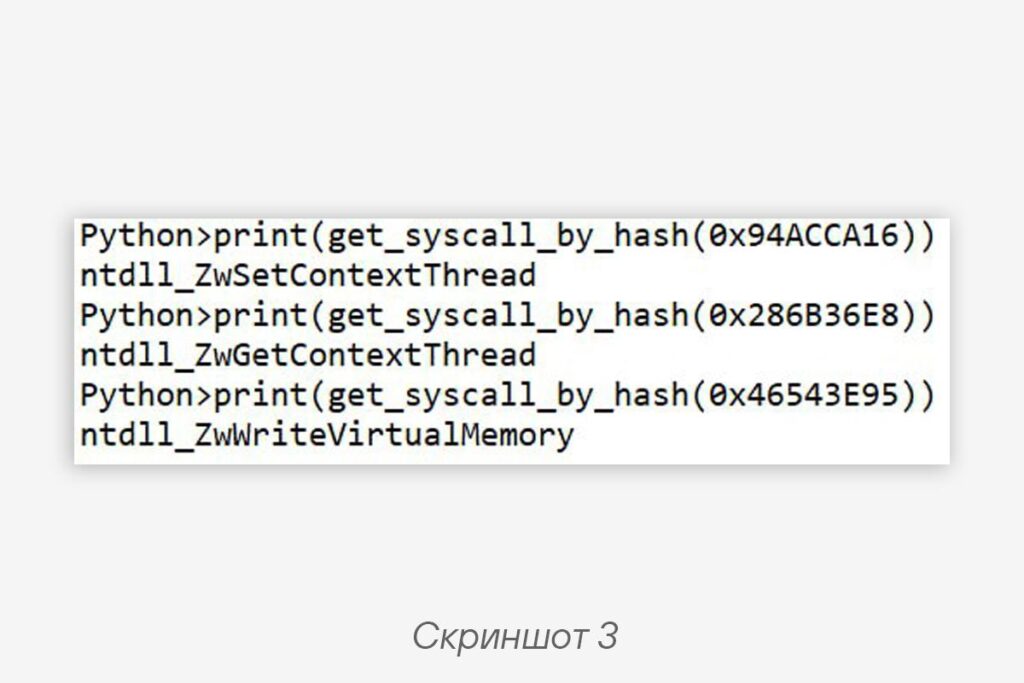
The script code implementing this logic is presented in the publication below. The main idea is that all wrapper functions over system calls are of the same type and look approximately like what is shown in screenshot 2. Before invoking the syscall instruction, the number of the required function is passed into the EAX register (the second instruction). We can take the second instruction of the wrapper function, get its operand — that will be the system call number. Then all that’s left is to compare it with what we’re looking for and output the result (screenshot 3).
😮💨 In this uncomplicated way, a reverse engineer can make their life easier when they come across malware with SysWhispers. Finally, once again (just in case), let’s say that the presented script will only work in debug mode, so if we’re talking about analyzing something malicious, it’s better to do it in a virtual machine. So it’s worth noting that IDA works with many debuggers, but in our case everything was developed and tested using WinDbg.
Script code:
import idaapi
import ida_ua
import ida_ida
import ida_name

def get_syscall_by_hash(hash: int) -> str:
    syscall_id = idaapi.Appcall.SW2_GetSyscallNumber(hash).value

    # Get function names
    dn = ida_name.get_debug_names(
            ida_ida.inf_get_min_ea(),
            ida_ida.inf_get_max_ea())

    for addr in dn:
        # Look for a function with the ntdll_Zw prefix - these are wrappers over syscalls
        if "ntdll_Zw" in dn[addr]:
            instruction_addr = addr + 3

            # Disassemble the instruction
            insn = idaapi.insn_t()
            ida_ua.create_insn(instruction_addr)
            idaapi.decode_insn(insn, instruction_addr)

            # Compare the function number with the one we're looking for
            if syscall_id == insn.ops[1].value:
                return dn[addr]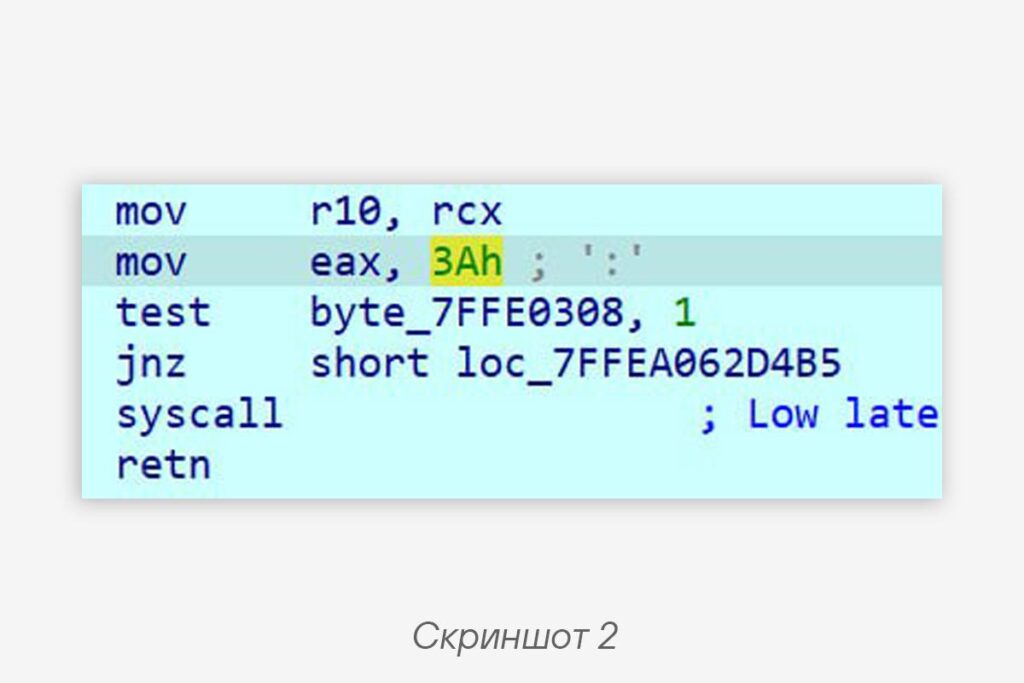
#reverse #malware #tip
@ptescalator
More from global_author
- This is Siemens...
Recently, our colleagues from the Positive Industrial Expertise Center discovered a curious Windows sample on MalwareBazaar.…
- Anti-antivirus
Recently, we came across an APK with an intriguing and trust-inspiring name: «Антивирус ФСБ.apk». After installing…
- .exe .docm .xlsm
.exe .docm .xlsm Malicious files with these extensions are most often found in corporate network traffic.…
- Chaos, shock, private keys from a not-so-private GitLab 💻
Over the past couple of months, the attacker has been distributing trojans from several npm accounts:…
- ::%16777216 — so what exactly are you?
::%16777216 — so what exactly are you? It is known that during attacks, adversaries can use…

More in Malware
- This is Siemens...
Recently, our colleagues from the Positive Industrial Expertise Center discovered a curious Windows sample on MalwareBazaar.…
- Anti-antivirus
Recently, we came across an APK with an intriguing and trust-inspiring name: «Антивирус ФСБ.apk». After installing…
- .exe .docm .xlsm
.exe .docm .xlsm Malicious files with these extensions are most often found in corporate network traffic.…
- Operation Chewbacca
At the end of June, the PT ESC team, during incident investigations, discovered a new group…
- Your Zimbra server is at risk
Recently, our PT ESC IR team encountered a new attack by ransomware groups on Zimbra mail…