
Generating COM vtable in IDA
More in Malware
- This is Siemens...
Recently, our colleagues from the Positive Industrial Expertise Center discovered a curious Windows sample on MalwareBazaar.…
- Anti-antivirus
Recently, we came across an APK with an intriguing and trust-inspiring name: «Антивирус ФСБ.apk». After installing…
- .exe .docm .xlsm
.exe .docm .xlsm Malicious files with these extensions are most often found in corporate network traffic.…
- Operation Chewbacca
At the end of June, the PT ESC team, during incident investigations, discovered a new group…
- Your Zimbra server is at risk
Recently, our PT ESC IR team encountered a new attack by ransomware groups on Zimbra mail…





While analyzing one of the Snake Keylogger variants, we needed to figure out which managed methods the native module calls through COM interfaces. This means we had to manually create a certain number of structures. And we also wanted to see the signature of each method, and there are many of them.
Let’s try to automate the process. The proposed approach may not be the only one, but it’s interesting and solves our task. Tool stack:
• OLE/COM Object Viewer (oleview)
• MIDL compiler (
midl.exe, included in Visual Studio Build Tools)• IDA
📂 Let’s use OLE/COM Object Viewer (oleview) to open
mscorlib.tlb and find the interfaces we’re interested in. The path to it:C:\Program Files (x86)\Windows Kits\10\bin\<version>\x86\oleview.exe
Code language: YAML (yaml)mscorlib.tlb contains COM descriptions of the base managed interfaces. This file is usually located in the directory:C:\Windows\Microsoft.NET\Framework\<Version>\mscorlib.tlb
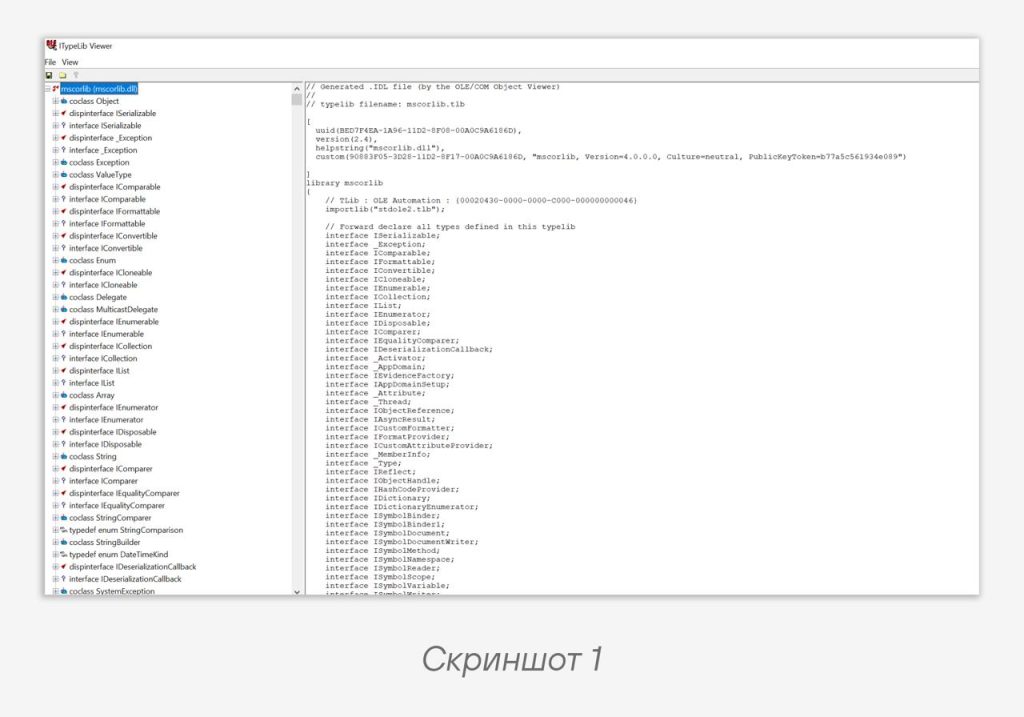
Code language: YAML (yaml)After opening the file, we see its IDL — Interface Definition Language (screenshot 1).
🫱 Next, in the oleview tree we find the interfaces we need (for example,
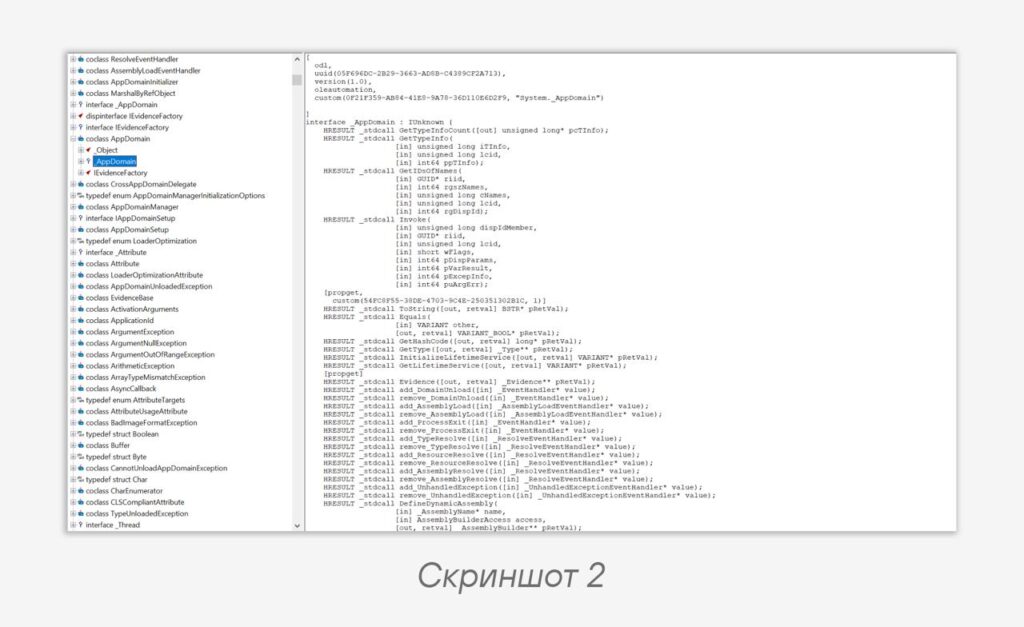
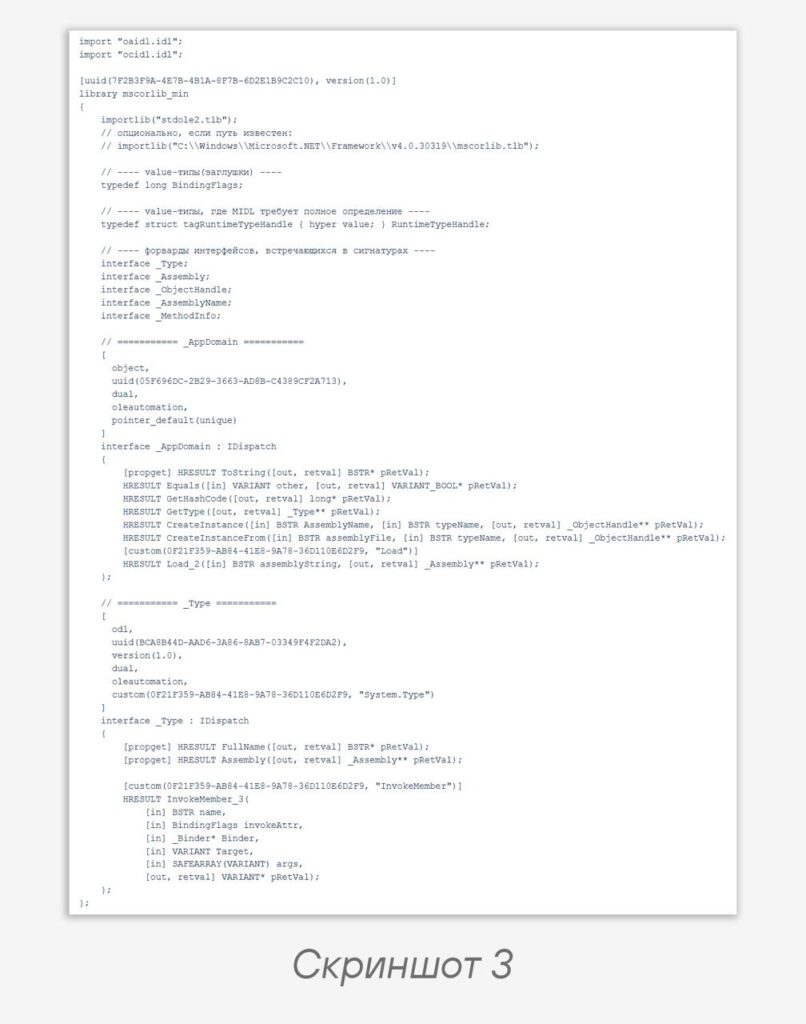
_AppDomain). We export their IDL and, following the example of the IDL for mscorlib (screenshot 1), assemble our own (screenshot 2). An example of a minimal IDL is shown in screenshot 3 (the number of methods is trimmed down).At this step, the file needs a bit of cleanup:
1️⃣ Forward-declare the interfaces, define the value types. Interfaces can be forward-declared, since a pointer to them is always the same size. But value types must be fully defined, otherwise you’ll get an unsatisfied forward declaration error. We’ll get by with stubs: that’s sufficient for method signatures.
2️⃣ Edit the function declarations.
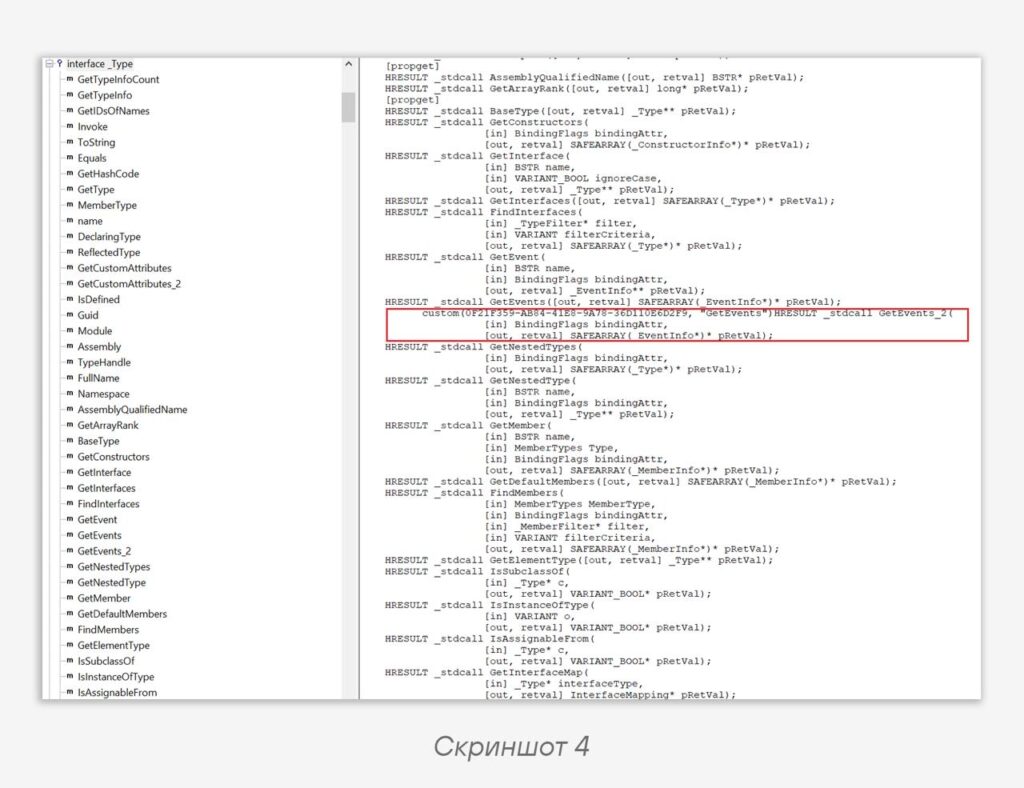
In screenshot 4 we see how the COM method
GetEvents_2 is declared. This is an overload variant of the GetEvents method. We’re interested in the custom attribute, which says that this method is an implementation of the .NET method Assembly.GetEvents, and the calling convention (_stdcall). If we leave everything as in the raw IDL, the compiler will complain because:1️⃣ In IDL you don’t write
_stdcall: it will appear in the generated .h.2️⃣ Method attributes (including
custom(…)) must only be in square brackets before the method’s return type (in our case — HRESULT).So we change the contents to the following:
[custom(0F21F359-AB84-41E8-9A78-36D110E6D2F9, "GetEvents")]
HRESULT GetEvents_2([in] BindingFlags bindingAttr, [out, retval] SAFEARRAY(_EventInfo*)* pRetVal);
Next, we use the command to build:
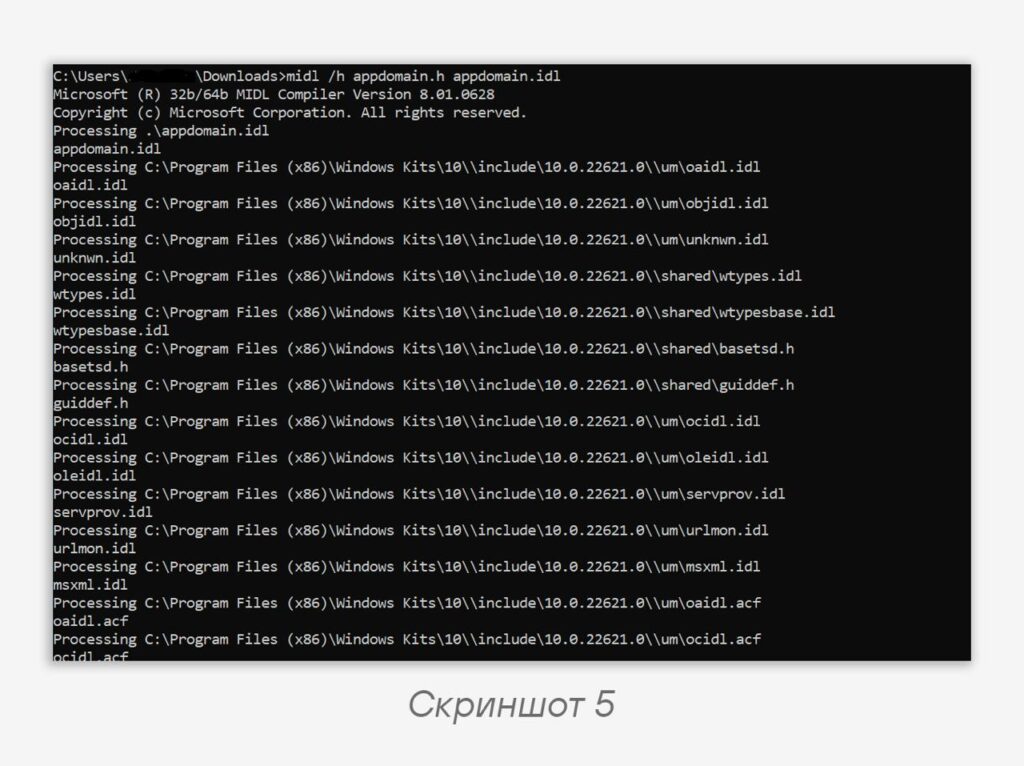
midl /h appdomain.h appdomain.idl👍 If you did everything correctly and the build succeeded, the output will look like in screenshot 5.
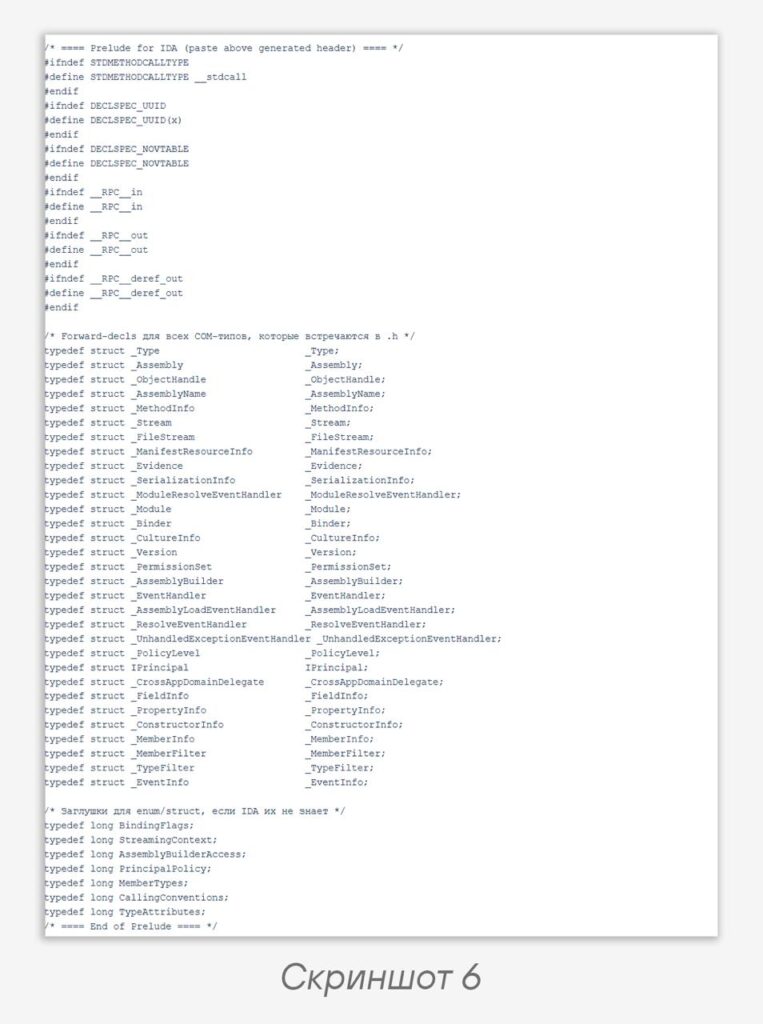
Now we have a ready-made header, which we’ll send to IDA. But first, let’s add includes to the header file (before the contents of
appdomain.h) so that IDA’s clang knows all the names and doesn’t complain about attributes or macros (screenshot 6):After that, we load the file into IDA:
File → Load file → Parse C header file…IDA uses the built-in
clang to convert C headers into IDA’s type base. Accordingly, in Options → Compiler you need to specify include paths so that clang can see the standard headers (paths to the standard Windows SDK headers). Usually it looks like this:-target x86_64-pc-win32
-x c++
-std=c++11
-I"C:\Program Files (x86)\Windows Kits\10\Include\<version>\ucrt"
-I"C:\Program Files (x86)\Windows Kits\10\Include\<version>\um"
-I"C:\Program Files (x86)\Windows Kits\10\Include\<version>\shared"
-I"C:\Program Files (x86)\Windows Kits\10\Include\<version>\winrt"
-I"C:\Program Files (x86)\Windows Kits\10\Include\<version>\cppwinrt"
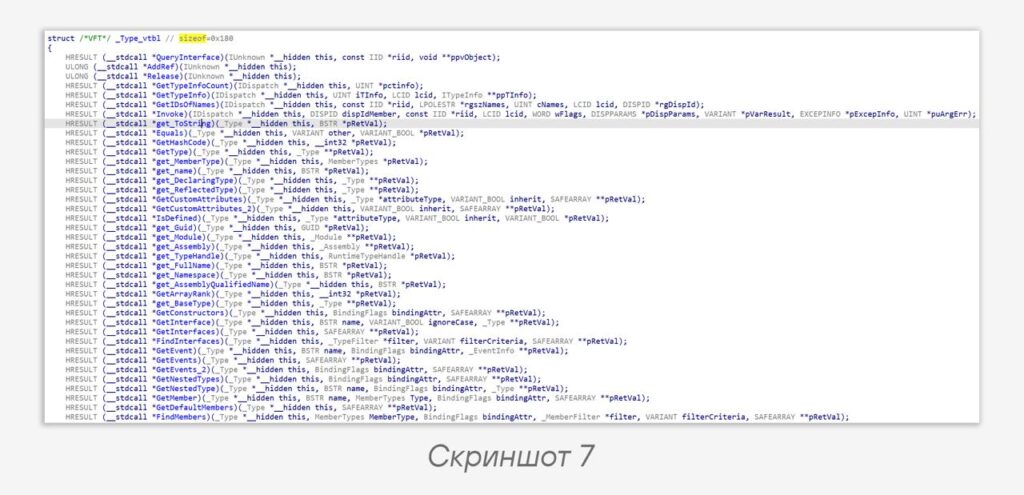
Code language: plaintext (plaintext)After that, the methods
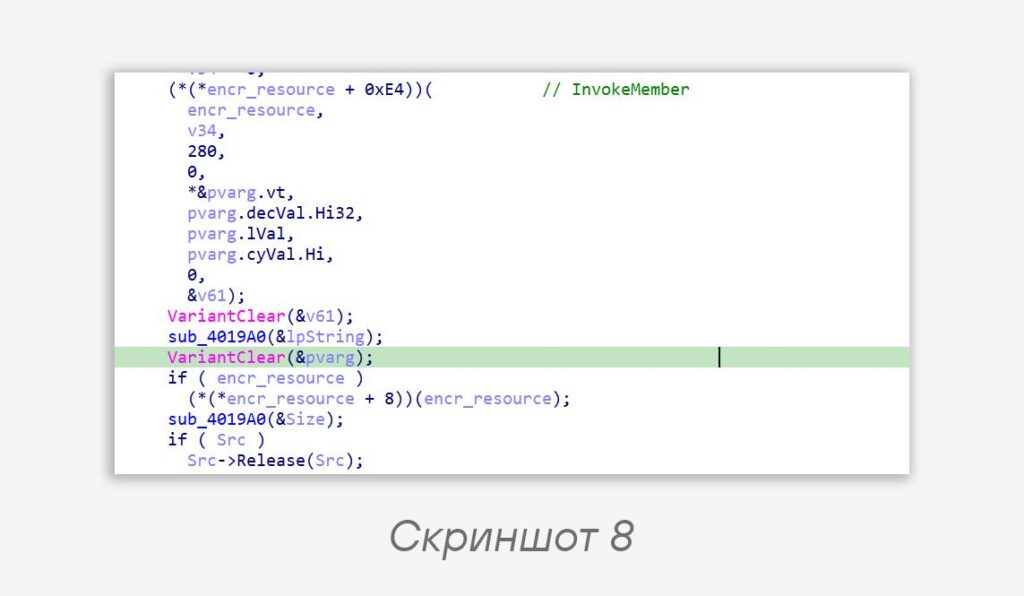
_AppDomain, _Type, and others will appear in Local Types (screenshot 7).👀 In screenshot 8 we see calls to two methods of the
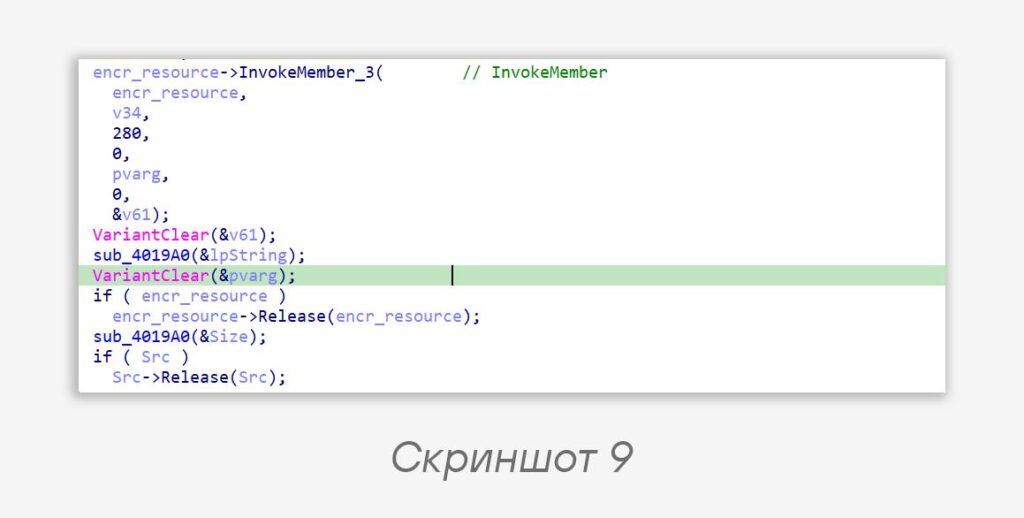
_Type interface. We make encr_resource a pointer to the _Type structure (whose vtable we saw in screenshot 7) and understand which methods are being called (screenshot 9). All the arguments collapsed under the correct signature, which we don’t need to write out manually.
#tip #malware #reverse
@ptescalator
More from global_author
- This is Siemens...
Recently, our colleagues from the Positive Industrial Expertise Center discovered a curious Windows sample on MalwareBazaar.…
- Anti-antivirus
Recently, we came across an APK with an intriguing and trust-inspiring name: «Антивирус ФСБ.apk». After installing…
- .exe .docm .xlsm
.exe .docm .xlsm Malicious files with these extensions are most often found in corporate network traffic.…
- Chaos, shock, private keys from a not-so-private GitLab 💻
Over the past couple of months, the attacker has been distributing trojans from several npm accounts:…
- ::%16777216 — so what exactly are you?
::%16777216 — so what exactly are you? It is known that during attacks, adversaries can use…

More in Malware
- This is Siemens...
Recently, our colleagues from the Positive Industrial Expertise Center discovered a curious Windows sample on MalwareBazaar.…
- Anti-antivirus
Recently, we came across an APK with an intriguing and trust-inspiring name: «Антивирус ФСБ.apk». After installing…
- .exe .docm .xlsm
.exe .docm .xlsm Malicious files with these extensions are most often found in corporate network traffic.…
- Operation Chewbacca
At the end of June, the PT ESC team, during incident investigations, discovered a new group…
- Your Zimbra server is at risk
Recently, our PT ESC IR team encountered a new attack by ransomware groups on Zimbra mail…