
How long have you been reverse engineering JavaScript?
More in Phishing & sandbox
- ⚡Fake news — THAT'S ALL
⚡Fake news — B U L L S H I T PT ESC specialists discovered an…
- PT ESC cyber intelligence group presented an overview of cyberattacks for Q2 2026 ✍️
PT ESC Cyber Intelligence Group presented an overview of cyberattacks for Q2 2026 ✍️ The report…
- Citizen, update yourself 🫵
Citizen, update yourself 🫵 Recently, a sample mir-pay.apk flew into our sandbox. At first glance, nothing…
- NetMedved: summer campaign against Russian organizations
NetMedved: Summer Campaign Against Russian Organizations 🐻👍 The PT ESC cyber intelligence group has recorded a…
- AI-95 with a malicious additive ⛽️
AI-95 with a malicious additive ⛽️ In mid-June, the Threat Intelligence team discovered several resources at…




How long has it been since you reversed JavaScript? 😲
Continuing the phishing theme (we previously looked at targeted suspicious documents leading to initial access or NTLM hash collection), we want to show examples of recent attacks targeting the mass user accustomed to using products from the well-known Microsoft company.
Let’s look at how threat actors generate fake HTML pages mimicking authentication credential input forms, from the perspective of JavaScript code and the obfuscation techniques used, and even find some interesting Easter eggs from the phishers.
1️⃣ First example
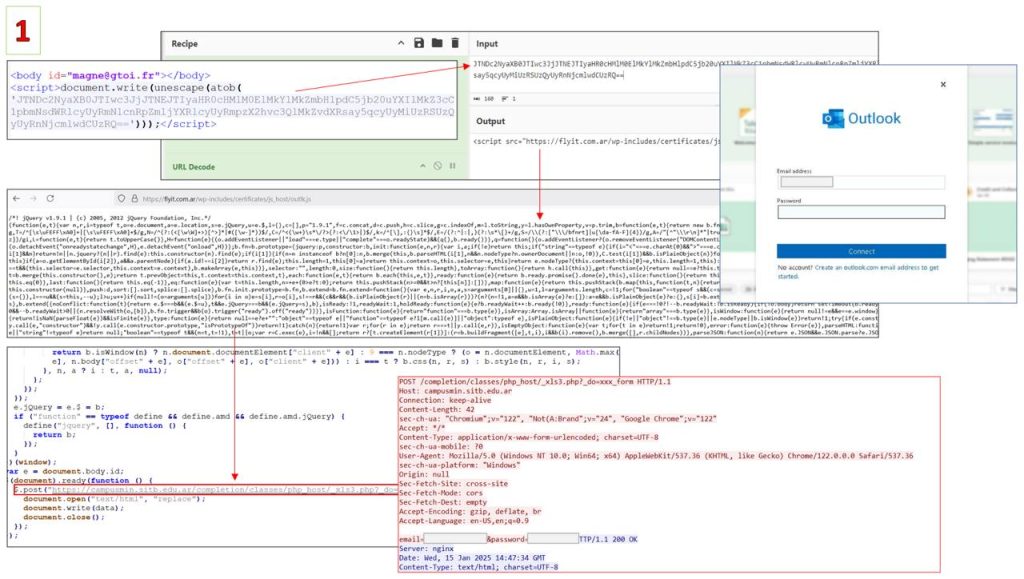
The most primitive example from today’s collection is the use of the following construct:
document.write(unescape(atob(Inside it is embedded an externally loaded script flyit.com.ar/wp-includes/certificates/js_host/outlk.js, which contains a jQuery library and additional code that sends the user’s credentials to campusmin.sitb.edu.ar/completion/classes/php_host/_xls3.php?_do=xxx_form.
A quick educational moment: the atob function allows decoding a base64 string, and document.write writes the content of its argument into the DOM of the active page, replacing its current content. In this case, the obfuscation is minimal — mostly just compression (minification) is used.
2️⃣ Second example
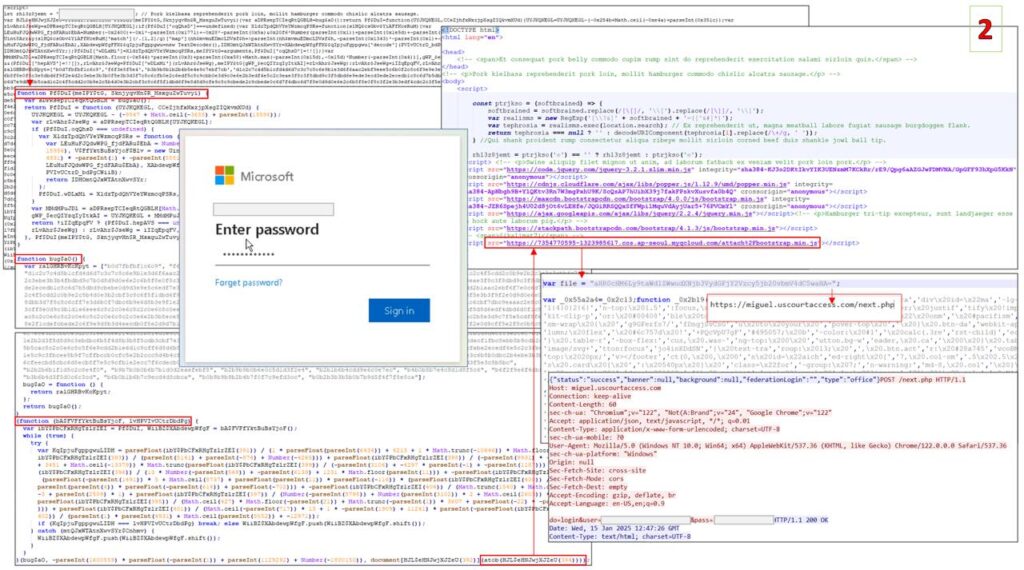
This is a more interesting example, as it contains a lot of obfuscated code. The HTML page delivered to the user contains only an obfuscated script that executes on the browser side.
Free deobfuscators can’t handle the code transformation, so we resort to manual JavaScript reversing: the dedicated functions used, the atob and document.write methods form a web page that subsequently loads a script from 7354770595-1323985617.cos.ap-seoul.myqcloud.com/attach%2Fbootstrap.min.js (obfuscated using the free service obfuscator.io), which is where the user’s credentials are actually collected. Then the login and password are sent to the threat actors’ C2 — miguel.uscourtaccess.com/next.php.
Can you spot the Easter eggs in the screenshot? 😏
3️⃣ Third example
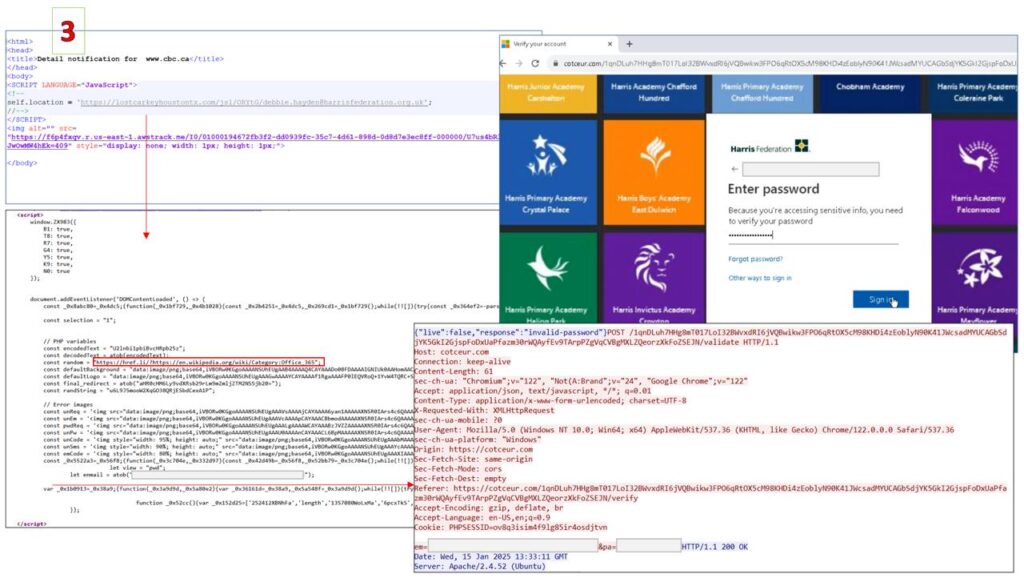
In the third case, a phishing kit called WikiKit is used to generate a fake page that is a branded version of the standard authentication credential input form. It got its name from redirecting to Wikipedia when JavaScript is disabled in the browser or the phishing link is invalid. This script blocks the use of debugging tools (although bypassing them is generally not difficult), and the collected data is sent to cotceur.com.
What are our recommendations? 🧐
Besides “don’t open files from suspicious emails,” which seems irrelevant for this channel (we’re the opposite — we’re interested in opening them), here are a number of simple but important points that are definitely worth paying attention to when analyzing web pages:
• on the Network tab of the browser, check the origin of additionally loaded resources — after all, jQuery is better obtained from the legitimate jQuery domain or a known CDN.
• the use of the atob function (base64 decoding), and with
aHR0cHM6
aHR0cDo
inside it (the decoding result is https: or http:) — a truly terrifying mix! And if you add document.write (adding content to an HTML document) and unescape (a deprecated method for decoding URIs) to that — it’s definitely a red flag 🚩
• anti-debugging is, of course, used for legitimate purposes, but very rarely: it’s worth thinking twice if you encounter it (these techniques, by the way, can be bypassed quite easily — for example, in the case of the third phishing page, instead of using hotkeys like F12 or Ctrl+Shift+i, manually open the tools in the settings or capture the traffic).
💡 We’d like to note that you shouldn’t see suspiciousness everywhere — for example, code compression and popular types of obfuscation are often used in legitimate projects! Decided to analyze some JS code yourself just for fun and saw a strange POST request? Let’s hope you entered a fake password 🤞🏻
Happy hunting!
#hunt #network #phishing
@ptescalator
More from global_author
- This is Siemens...
Recently, our colleagues from the Positive Industrial Expertise Center discovered a curious Windows sample on MalwareBazaar.…
- Anti-antivirus
Recently, we came across an APK with an intriguing and trust-inspiring name: «Антивирус ФСБ.apk». After installing…
- .exe .docm .xlsm
.exe .docm .xlsm Malicious files with these extensions are most often found in corporate network traffic.…
- Chaos, shock, private keys from a not-so-private GitLab 💻
Over the past couple of months, the attacker has been distributing trojans from several npm accounts:…
- ::%16777216 — so what exactly are you?
::%16777216 — so what exactly are you? It is known that during attacks, adversaries can use…




More in Phishing & sandbox
- ⚡Fake news — THAT'S ALL
⚡Fake news — B U L L S H I T PT ESC specialists discovered an…
- PT ESC cyber intelligence group presented an overview of cyberattacks for Q2 2026 ✍️
PT ESC Cyber Intelligence Group presented an overview of cyberattacks for Q2 2026 ✍️ The report…
- Citizen, update yourself 🫵
Citizen, update yourself 🫵 Recently, a sample mir-pay.apk flew into our sandbox. At first glance, nothing…
- NetMedved: summer campaign against Russian organizations
NetMedved: Summer Campaign Against Russian Organizations 🐻👍 The PT ESC cyber intelligence group has recorded a…
- AI-95 with a malicious additive ⛽️
AI-95 with a malicious additive ⛽️ In mid-June, the Threat Intelligence team discovered several resources at…