
PDQ-Masters
More in Malware
- This is Siemens...
Recently, our colleagues from the Positive Industrial Expertise Center discovered a curious Windows sample on MalwareBazaar.…
- Anti-antivirus
Recently, we came across an APK with an intriguing and trust-inspiring name: «Антивирус ФСБ.apk». After installing…
- .exe .docm .xlsm
.exe .docm .xlsm Malicious files with these extensions are most often found in corporate network traffic.…
- Operation Chewbacca
At the end of June, the PT ESC team, during incident investigations, discovered a new group…
- Your Zimbra server is at risk
Recently, our PT ESC IR team encountered a new attack by ransomware groups on Zimbra mail…





PDQ-Masters 🧙♂️
The main attack vector using malware is phishing campaigns via email. The ideal phishing email with malware differs from a legitimate email only in the content of the attached payload: it is sent from a trusted sender as a result of their compromise and contains malware. But today, as an example, let’s look at a phishing attack with a slight attempt at personalization for the target, which bypassed basic protection tools and was stopped on the approach to the employee’s mailbox by more advanced email protection technologies.
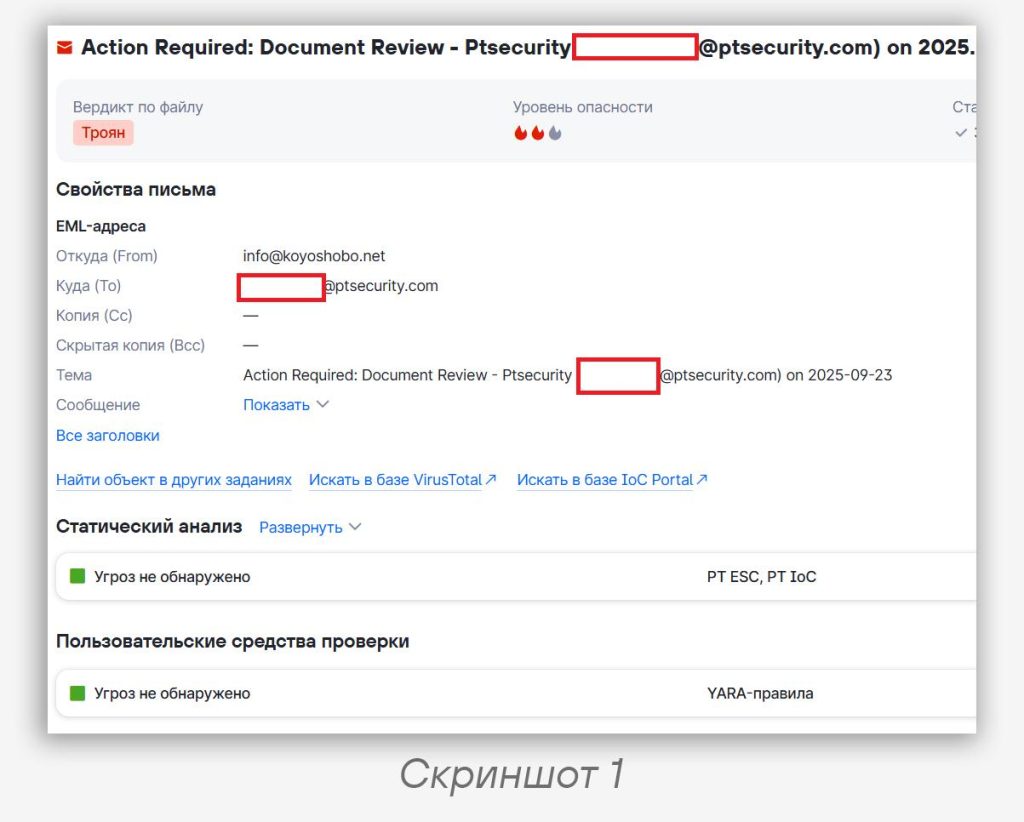
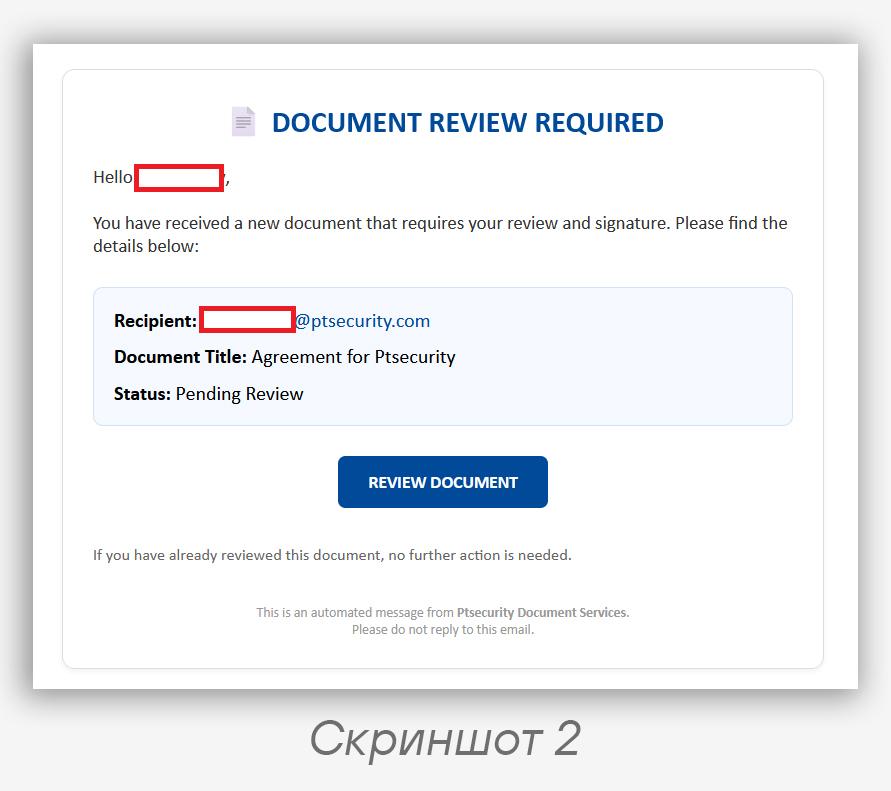
An email from an anonymous sender from a legitimate domain — info@koyoshobo.net, with an obvious attempt to attract attention (subject: “Action Required: Document Review…”, screenshot 1). The content is HTML disguised as an electronic document management system form with a button to navigate to the document (screenshot 2). A link to the “document” behind this button was statically extracted from the page:
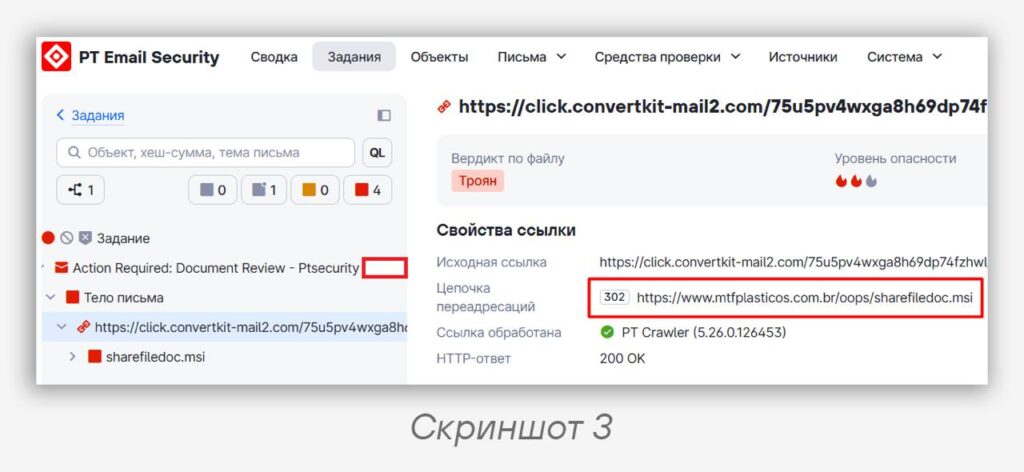
https://click.convertkit-mail2.com/75u5pv4wxga8h69dp74fzhwl85666tnhrg6p3/m2h7h5h38zwp97cm/aHR0cHM6Ly93d3cubXRmcGxhc3RpY29zLmNvbS5ici9vb3BzL3NoYXJlZmlsZWRvYy5tc2k
At the time of the attack, the link was new and was not blocked by reputation analysis. It was automatically launched in an isolated browser environment, which allowed obtaining all redirects (screenshot 3) and arriving at the final link to the “document” — https://www.mtfplasticos.com.br/oops/sharefiledoc.msi, downloading for inspection the file 04276b7f1cf487e52f8927134365ae55, which is obviously an executable.
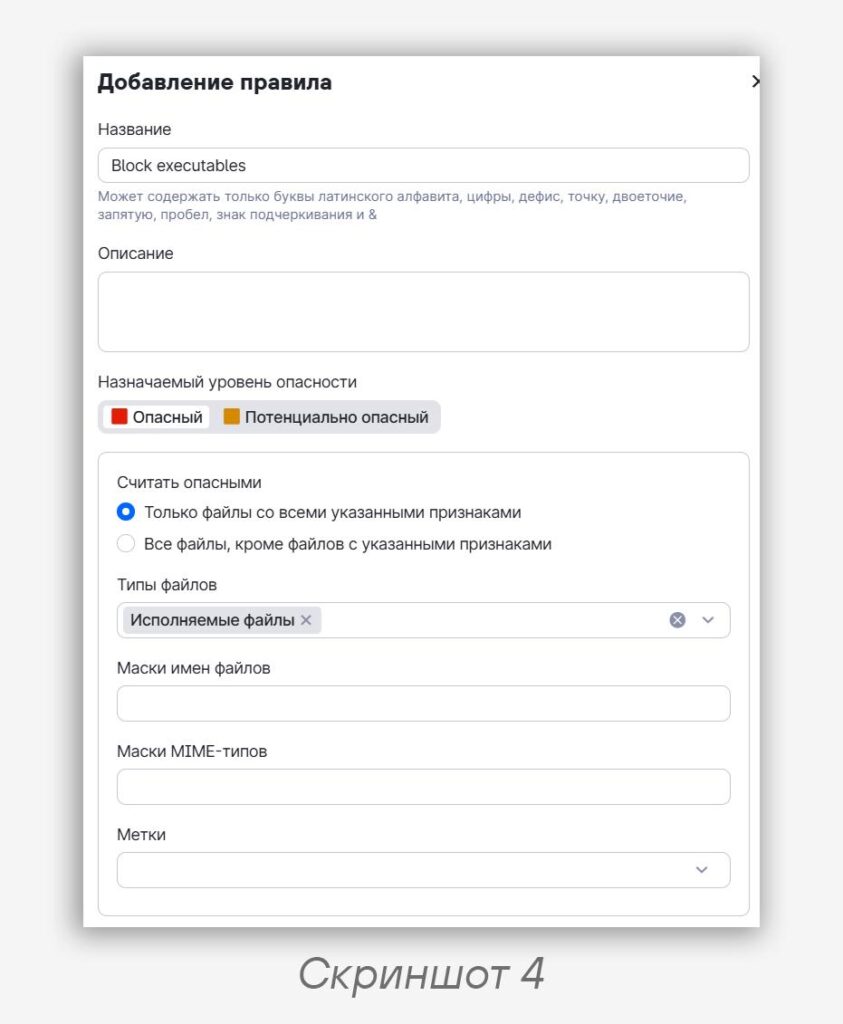
💁♂️ We could stop here — executable files in email can be easily blocked (the main thing is to make sure that your protection tool blocks by file format, not solely by extension), for example, as shown in screenshot 4 in the case of PT Sandbox. But if you need a flexible configuration that allows exchanging various files and links to them via email, it is always important to understand what exactly a file represents. For this purpose, basic protection tools provide antivirus scanning, while advanced ones provide sandbox file analysis, which enables detecting the most sophisticated threats and new malware that has not yet appeared in antivirus databases.
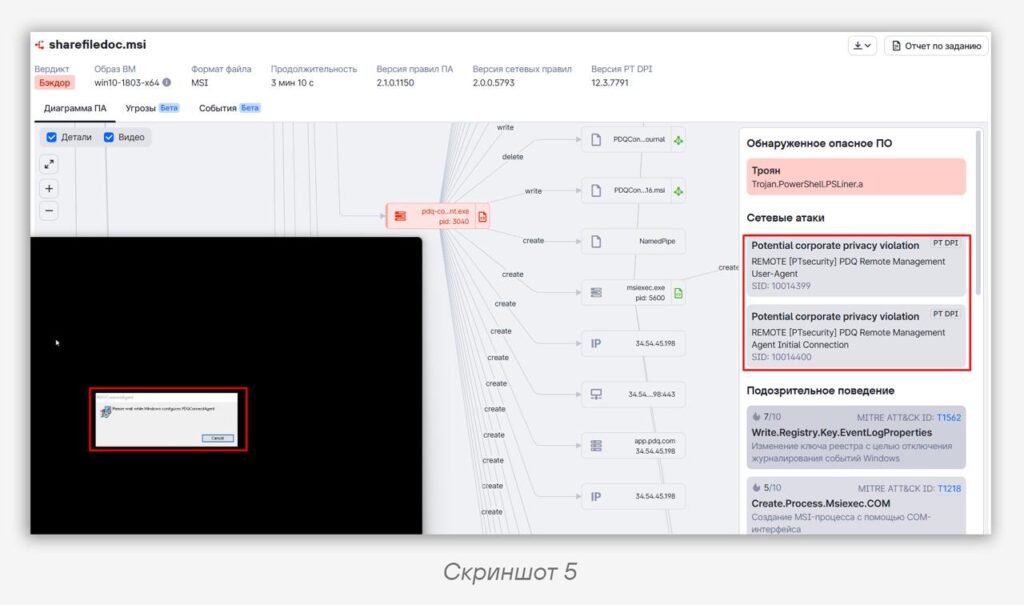
The sandbox immediately revealed the behavior and network nature of the sample (screenshot 5) and blocked it for dangerous tricks in PowerShell — inside turned out to be the PDQ Connect utility. “And what’s malicious about that?!” — you ask. And we answer — remote access utilities unauthorized by the information security policy are themselves prohibited 🙅♂️
But here it’s a bit more complicated — the original MSI file is not just a generalized PDQ Connect software installer, it is a “silent” installer of the PDQ Connect Agent, which is generated individually for a user, with a unique token, and is deployed within an organization’s infrastructure. If an attacker generates such an installer and installs it on someone without their knowledge, this utility turns into a veritable backdoor. Analysis in the sandbox allowed automatically obtaining the agent token — 0yfer-ks1g2uufaxwpfam81pmasj9bk5e-q7btltzsrkhvz4xxyoonu8cb7kokkd7fc6esztcx1uqccmabxn3w.
Thus, the attacker could gain the ability to control the victim’s computer through the legitimate remote access service pdq.com.
🔍 Characteristic YARA strings that will help you find artifacts from such “agents” in your systems:
strings:
        $a  = "pdqconnectagent-setup" ascii wide
        $s1 = "PDQ.com" fullword wide
        $s2 = "CustomActions.StartService" wide
        $s3 = "CustomActions.WriteToken" wide
        $s4 = "CustomActions.DeleteEvent" wide
        $s5 = "CustomActions.CreateEventSource" wide
        $s6 = "CustomActions.CleanData" wide
    condition:
        (uint16(0) == 0x5a4d or (uint32be(0) == 0xd0cf11e0 and uint32be(4) == 0xa1b11ae1))
        and $a
        and 3 of ($s*)
Don’t forget to monitor the configuration of your protection tools: they should block when possible, not just notify about threats. It is always easier to defend yourself if you limit the attack surface — the possible types of files and links that can be exchanged via email.
#phishing #malware #emailsecurity #sandbox #avlab
@ptescalator
More from global_author
- This is Siemens...
Recently, our colleagues from the Positive Industrial Expertise Center discovered a curious Windows sample on MalwareBazaar.…
- Anti-antivirus
Recently, we came across an APK with an intriguing and trust-inspiring name: «Антивирус ФСБ.apk». After installing…
- .exe .docm .xlsm
.exe .docm .xlsm Malicious files with these extensions are most often found in corporate network traffic.…
- Chaos, shock, private keys from a not-so-private GitLab 💻
Over the past couple of months, the attacker has been distributing trojans from several npm accounts:…
- ::%16777216 — so what exactly are you?
::%16777216 — so what exactly are you? It is known that during attacks, adversaries can use…

More in Malware
- This is Siemens...
Recently, our colleagues from the Positive Industrial Expertise Center discovered a curious Windows sample on MalwareBazaar.…
- Anti-antivirus
Recently, we came across an APK with an intriguing and trust-inspiring name: «Антивирус ФСБ.apk». After installing…
- .exe .docm .xlsm
.exe .docm .xlsm Malicious files with these extensions are most often found in corporate network traffic.…
- Operation Chewbacca
At the end of June, the PT ESC team, during incident investigations, discovered a new group…
- Your Zimbra server is at risk
Recently, our PT ESC IR team encountered a new attack by ransomware groups on Zimbra mail…