
Rapid decryption of data from an NSIS script
More in General
- Operation Chewbacca
At the end of June, the PT ESC team, during incident investigations, discovered a new group…
- Ding, ding — who's there?
Ding, ding — who's there? 🔔 The cyber intelligence group of Positive Technologies' expert security center…
- Enterprise-grade validation system with schema support
Enterprise-grade validation system with schema support (c) The author of a dozen trojans who forgot to…
- One less feathered thief — plus one hundred rating points!
One less feathered thief — plus one hundred rating points! 😵 The Threat Intelligence team at…
- DragonDoll: a matryoshka in the world of Android spies
DragonDoll: a matryoshka in the world of Android spies 🪆 At the beginning of this spring,…




Rapid decryption of data from an NSIS script 🗄
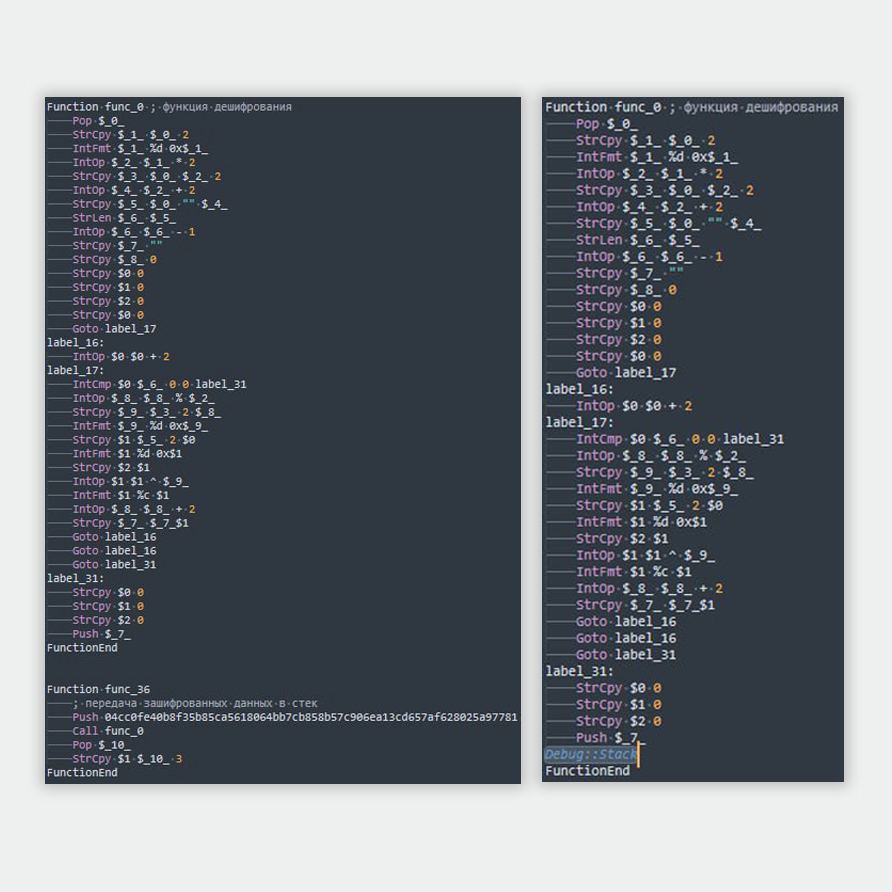
When there’s no time to identify the encryption algorithm and implement a decryption algorithm, a debugger comes to the rescue. But what about a scripting language for an installer?
The XDigo loader is taken as an example
• First, let’s extract the script with the .nsi extension. We’ll use a special version of 7-Zip.
• After that, we need a compiler for .nsi scripts — let’s download and install NSIS. Let’s open the compiler and load the extracted script into it. The program’s basic capabilities are limited: it only allows you to compile the script into an executable file and run it.
• In order to extend the compiler’s functionality, we’ll need the Debug Plug-In. Its set of functions is not very extensive, but it’s more than enough to dynamically decrypt data.
• After installing the plugin, let’s open the original malicious script and, at the end of the decryption function, after the operation that passes the decrypted data to the stack, add the following line:
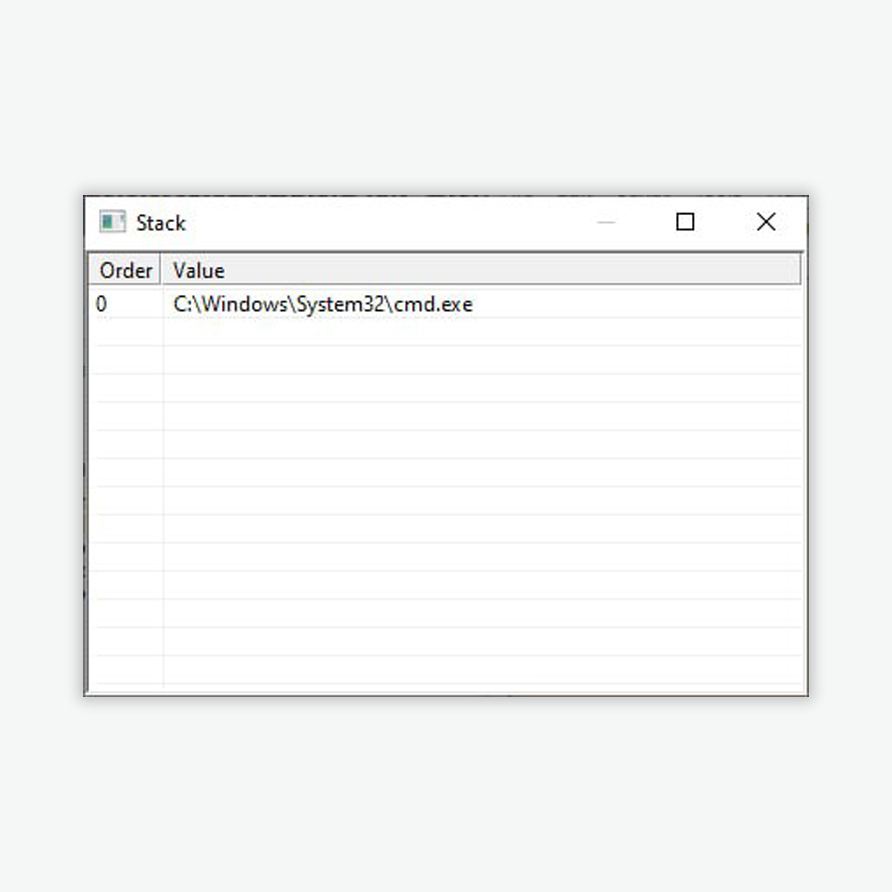
Debug::StackCode language: YAML (yaml)• As a result of recompiling the script and doing a test run of the executable file, each time after the decryption function executes, a separate window will display the state of the stack at the moment the Debug::Stack line is executed, and the decrypted data will be found in that data.
#reverse #tips #malware #XDigo #TI
@ptescalator
More from ti_author
- Ding, ding — who's there?
Ding, ding — who's there? 🔔 The cyber intelligence group of Positive Technologies' expert security center…
- Enterprise-grade validation system with schema support
Enterprise-grade validation system with schema support (c) The author of a dozen trojans who forgot to…
- One less feathered thief — plus one hundred rating points!
One less feathered thief — plus one hundred rating points! 😵 The Threat Intelligence team at…
- DragonDoll: a matryoshka in the world of Android spies
DragonDoll: a matryoshka in the world of Android spies 🪆 At the beginning of this spring,…
- ⚡Fake news — THAT'S ALL
⚡Fake news — B U L L S H I T PT ESC specialists discovered an…
More in General
- Operation Chewbacca
At the end of June, the PT ESC team, during incident investigations, discovered a new group…
- Ding, ding — who's there?
Ding, ding — who's there? 🔔 The cyber intelligence group of Positive Technologies' expert security center…
- Enterprise-grade validation system with schema support
Enterprise-grade validation system with schema support (c) The author of a dozen trojans who forgot to…
- One less feathered thief — plus one hundred rating points!
One less feathered thief — plus one hundred rating points! 😵 The Threat Intelligence team at…
- DragonDoll: a matryoshka in the world of Android spies
DragonDoll: a matryoshka in the world of Android spies 🪆 At the beginning of this spring,…