
Recognize STL code easily
More in Reverse engineering
- Why IDA doesn't fold constants and how to fix it
Why IDA doesn't fold constants and how to fix it 👨💻 Recently, obfuscation has been increasingly…
- Again CFG
CFG again 👋 A common task when extracting malware configurations at scale is obtaining function boundaries…
- Deobfuscating .NET function names manually
Deobfuscating .NET function names manually 🙌 .NET malware loves packers, obfuscation (of names, CFG, and other…
- Idea for a correlation rule in SIEM
Idea for a SIEM correlation rule 💡 Although tracking the entire attack chain described in the…
- We continue reproducing the attack from the post above 🔼
Continuing to reproduce the attack from the post above 🔼 3️⃣ Creating a public API Gateway…


During reverse engineering, we often encounter STL code whose analysis at first glance seems difficult. An inexperienced eye may mistake this code for something useful and waste time analyzing some constructor.
In fact, what matters here is taking the time to recognize an STL container by indirect signs, quickly understand where which data lies, type it, and move on. In a new series of posts, we’ll cover the most common STL containers and start with
std::vector.Pattern 1️⃣: three consecutive reads/writes of pointers
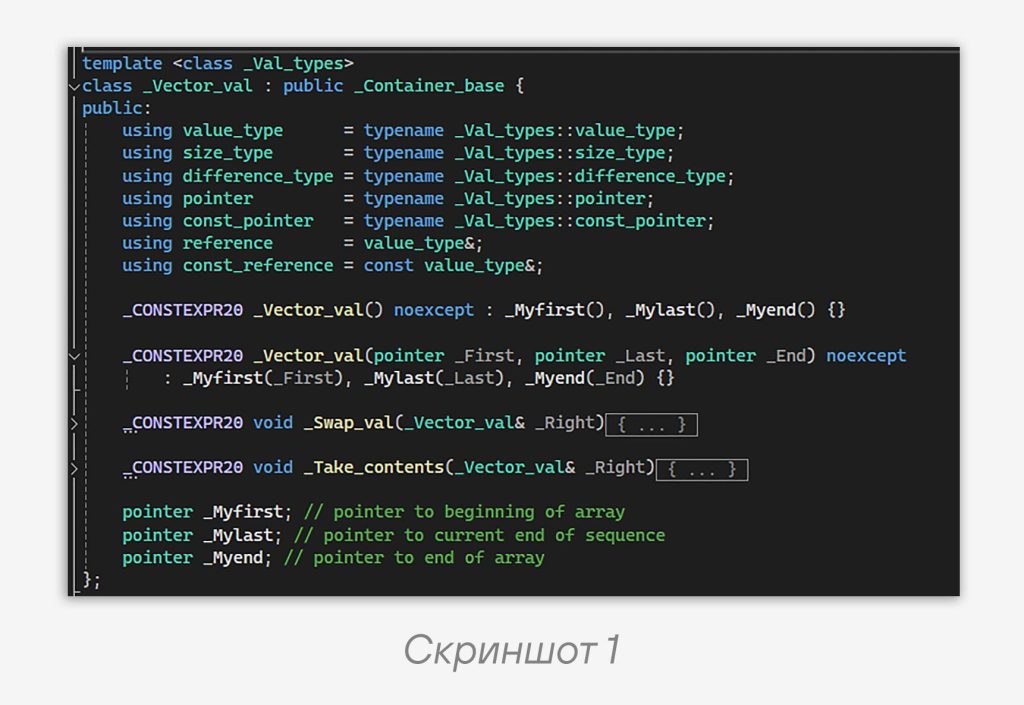
std::vector is one of the simplest containers. It occupies 24 bytes in memory in 64-bit builds. If we open the source code of std::vector in MSVC STL, we’ll see the class _Vector_val (screenshot 1), which stores exactly three pointers — the beginning (_Myfirst) and the end of the data (_Mylast), as well as the end of the allocated memory (_Myend).It is precisely this trio that defines the vector’s memory layout. The compiler places them sequentially in memory (offsets 0, 8, 16 bytes in 64-bit code). Therefore, in assembly we will always see accesses at these offsets — this is our main reference point.
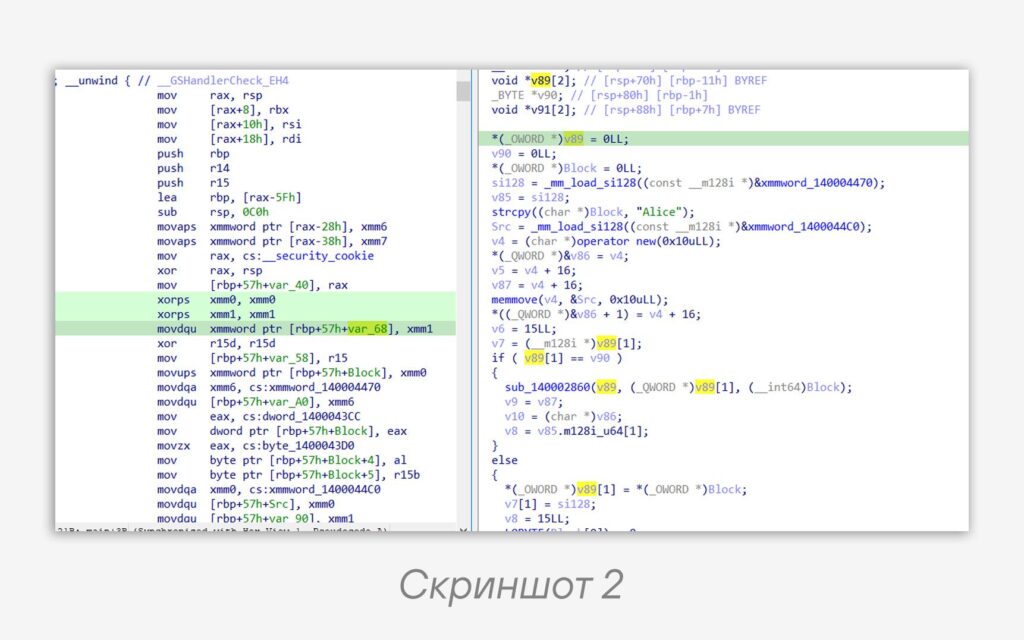
Let’s immediately look at a simple example in screenshot 2. Without having the source, it’s clear that the overall picture looks messy. On the left in the assembly code we see a chunk of code:
xorps xmm1, xmm1 ; и xmm1
movdqu xmmword ptr [rbp+57h+var_68], xmm1 ; записываем 16 нулевых байт по адресу var_68
xor r15d, r15d ; обнуляем r15d
mov [rbp+57h+var_58], r15 ; записываем 8 нулевых байт по адресу var_58Code language: Intel x86 Assembly (x86asm)
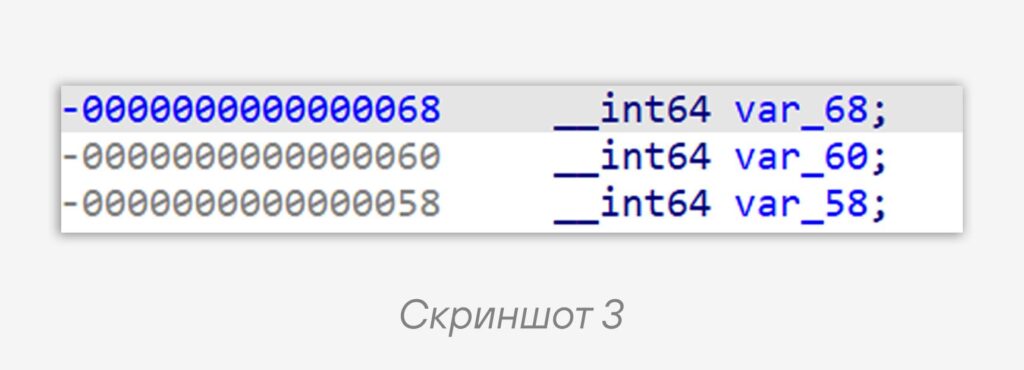
The compiler accesses the vector’s members as offsets relative to a base address. The base address here is in the local variable var_68. The first 16 bytes are zeroed out: at offset
var_68 lies _Myfirst, at offset var_60 — _Mylast. Then _Myend, which is located at offset var_58, is zeroed out.Thus, we see the initialization of an empty vector, performed instead of calling the default constructor. We check the vector’s size — 16 + 8 = 24 bytes. In screenshot 3 you can see what the vector looks like on the stack.
This makes our task easier. For now we assume that we’re working with a vector, but there’s still a chance that we might want to reverse
sub_140002860. Let’s look at the second pattern, come to our senses, and not do that.Pattern 2️⃣:
push_back and checking whether the vector is fullIn C++, the vector’s
push_back() is a built-in method used to add a new element to the end of the vector. It automatically resizes the vector if there isn’t enough space to place the new element. It’s worth noting that this is not the only or the primary way to fill a vector, but in this post we’ll consider it as a specific operation in which the main pattern manifests itself.Usually, if this method is used, the implementation in pseudocode will look something like this:
if (_Mylast == _Myend)
  push_back_func();
else
  construct(_Mylast, value);
  ++_Mylast;Code language: plaintext (plaintext)
The code checks whether there is room for a new element in the vector. If not, then it is allocated and the element will be added to the end of the vector. If there is, the value is added at the address currently pointed to by
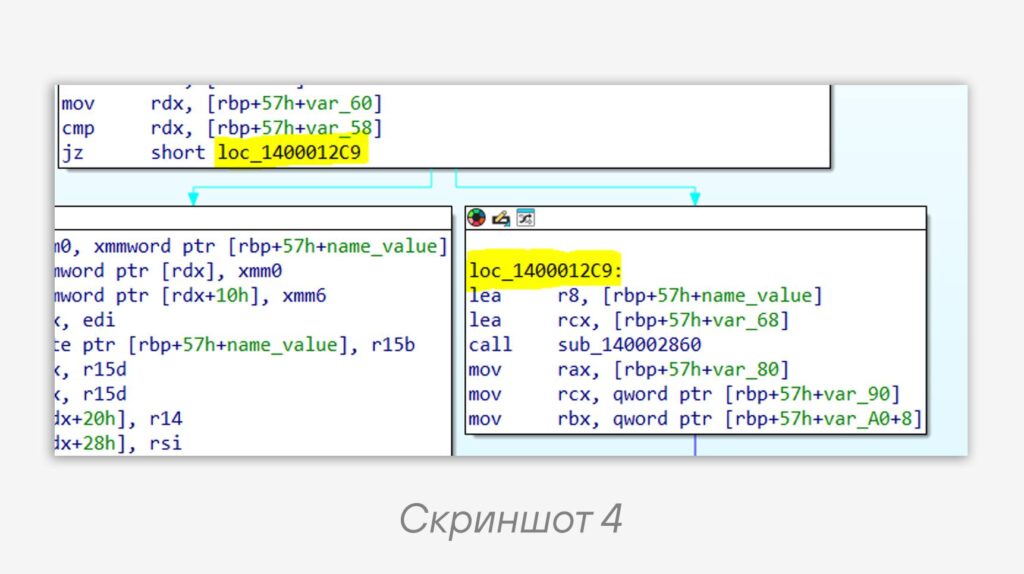
_Mylast. Let’s look at our example in screenshot 4.👀 We see that the pattern is visible. There is a comparison of the pointers
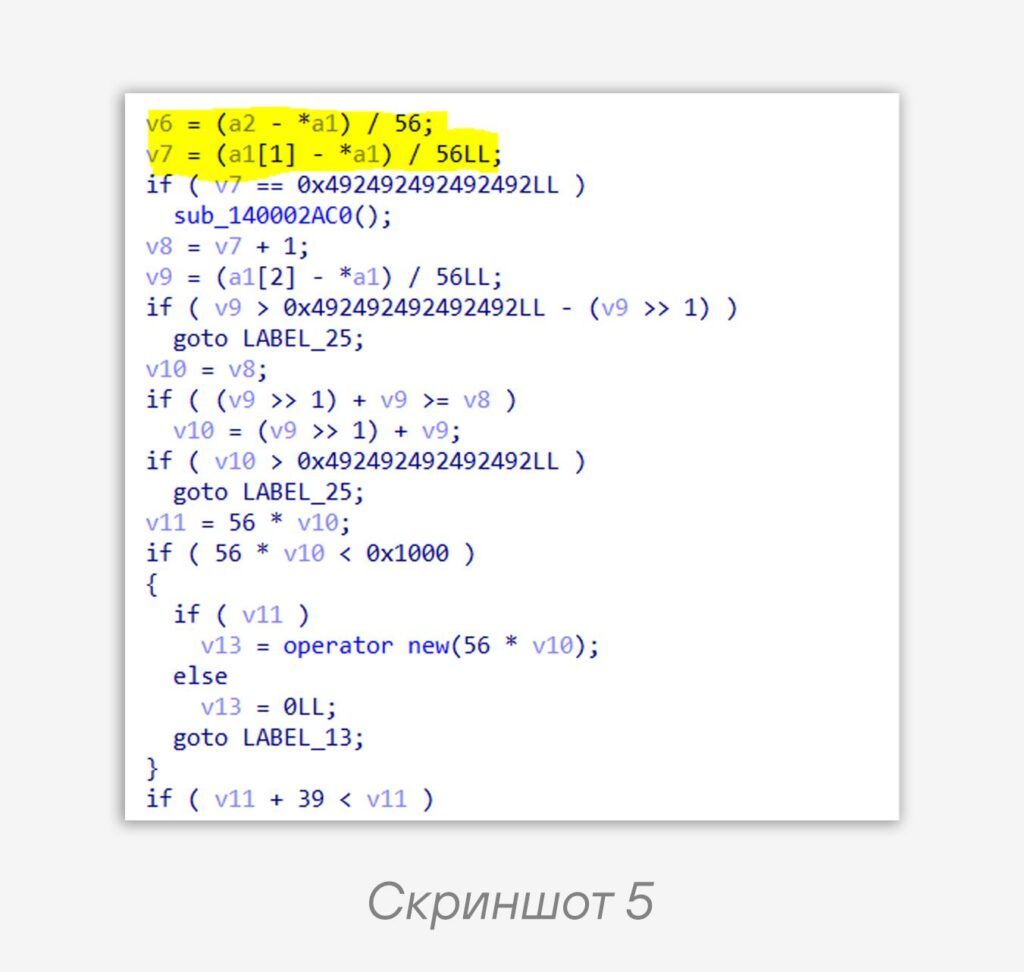
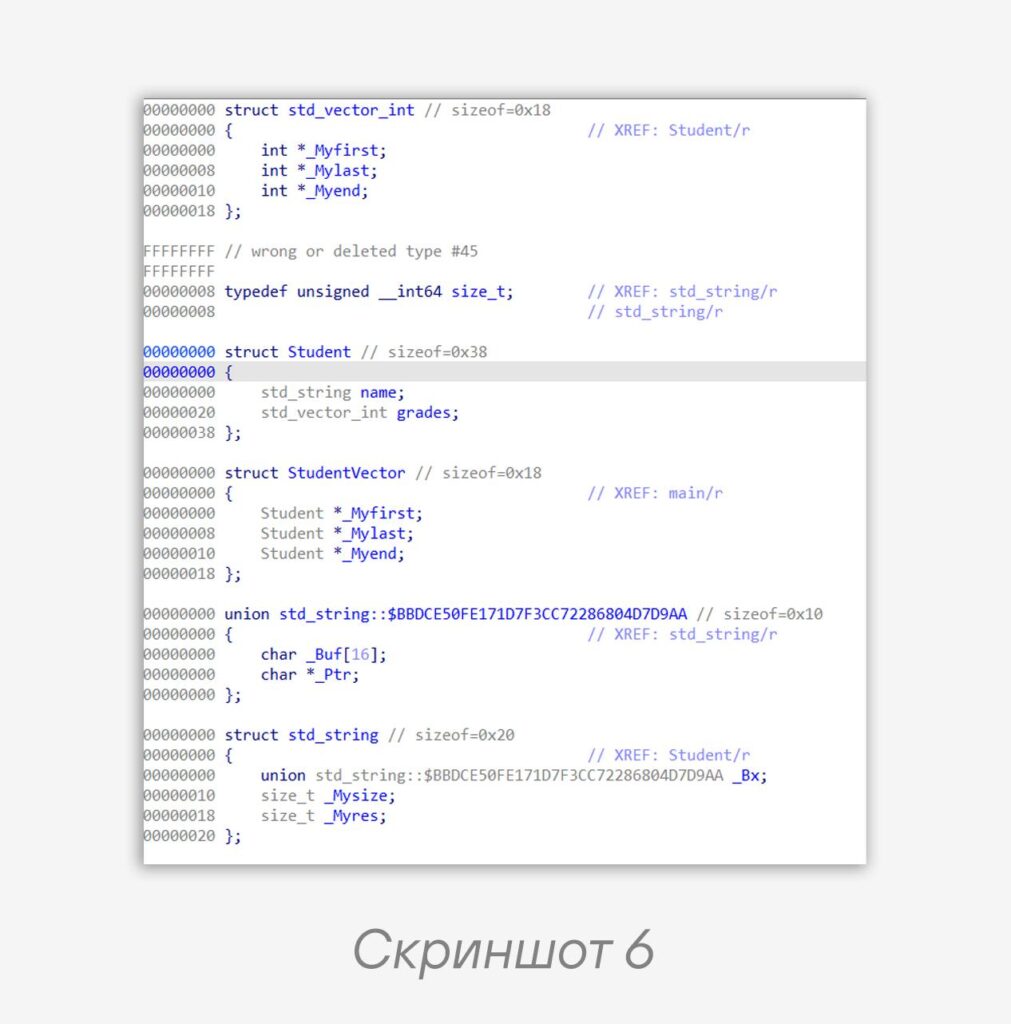
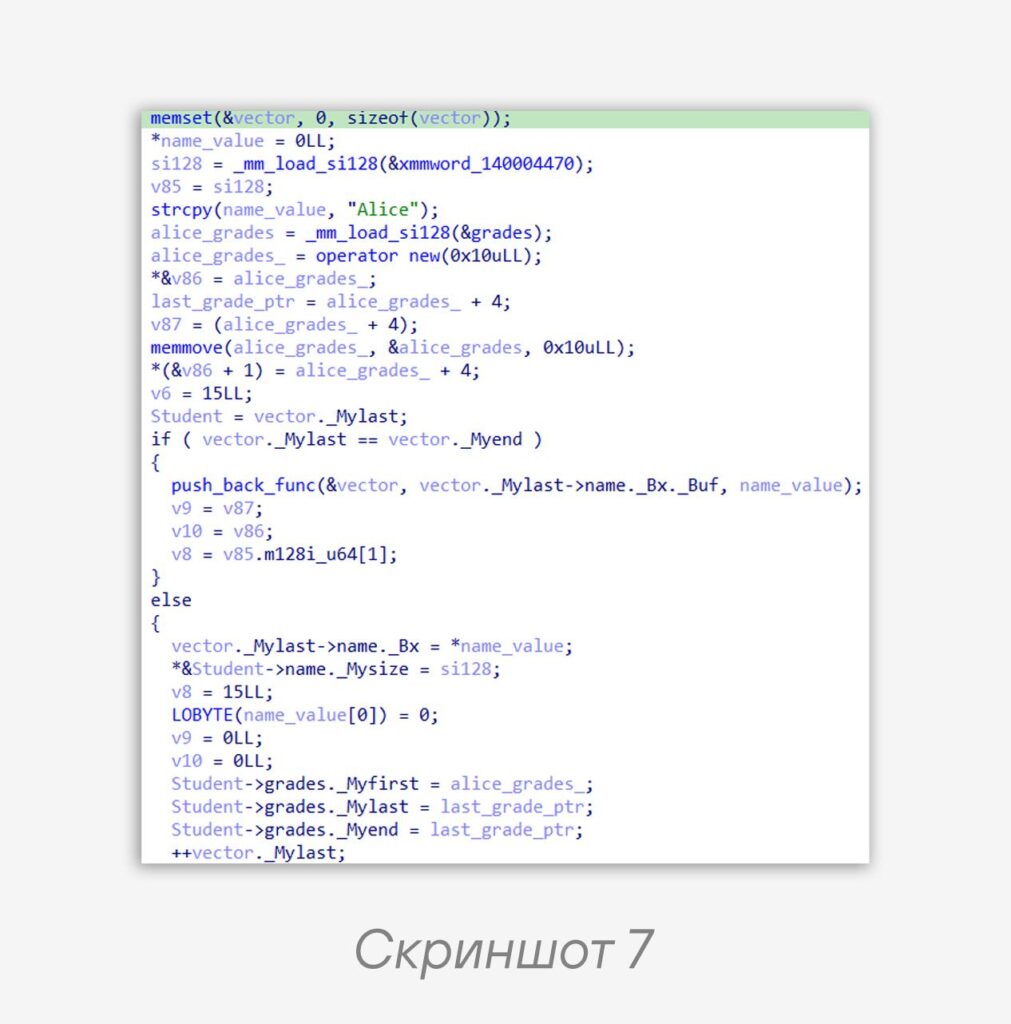
_Mylast and _Myend, followed by a call to the function sub_140002860, to which our pointers and the target value are passed. If we step into sub_140002860, the first thing we’ll see will be the computation of the vector’s size — size() = (_Mylast - _Myfirst) / sizeof(T) (screenshot 5). That is, in order to determine whether new memory needs to be allocated, the function needs to compute the new size of the vector and compare it with the current capacity. For us, this is a hint — we’re looking at the push_back function.🤝 Now that it’s clear that we’re dealing with a vector, we can recreate its structure (screenshot 6) and the structure that uses it, and mark them up in IDA (screenshot 7). It looks a bit better and clearer.
Despite the existence of other constructors and methods of
std::vector, knowing its internal memory layout allows us to easily identify a vector in compiled code.Stay tuned!
#tip #reverse
@ptescalator (X, Max)
More from global_author
- This is Siemens...
Recently, our colleagues from the Positive Industrial Expertise Center discovered a curious Windows sample on MalwareBazaar.…
- Anti-antivirus
Recently, we came across an APK with an intriguing and trust-inspiring name: «Антивирус ФСБ.apk». After installing…
- .exe .docm .xlsm
.exe .docm .xlsm Malicious files with these extensions are most often found in corporate network traffic.…
- Chaos, shock, private keys from a not-so-private GitLab 💻
Over the past couple of months, the attacker has been distributing trojans from several npm accounts:…
- ::%16777216 — so what exactly are you?
::%16777216 — so what exactly are you? It is known that during attacks, adversaries can use…




More in Reverse engineering
- Why IDA doesn't fold constants and how to fix it
Why IDA doesn't fold constants and how to fix it 👨💻 Recently, obfuscation has been increasingly…
- Again CFG
CFG again 👋 A common task when extracting malware configurations at scale is obtaining function boundaries…
- Deobfuscating .NET function names manually
Deobfuscating .NET function names manually 🙌 .NET malware loves packers, obfuscation (of names, CFG, and other…
- Idea for a correlation rule in SIEM
Idea for a SIEM correlation rule 💡 Although tracking the entire attack chain described in the…
- We continue reproducing the attack from the post above 🔼
Continuing to reproduce the attack from the post above 🔼 3️⃣ Creating a public API Gateway…