
Useful tools: Mandiant capa
More in Malware
- This is Siemens...
Recently, our colleagues from the Positive Industrial Expertise Center discovered a curious Windows sample on MalwareBazaar.…
- Anti-antivirus
Recently, we came across an APK with an intriguing and trust-inspiring name: «Антивирус ФСБ.apk». After installing…
- .exe .docm .xlsm
.exe .docm .xlsm Malicious files with these extensions are most often found in corporate network traffic.…
- Operation Chewbacca
At the end of June, the PT ESC team, during incident investigations, discovered a new group…
- Your Zimbra server is at risk
Recently, our PT ESC IR team encountered a new attack by ransomware groups on Zimbra mail…





😏 Useful tools: Mandiant capa
Imagine the situation: you are a malware analyst or an incident response specialist and you need to analyze a large volume of binary files in a short time. As part of this analysis, you need to separate harmless files from potentially dangerous ones and, for the latter, determine their functions and presumed role in the compromise chain of the infected host. You will need all of this to form a picture of the attack, as well as to prioritize your response.
😐 You can separate good files from bad ones, for example, using whitelists of file hash sums, but quickly determining functions may prove difficult, since this requires the analyst to have extensive experience with malware analysis.
Unfortunately, such common tools as string viewers (for example, strings or FLOSS), as well as PE file analyzers (for example, Detect It Easy or CFF Explorer), display only the lowest level of detail and do not offer users any help in interpreting the data obtained.
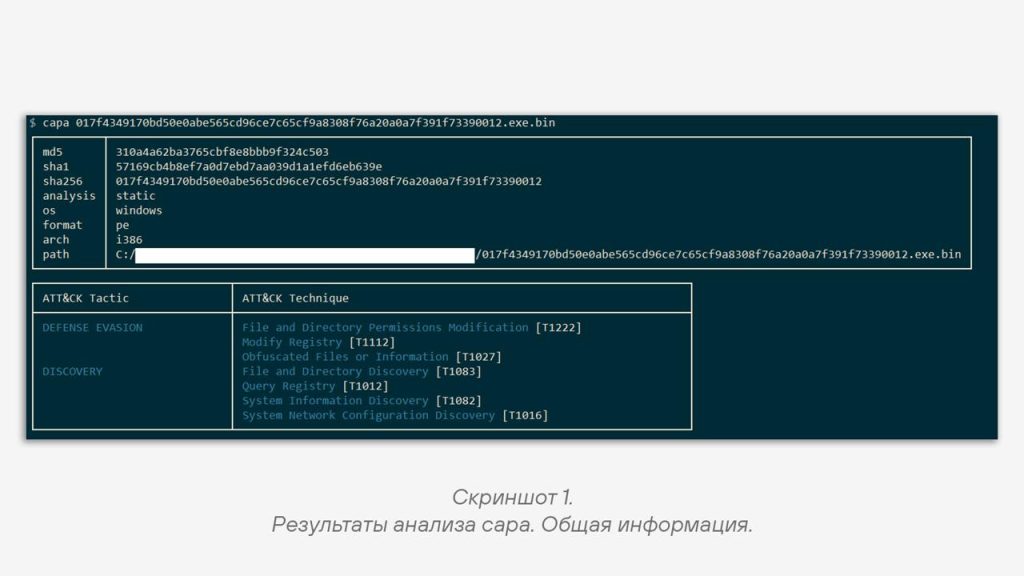
😠 To solve the task of rapid code analysis and finding malicious techniques implemented in a program, you can use scanning with heuristic engines. These engines use a set of rules that are aimed at identifying specific code sections or individual artifacts characteristic of certain techniques. A good example of such an engine is capa from Mandiant.
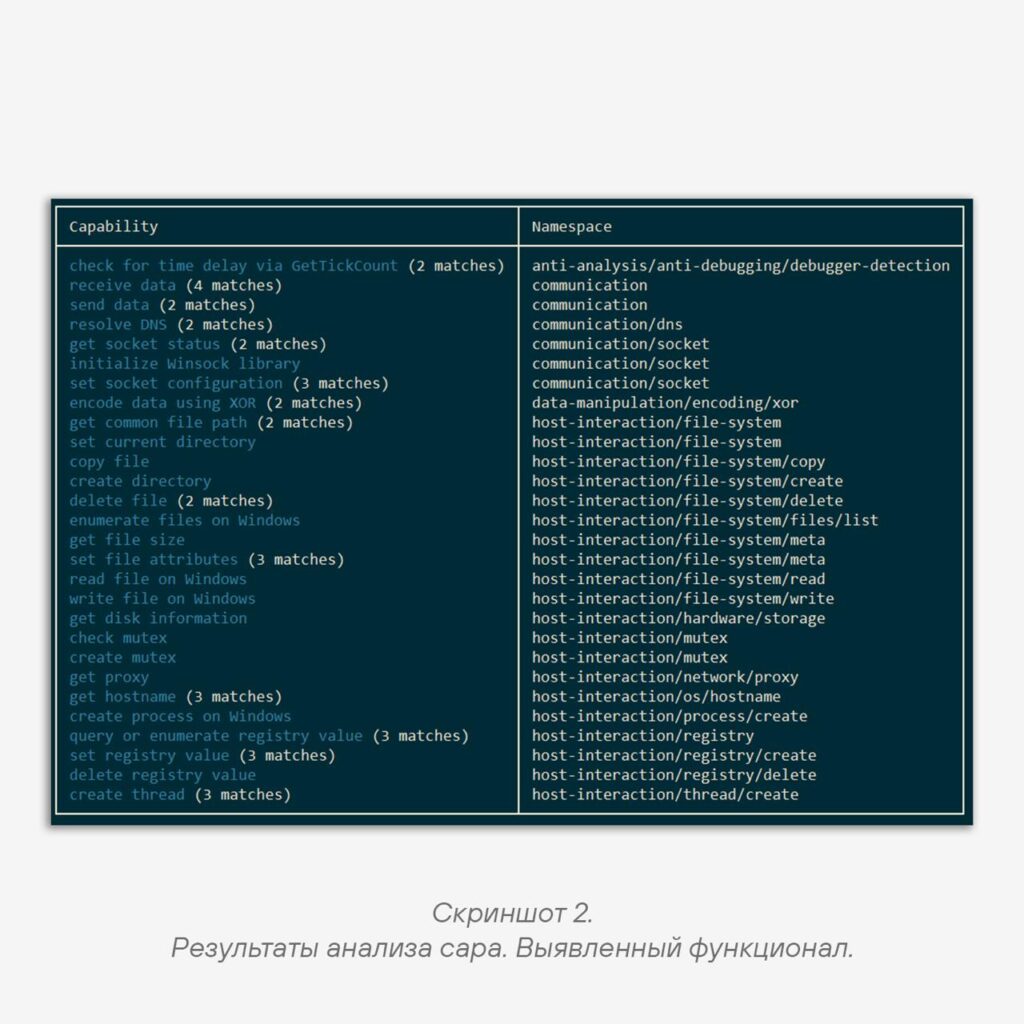
After analyzing the file you are interested in with this tool, you can obtain a list of detected techniques, as, for example, in screenshots 1 and 2.
☹️ How do you work with this data? To identify malicious software, you can proceed as follows:
1️⃣ Analyze all available capa rules.
2️⃣ Assign a danger rating to each of them (for example, as a number from 0 to 10).
3️⃣ Set a threshold value for classifying a file as malicious.
4️⃣ Sum the ratings of the detections for the file being analyzed and compare them with the threshold value: if the sum of the ratings is greater, then the file is potentially malicious.
This way, you will be able to quickly classify large sets of files, and most importantly, understand how they can cause harm.
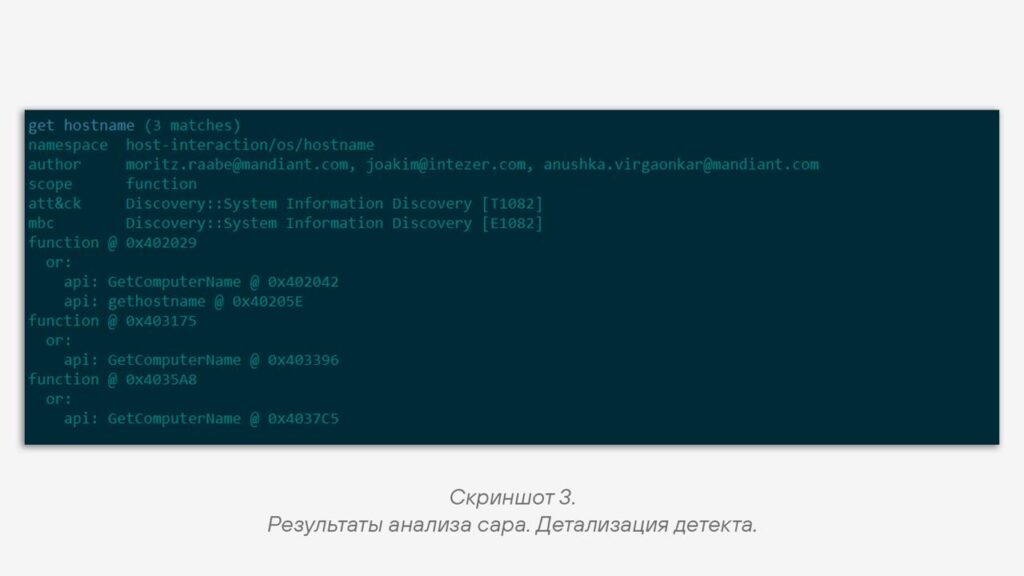
🫰 But you can dig deeper and use capa as an auxiliary tool for reverse engineering. Here we are helped by the fact that capa detections allow you to locate the place in the file’s code where a particular technique was implemented (screenshot 3).
Thanks to this, if the goal of reverse engineering comes down to clarifying the implementation of certain malicious mechanisms, it will be possible to speed up their discovery.
🤌 And as a third, more specific scenario, capa can be considered as a tool to help in finding similar malware samples.
Due to the fact that capa has quite a lot of different detection rules, detection profiles can be generated for the files being analyzed, which, given a sufficient number, will be relatively unique. If, while analyzing a stream of malware, you encounter files with similar profiles, then they can be taken for comparison and identification of new versions of malware families.
#tip #tool #malware
@ptesaclator
More from global_author
- This is Siemens...
Recently, our colleagues from the Positive Industrial Expertise Center discovered a curious Windows sample on MalwareBazaar.…
- Anti-antivirus
Recently, we came across an APK with an intriguing and trust-inspiring name: «Антивирус ФСБ.apk». After installing…
- .exe .docm .xlsm
.exe .docm .xlsm Malicious files with these extensions are most often found in corporate network traffic.…
- Chaos, shock, private keys from a not-so-private GitLab 💻
Over the past couple of months, the attacker has been distributing trojans from several npm accounts:…
- ::%16777216 — so what exactly are you?
::%16777216 — so what exactly are you? It is known that during attacks, adversaries can use…

More in Malware
- This is Siemens...
Recently, our colleagues from the Positive Industrial Expertise Center discovered a curious Windows sample on MalwareBazaar.…
- Anti-antivirus
Recently, we came across an APK with an intriguing and trust-inspiring name: «Антивирус ФСБ.apk». After installing…
- .exe .docm .xlsm
.exe .docm .xlsm Malicious files with these extensions are most often found in corporate network traffic.…
- Operation Chewbacca
At the end of June, the PT ESC team, during incident investigations, discovered a new group…
- Your Zimbra server is at risk
Recently, our PT ESC IR team encountered a new attack by ransomware groups on Zimbra mail…